New Bases: filter dates

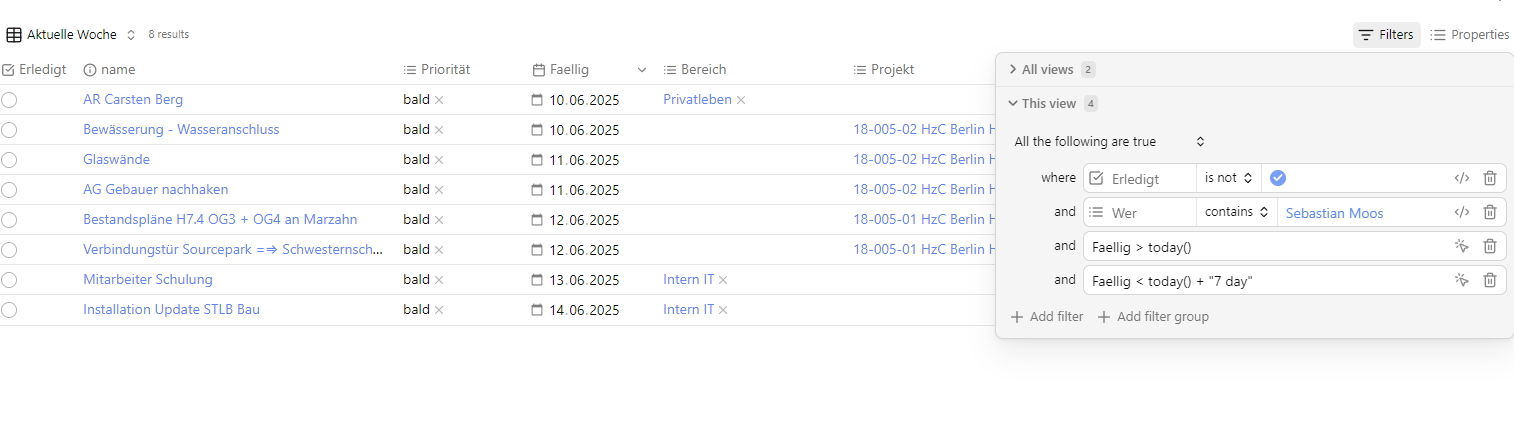
When trying to dynamically filtering on a date. I found the following syntax in the inline base definition to work.

views:
  - type: table
    name: TODAY
    filters:
      and:
        - dateEquals(date(property.Review), date(now()))
    order:
      - file.name
      - Review
    columnSize:
      property.Review: 149
    sort:
      - column: file.name
        direction: ASC
      - column: property.Review
        direction: DESC

The trick was to convert the value from field (in the example “Review” which is a YAML date field) into a Date object first.

Hope this helps someone

5 Likes

Hey Armin, thank you for the tip.
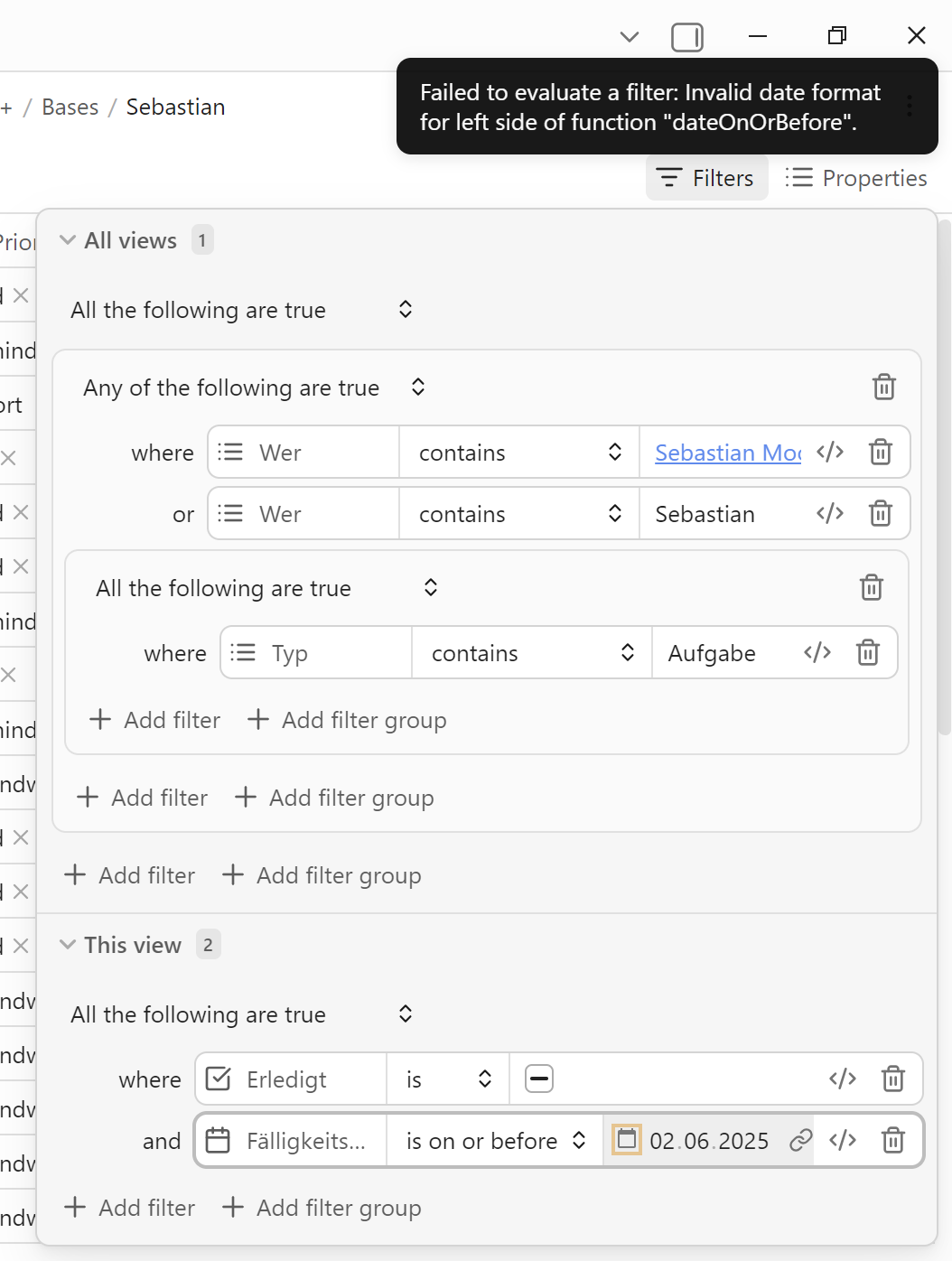
I also tried this with dateOnOrBefore, but got this message:


Have you got a clue, how to solve this? I want to manage my tasks with this,
my goal is, to get a table with a weekly overview, one table with the tasks in the next week and one table with the tasks in the future, after next week…

yeah this is a Type issue you need to cut and paste the formular directly in (click on </>). the key is to convert both sides (left and right) using the date(…) function. This is the same whether you use the dateOnOrBefore or date equals etc function.. so
dateEquals(date(property.Review), date(now())) … for Todays notes
dateOnOrBefore (date(property.Review), date(now())) … for “overdue” notes

Ich benutze “Review” anstatt “FaelligkeitsDatum”
now() gives you Todays date

I have not yet explicit tried to add lets say 7 days dynamically. you may want to check out Javascript Luxon info that is what Obsidian is using.

What I do to have a table for tomorrow is using the review field in the document with the table it self so the formular becomes something like:

dateEquals(date(property.Review), date(this.property.Review))

so then I can just toggle the in note Review field (which is this.property.Review) and compare it to the Review field values in other notes.

Hope this helps

Thank you very much! Now its clearer for me…

Sebastian,

one more. I found in the documentation

dateModify()

  • dateModify(datetime, duration) retrieves a datetime modified by the provided duration.
  • duration may be a number of milliseconds (1 minute is equivalent to 60000)
  • duration may be a text value such as 2h, 2 hour, 2 hours, -2 hours
  • Valid units for duration text values are year, month, week, day, hour, minute, second, the plural versions, and the single letter abbreviation. month is abbreviated to M.

So this may be the ticket for your In 7 days feature.

Good luck

1 Like

But remember that the duration is a string, so needs double quoting (thanks to @dawni in another thread). Without the quotes dateModify usually returns the unmodified datetime value. I wasted 2 days trying to get this to work without the quotes :disappointed_face:.

date(dateModify(date(property.originalDateTime), "7 days")) should work.

3 Likes

and time flies - Version 1.9.2 changed all of the above. This is no longer valid.

see Bases syntax - Obsidian Help

so something as simple as Review == today() now works

Hey Armin,
I think the change was really positive,
I had to change all the tables again, but this was done within half an hour and everything is easier now. Thanks to the Obsidian team!

Totally agree .. made it much easier

Not sure if this is the best place to post this.

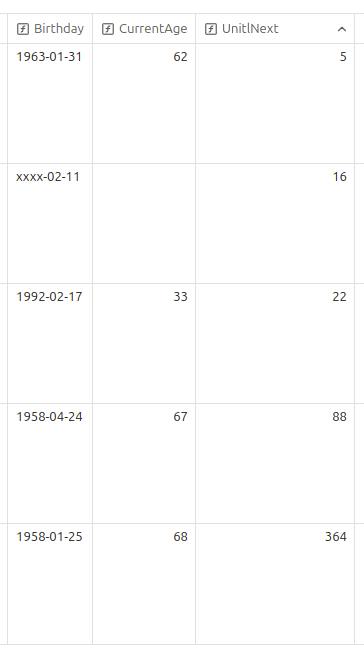
Does anyone know how to work with “days”. By that I mean a month, a day and NO year. For example, I have a base of contacts, each with a birthday. I’d like to make a column of “upcoming birthdays”. So if today is August 28, then an August 29 birthday should be at the top of the list (regardless of the year of the birthdate).

Thank you very much for this, this discussion thread helped a lot. I was wondering, is there a way to tie a base in to the daily note to update by note, so while today() works - if I return to it on a different day it will be different than it was on that day.

Is there a way to make the filter tie into the file’s date it’s embedded on? Probably not but thought I’d see if anyone sorted that out yet. Might need to stick with Dataview for this purpose.

Give this topic a look. I think that’s what you’re looking for.

The examples there are based on ctime/mtime, but can easily used with a property. e.g.
created == this.file.name

I just went down this rabbit hole.

Working (wrestling?) with vibecoding in Copilot, here’s what ended up working for me.

  • I created three separate fields in the YAML frontmatter: BYear, BMonth, BDay. All number type.

  • In bases, create a formula property for “CurrentAge”, “UntilNext”, and “Birthday”.

    • The Birthday is a single-column visual of the birthday data (for example, shows xxxx-02-11 for a birthday in my people notes that have a birthday on 11th Feb but i don’t have year info).

    • CurrentAge shows the age of that person as of today, but only if we know their year as well (obviously). This adds one if the birthday is already passed.

    • UntilNext is the birthday countdown and only uses the BMonth and BDay values. It also rounds the value down to avoid lengthy decimals.

    Here are the formula needed for each:

    Birthday

(if(BYear, BYear, “xxxx”)

“-”

if(BMonth,if(BMonth < 10, “0” + BMonth, BMonth),“xx”)

“-”

if(BDay,if(BDay < 10, “0” + BDay, BDay),“xx”))

CurrentAge

if(BYear,today().year- BYear- if(date(today().year+ “-”+ if(BMonth < 10, “0” + BMonth, BMonth)+ “-”+ if(BDay < 10, “0” + BDay, BDay)) > today(),1,0),“”)

UntilNext

if(BMonth && BDay,((number(date(today().year+ “-”+ if(BMonth < 10, “0” + BMonth, BMonth)+ “-”+ if(BDay < 10, “0” + BDay, BDay))+ if(date(today().year+ “-”+ if(BMonth < 10, “0” + BMonth, BMonth)+ “-”+ if(BDay < 10, “0” + BDay, BDay)) < today(),“1y”,“0y”))- number(date(today()))) / 86400000).floor(),“”)

(sorry if the formatting is not as it should be/expected - i had a whole lot of trouble getting my head around how to get this to work in the post).

Here’s what that renders like:
Thank you @awiklendt but it should definitely be a filter from bases itself. I don’t want to contaminate my documents with split dates.
Birthdays and wedding days are the exact same use-case i have too.

1 Like