Nested list in yaml equals json in bases - can we clean up the json with formulae?

From what I’ve been reading, there is still no way in Obsidian to flesh out the json properties that result from using a nested list in the frontmatter. Is that correct?


My Existing frontmatter works, but it isn’t as precise as it could be:

title: Quo Vadis, Aida
viewing:
 - 2020-09-15 JL at tiff
 - 2026-10-08 JL Terry Lucie
 - 2026-10-24 mom

in my .base file I have a col for 1st seen (viewing[0]) and last seen (viewing[-1]) and I managed to get a column that shows everyone who has seen the movie by slicing the entries to remove the dates.

What I’m trying to do

I would prefer having the precision that might come in the future, where we could select 'watched[0].date or [watched[-1].who. I’d add a few fields if we could do that.

So my question:

Given this nested list frontmatter…

title: Quo Vadis, Aida
watched:
 - date: 2020-09-15
   who: JL at tiff
 - date: 2026-10-08
   who: JL Terry Lucie
 - date: 2026-10-24
   who: mom

Is there a way of cleaning-up the json more than what gets displayed when I select watched[0] for example? Can I get the ‘who’ info out of this?

1st watched:

{"date":"2020-09-15","who":"JL at tiff"}

last watched:

{"date":"2026-10-08","who":"JL terry lucie"}
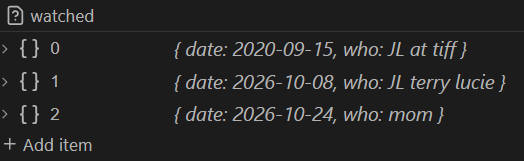
Bases can read YAML mappings right now. It’s only the Properties interface that doesn’t recognize them; but even so, it preserves nested data that you enter.

The Bases formulas for your example front matter are exactly the ones you showed:

  • watched[0].date will return 2020-09-15
  • watched[-1].who will return mom

For convenience, the Nested Properties community plugin lets you edit objects and lists of lists directly in the Properties interface: https://github.com/mnaoumov/obsidian-nested-properties. Editing them in Source mode is still quicker though.

Right. I tried that and got it wrong, I guess. I probably put the “count” at the end as in watched.date[0] or something. So thanks for responding and correcting that.

The watched[0].date thing isn’t always as easy as it looks, though, is it? It seems quite complicated to extract from json without having to manually address each item ([0], [1]). I have found that watched.map(value) for example, which auto iterates through all the values until it finds none, doesn’t work here. Let me explain.

What I would like

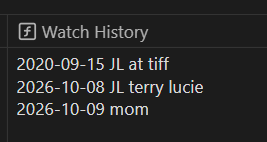
I’d like a formula that displays the results in English rather than json. Example:

Watched History
2020-09-15 JL at tiff
2026-10-08 JL Terry Lucie
2026-10-24 mom

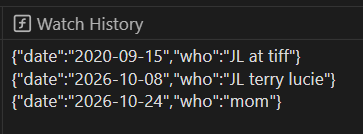
rather than displaying the property itself:

or the prettier version, but still too illegible for my taste:

watched.map([value])

Seems the only way I could get what I want is to manually write it all out for each iteration:

[
[watched[0].date + " " + watched[0].who],
[watched[1].date + " " + watched[1].who],
[watched[2].date + " " + watched[2].who],
[watched[3].date + " " + watched[3].who],
[watched[4].date + " " + watched[4].who],
[watched[5].date + " " + watched[5].who],
[watched[6].date + " " + watched[6].who],
[watched[7].date + " " + watched[y].who]
]

result:

There’s got to be a better way, right?

Please note that I do want ALL the watched data, and not just 1st and last which I have in other columns, not because I care about the dates as much as I care about who has seen the film so that I don’t show it to them again.

watched.map([value.date, value.who])

That simple, eh?
Geez. I never would have got there.
Thanks so much dawni.