I’m trying to migrate my dataview tables to bases, but I’m struggling with the execution.
I’d like to display the table at the full width of the note, and disable scrolling in the cells, so it shows the full contents.
For reference, I’m working on my personal dictionary, where each language gets a table that displays the dictionary entries in that language.
The base I’m working on:
```base
views:
  - type: table
    name: Table
    filters:
      and:
        - file.path.startsWith("Dictionary/01 Lemmata")
        - Language.contains(this.file.name)
    order:
      - Lemma
      - Language
      - Etymology
      - Definition

```
and this would be one of the entries that are queried by the base:
---
Lemma: monsoon
Etymology: From Portuguese monção and Dutch moesson, from Arabic مَوْسِم (mawsim, “season”), from وَسَمَ (wasama, “to mark, to brand”).
Definition: Any of a number of winds associated with regions where most rain falls during a particular season. Tropical rainy season when the rain lasts for several months with few interruptions. The rains themselves. Entire meteorological systems with such characteristics.
Language:
- "[[English]]"
- "[[Portuguese]]"
- "[[Dutch]]"
- "[[Arabic]]"
DateAdded: 2023-08-09
Category: "[[Dictionary Entries]]"
---
It correctly finds the note, however it’s hard to read.
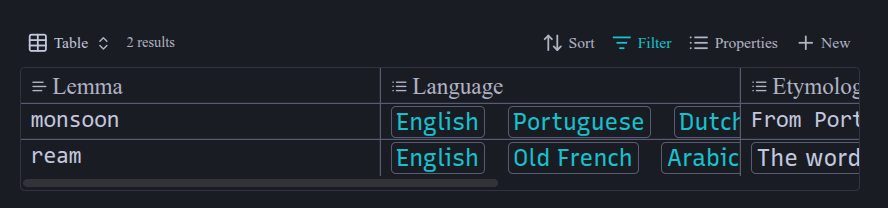
I can scroll to the right but even then most of the text isn’t displayed.
Ideally it would end up looking as close as possible to the dataview table:
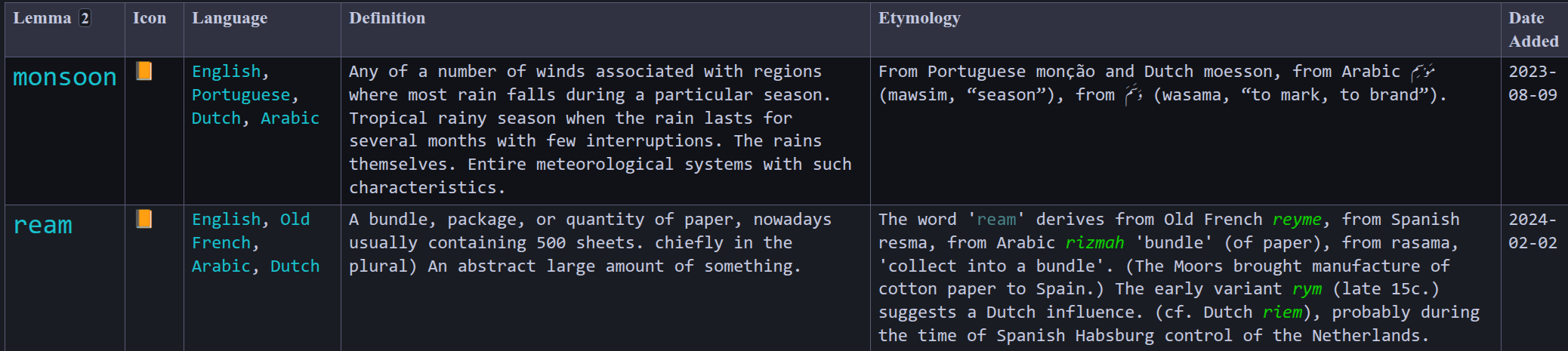
I’d stay with dataview, except for the fact that bases run circles around dataview in speed, and most of the other queries have more results which causes lag with dataview.
I’ve played around with the inspector, but my understanding of CSS isn’t enough for this. I’ve tried stuff like display: flex but I’m not sure that’s useful here or if I’m targeting the correct classes.
Thanks!