Is this project open source? Yes
Is this project completely free? Yes
Is this project vibe-coded beyond the author’s ability to comprehend how it works? No
Community Directory: N/A (This is a workflow showcase / CSS snippet, not a plugin)
My visual Book Tracking MOC (DataviewJS + CSS) 
Hey everyone!
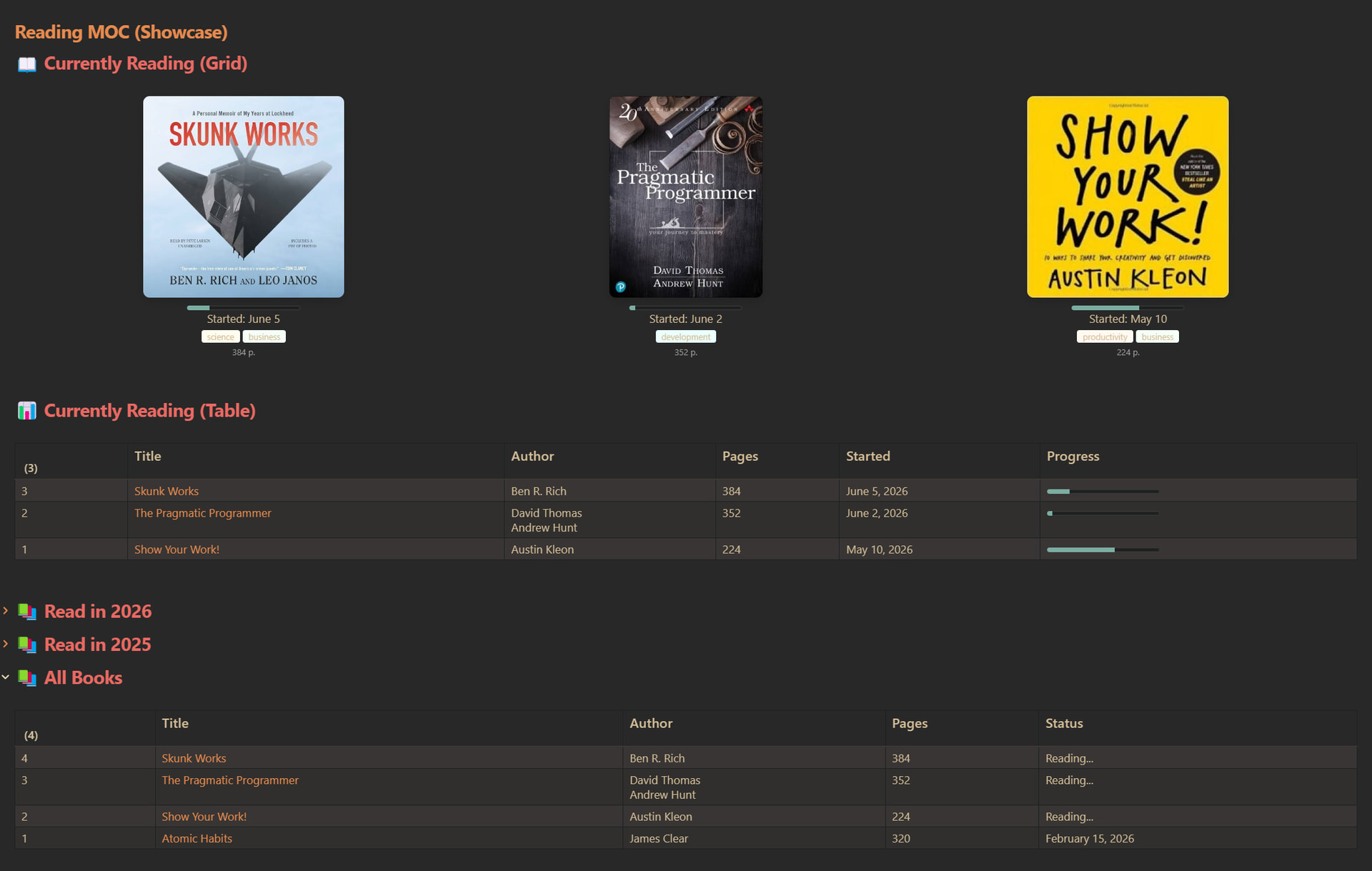
I wanted to share my visual dashboard (MOC) for tracking my books. I was looking for something highly visual for my active queue, but strictly analytical and automated for my yearly archives.
Here is what it looks like:
Features
- Visual Grid: Shows books I am currently reading with cover images, progress bars, and custom-colored categories.
- Automated Tables: Tracks finished books by year (e.g., “Read in 2026”, “Read in 2025”) and maintains a complete library table at the bottom.
- 100% Dynamic: Uses
dataviewjsto automatically fetch metadata from note frontmatter.
How to Set It Up
1. Create a CSS Snippet
Create a file named books.css in your .obsidian/snippets/ folder, paste the following code, and enable it in your Obsidian settings (Appearance → CSS Snippets):
.books > span {
    padding: 15px;
    display: grid;
    grid-template-columns: repeat(auto-fit, minmax(220px, 1fr));
    grid-auto-rows: minmax(300px, auto);
    gap: 15px;
    height: 100%;
}

.books img {
    cursor: pointer;
    height: 250px !important;
    display: block;
    margin: 0 auto 10px auto;
    border-radius: 8px;
    box-shadow: 0 4px 12px rgba(0,0,0,0.15);
    transition: transform 0.2s ease;
}

.books img:hover {
    transform: scale(1.03);
}

.books p[dir=auto] { margin: 0; }
.books progress { display: block !important; margin: 0 auto; }
.books .book { text-align: center; }
.books .book .pages { color: #9e9e9e; font-size: 0.75em; }

.books .book .category {
    display: inline-block;
    margin-bottom: 0.3em;
    border-radius: 3px;
    padding: 0px 7px;
    width: auto;
    font-size: 0.75em;
}
2. Create the DataviewJS Codeblock
Create a new note in Obsidian, make sure you have the Dataview plugin enabled (with Enable JavaScript Queries toggled ON), and paste the following code:
# 📖 Currently Reading (Grid)

```dataviewjs
const categoryColors = {
	"productivity": "#fff9f2", "development": "#ebffff", "business": "#f5fff7",
	"fiction": "#f7f9ff", "science": "#fffdf0",
	"default": "#f5f5f5"
};
const getCategoryColor = category => {
    if (category in categoryColors) return categoryColors[category];
    return categoryColors["default"];
}

const hasBookTag = (tags) => {
    if (!tags) return false;
    if (tags.path) return tags.path.includes("book");
    if (Array.isArray(tags)) {
        return tags.some(t => {
            if (typeof t === "string") return t.includes("book");
            if (t && t.path) return t.path.includes("book");
            return false;
        });
    }
    if (typeof tags === "string") return tags.includes("book");
    return false;
};

const getBooks = () => dv.pages("").where(page => {
    const tags = page.Tags || page.tags;
    const started = page["Date Started"];
    const finished = page["Date Finished"];

    const isFinished = finished && finished !== "" && finished !== null;

    if (hasBookTag(tags) && page.file.folder != "8 - Templates" && !isFinished && started) {
        return true;
    }
    return false;
}).sort(p => p["Date Started"], "desc");

const formatDate = d => {
    if (!d) return "";
    return d.year === dv.date("now").year
        ? d.toFormat("MMMM d")
        : d.toFormat("MMMM d, yyyy");
}

let books = "";

for (const book of getBooks()) {
	const categoriesProperty = book.Categories || book.categories;
	const categories = categoriesProperty ? categoriesProperty.map(
	    c => `<span class="category" style="background-color: ${getCategoryColor(c)}">${c}</span>`
	).join(" ") : "";

	const cover = book.Cover || book.cover;
	const pages = book.Pages || book.pages;
	const started = book["Date Started"];

    books += `<div class="book">
		<a data-tooltip-position="top" data-href="${book.file.name}" href="${book.file.name}.md" class="internal-link" target="_blank" rel="noopener nofollow"><img src="${cover}" data-filename="${book.file.name}" /></a>
        ${book.Progress || ""}
        Started: ${formatDate(started)}<br>
        <div class="categories">${categories}</div>
        <div class="pages">${pages} p.</div>
    </div>`;
}

if (books === "") {
    dv.paragraph("No books currently reading.");
} else {
    dv.el("div", books, {cls: "books"});
}
 Currently Reading (Table)
const hasBookTag = (tags) => {
    if (!tags) return false;
    if (tags.path) return tags.path.includes("book");
    if (Array.isArray(tags)) {
        return tags.some(t => {
            if (typeof t === "string") return t.includes("book");
            if (t && t.path) return t.path.includes("book");
            return false;
        });
    }
    if (typeof tags === "string") return tags.includes("book");
    return false;
};

let booksCount = 0;

let bookPages = dv.pages("").where(page => {
    const tags = page.Tags || page.tags;
    const started = page["Date Started"];
    const finished = page["Date Finished"];

    const isFinished = finished && finished !== "" && finished !== null;

    if (hasBookTag(tags) && page.file.folder != "8 - Templates" && !isFinished && started) {
	  booksCount++;
      return true;
    }
    return false;
}).sort(p => p["Date Started"], "desc");

if (booksCount === 0) {
    dv.paragraph("No books currently reading.");
} else {
    const MAX_BOOK_NAME_LENGTH = 50;
    let index = booksCount + 1;

    dv.table(
        ["#", "Title", "Author", "Pages", "Started", "Progress"],
        bookPages.map(p => {
            const title = p.Title || p.title;
            const author = p.Author || p.author;
            const started = p["Date Started"];

            const shortName = title && title.length > MAX_BOOK_NAME_LENGTH
                ? title.substring(0, MAX_BOOK_NAME_LENGTH) + "..."
                : title;
            const authors = author ? author.split(",").map(el => el.trim()).join("<br />") : "";
            return [
                --index,
                dv.fileLink(p.file.path, false, shortName),
                authors,
                p.Pages || p.pages,
                started !== null ? started.toFormat("MMMM d, yyyy") : "",
                p.Progress || ""
            ];
        })
    );
}
Read in 2026
const hasBookTag = (tags) => {
    if (!tags) return false;
    if (tags.path) return tags.path.includes("book");
    if (Array.isArray(tags)) {
        return tags.some(t => {
            if (typeof t === "string") return t.includes("book");
            if (t && t.path) return t.path.includes("book");
            return false;
        });
    }
    if (typeof tags === "string") return tags.includes("book");
    return false;
};

let booksCount = 0;

let bookPages = dv.pages("").where(page => {
    const tags = page.Tags || page.tags;
    const finished = page["Date Finished"];

    if (hasBookTag(tags) && page.file.folder != "8 - Templates" && finished && new Date(finished.ts).getFullYear() === 2026) {
	  booksCount++;
      return true;
    }
    return false;
}).sort(p => p["Date Finished"], "desc");

if (booksCount === 0) {
    dv.paragraph("No books finished in 2026.");
} else {
    const MAX_BOOK_NAME_LENGTH = 50;
    let index = booksCount + 1;

    dv.table(
        ["#", "Title", "Author", "Pages", "Finished"],
        bookPages.map(p => {
            const title = p.Title || p.title;
            const author = p.Author || p.author;

            const shortName = title && title.length > MAX_BOOK_NAME_LENGTH
                ? title.substring(0, MAX_BOOK_NAME_LENGTH) + "..."
                : title;
            const authors = author ? author.split(",").map(el => el.trim()).join("<br />") : "";
            return [
                --index,
                dv.fileLink(p.file.path, false, shortName),
                authors,
                p.Pages || p.pages,
                p["Date Finished"] !== null ? p["Date Finished"].toFormat("MMMM d, yyyy") : ""
            ];
        })
    );
}
Read in 2025
const hasBookTag = (tags) => {
    if (!tags) return false;
    if (tags.path) return tags.path.includes("book");
    if (Array.isArray(tags)) {
        return tags.some(t => {
            if (typeof t === "string") return t.includes("book");
            if (t && t.path) return t.path.includes("book");
            return false;
        });
    }
    if (typeof tags === "string") return tags.includes("book");
    return false;
};

let booksCount = 0;

let bookPages = dv.pages("").where(page => {
    const tags = page.Tags || page.tags;
    const finished = page["Date Finished"];

    if (hasBookTag(tags) && page.file.folder != "8 - Templates" && finished && new Date(finished.ts).getFullYear() === 2025) {
	  booksCount++;
      return true;
    }
    return false;
}).sort(p => p["Date Finished"], "desc");

if (booksCount === 0) {
    dv.paragraph("No books finished in 2025.");
} else {
    const MAX_BOOK_NAME_LENGTH = 50;
    let index = booksCount + 1;

    dv.table(
        ["#", "Title", "Author", "Pages", "Finished"],
        bookPages.map(p => {
            const title = p.Title || p.title;
            const author = p.Author || p.author;

            const shortName = title && title.length > MAX_BOOK_NAME_LENGTH
                ? title.substring(0, MAX_BOOK_NAME_LENGTH) + "..."
                : title;
            const authors = author ? author.split(",").map(el => el.trim()).join("<br />") : "";
            return [
                --index,
                dv.fileLink(p.file.path, false, shortName),
                authors,
                p.Pages || p.pages,
                p["Date Finished"] !== null ? p["Date Finished"].toFormat("MMMM d, yyyy") : ""
            ];
        })
    );
}
All Books
const hasBookTag = (tags) => {
    if (!tags) return false;
    if (tags.path) return tags.path.includes("book");
    if (Array.isArray(tags)) {
        return tags.some(t => {
            if (typeof t === "string") return t.includes("book");
            if (t && t.path) return t.path.includes("book");
            return false;
        });
    }
    if (typeof tags === "string") return tags.includes("book");
    return false;
};

let booksCount = 0;

let bookPages = dv.pages("").where(page => {
    const tags = page.Tags || page.tags;

    if (hasBookTag(tags) && page.file.folder != "8 - Templates") {
	  booksCount++;
      return true;
    }
    return false;
}).sort(p => p["Date Finished"] || p["Date Started"], "desc");

if (booksCount === 0) {
    dv.paragraph("No books found.");
} else {
    const MAX_BOOK_NAME_LENGTH = 50;
    let index = booksCount + 1;

    dv.table(
        ["#", "Title", "Author", "Pages", "Status"],
        bookPages.map(p => {
            const title = p.Title || p.title;
            const author = p.Author || p.author;
            const finished = p["Date Finished"];

            const shortName = title && title.length > MAX_BOOK_NAME_LENGTH
                ? title.substring(0, MAX_BOOK_NAME_LENGTH) + "..."
                : title;
            const authors = author ? author.split(",").map(el => el.trim()).join("<br />") : "";

            const status = (finished && finished !== "") ? finished.toFormat("MMMM d, yyyy") : "Reading...";

            return [
                --index,
                dv.fileLink(p.file.path, false, shortName),
                authors,
                p.Pages || p.pages,
                status
            ];
        })
    );
}
### 3. Your Book Note Frontmatter Format
To make the DataviewJS scripts find your books, make sure your book notes contain the following frontmatter (Properties):

```yaml
---
Tags: [[3 - Tags/book]]
Title: Show Your Work!
Author: Austin Kleon
Pages: 224
Date Started: 2026-05-10
Date Finished:
Progress: <progress value="60" max="100"></progress>
Categories:
  - productivity
  - business
Cover: https://m.media-amazon.com/images/I/71Z-A2B2I+L._AC_UF1000,1000_QL80_.jpg
---
Link to project’s repository (made inline for security): https://github.com/danzansho/obsidian-voice-bot
Let me know if you run into any issues or want to customize the design further. Happy reading and note-taking!