My PDF → Markdown → Obsidian Workflow
One of the biggest gaps in my knowledge management system used to be PDF annotations.
For years, I highlighted research papers, books, technical documentation, and work-related PDFs. I spent a lot of time making annotations, but very little of that information ever made its way into my Obsidian vault.
The annotations stayed inside the PDFs.
As a result, I ended up with two separate systems:
-
Obsidian contained my notes and ideas.
-
PDFs contained my highlights and comments.
The more I read, the more fragmented things became.
What I wanted
My goal was simple:
-
Read and annotate PDFs in whatever application I prefer.
-
Extract highlights and comments.
-
Convert them into Markdown.
-
Store everything in Obsidian.
I didn’t want to be locked into a specific PDF reader or annotation tool.
Over the years I’ve used different combinations of:
-
Zotero
-
Adobe Acrobat
-
GoodNotes
-
PDF Expert
-
Preview
Changing readers wasn’t a problem.
Getting annotations out of them consistently was.
Current Workflow
Step 1: Annotate PDFs
I annotate PDFs wherever it makes sense.
Sometimes that’s Zotero on desktop.
Sometimes it’s GoodNotes on an iPad.
Sometimes it’s Adobe Acrobat for work documents.
The important thing is that the annotations are stored in the PDF itself.
Step 2: Extract Annotations
For extraction, I use a browser-based tool that reads standard PDF annotations and converts them into Markdown.
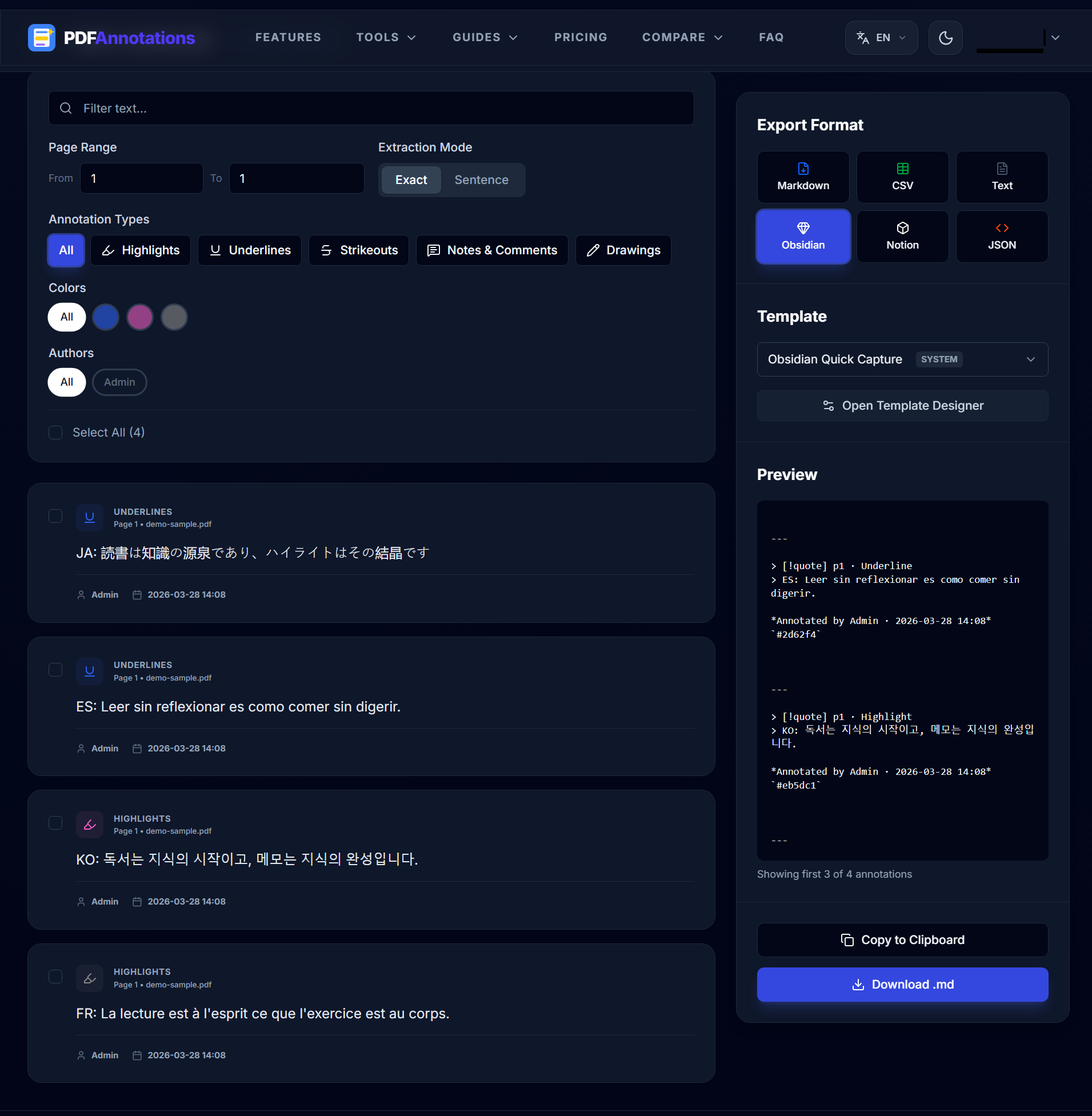
The reason I went this route is that I wanted a workflow that wasn’t tied to a single PDF ecosystem.
The extraction step preserves information such as:
-
Highlighted text
-
Comments
-
Page numbers
-
Annotation colors
-
Authors (when available)
Everything runs locally in the browser, which is useful when working with sensitive documents.
Step 3: Import into Obsidian
The resulting Markdown file is imported into my vault.
A typical annotation looks something like this:
> [!quote] Page 47
> The replication crisis has prompted a reassessment of statistical methods across the social sciences.

**Comment**

Cross-reference with Chapter 3 methodology.
Once the annotations exist as Markdown, they become part of the same system as the rest of my notes.
They are searchable, linkable, and easy to revisit later.
What Changed
The biggest benefit wasn’t convenience.
It was discoverability.
Before, I knew I had highlighted useful information somewhere, but finding it often meant reopening PDFs and manually searching through documents.
Now, PDF annotations live alongside my notes.
When I search my vault, both my own writing and the original highlights appear together.
Questions for Other Obsidian Users
I’m curious how other people handle PDFs.
-
What application do you use for annotation?
-
Do you regularly move annotations into Obsidian?
-
Do you keep annotations inside PDFs, or convert them into notes?
-
What’s the biggest pain point in your current workflow?
I’d love to see how others approach this problem.