This is an info post. It took me a while to understand the issues with multiple highlights, so I’d like to make it clearer for others.
Custom highlights
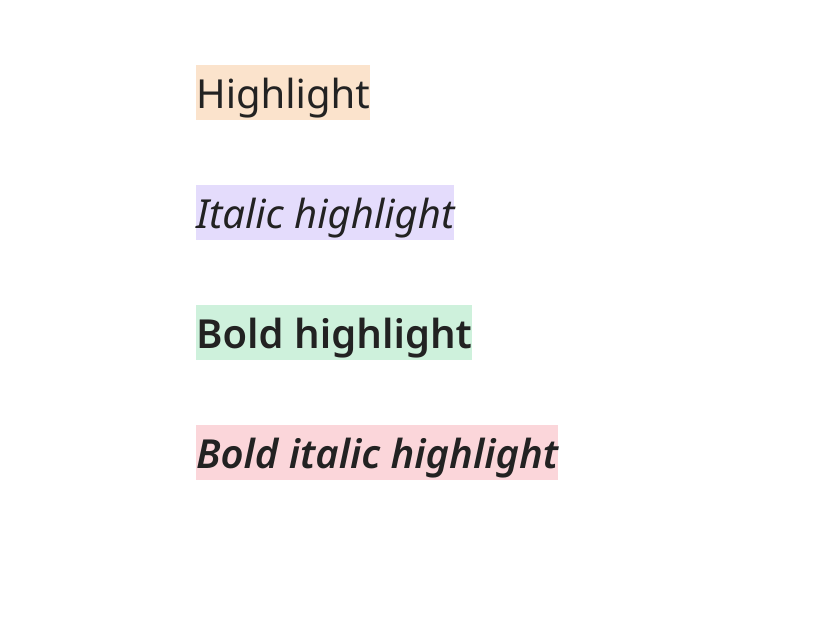
It is possible to have multiple highlight colours, using some simple HTML.
You can input the HTML yourself or use a plugin (Highlightr or Note Annotations.) If you use a plugin it will just simplify the addition of the HTML. The result is the same.
Limitation
But there’s a limitation: The highlighted text will be (mostly) treated as plain text, not markdown. No formatting (bold, italic…) and no active links.
CORRECTION: If you place formatting marks outside the html, it will take effect in reading mode (and in callouts). Not in live preview mode.
E.g. **<mark style="background: #FF4500;">OrangeRed highlight, bold</mark>**
→ OrangeRed highlight, bold
(It shows the correct colour in Obsidian, but not in the forum.)
Options
There is no complete workaround, but you might get what you need with:
- Callouts. The whole block will be coloured. Markdown works.
- List callouts (the plugin). Markdown works just as with callouts, but the color applies to an individual bullet point, numbered list item or task.
- Use the HTML solution but only apply it to plain text. (I use Highlightr plugin commands for this.)
Changing the default highlight color
Note that it’s simple to change the highlight color with a CSS snippet, but you’ll still only have one color.
Here’s the CSS snippet I use to adjust the colour in both dark and light modes. But again, it doesn’t give you more than one colour to use at the same time. (Pardon the wordy comments in the code – I used an LLM to create the snippet based on my colour/mood requirements.)
.theme-light {
  /* This specifically targets text highlighted using Markdown syntax (e.g., '==highlight==')
     It ensures the background color provides good contrast against the standard text color. */
  .cm-s-obsidian .cm-highlight {
    background-color: #F5CE93; /* Soft Terracotta for slightly enhanced contrast */
    color: var(--text-normal); /* Keeps the standard text color (usually dark in light mode) */
  }

.theme-dark {
  /* This specifically targets text highlighted using Markdown syntax (e.g., '==highlight==')
     It ensures the background color provides good contrast against the standard text color. */
  .cm-s-obsidian .cm-highlight {
    background-color: #8F590F; /* Deep Golden Brown for excellent contrast */
    color: var(--text-normal); /* Keeps the standard text color (usually light in dark mode) */
  }