Steps to reproduce
- Edit a file in live preview node, ideally one that already contained a bunch of nested bullet points, with multiple lines of text in each bullet.
- After adding a few new bullets, scroll around the file.
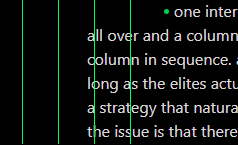
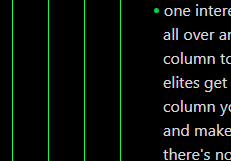
- A few (usually a small number) or bullets may end up with the issue, having the second and following lines of that single bulleted paragraph lose their indentation, and instead appear aligned further left than they should as a part of that bulleted paragraph.
- This is, unfortunately, intermittent, and is often (temporarily) resolved after closing and reopening the file or after moving the cursor to the bulleted paragraph and pressing the arrow key to pass the cursor over it and then out of the block (causing the bullet to switch to edit rendering temporarily, then back to preview rendering).
- Note that which bullets in a file this issue occurs for is also inconsistent.
Did you follow the troubleshooting guide? [Y/N]
Yes. I copied one of my files into sandbox, worked on it there for a while, and an hour later, found this:
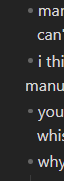
See the 4th line of text (second line of the second bullet).
Expected result
I expect my formatting to be consistently consistent, and not “randomly” lose indentation for individual paragraphs in my file.
Actual result
See the 4th line of text (second line of the second bullet) in this screenshot of the issue:
Environment
SYSTEM INFO:
Obsidian version: v1.11.5
Installer version: v1.8.4
Operating system: Windows 11 Home 10.0.26200
Login status: not logged in
Language: en
Insider build toggle: off
Live preview: on
Base theme: adapt to system
Community theme: none
Snippets enabled: 0
Restricted mode: on
RECOMMENDATIONS:
none
Additional information
This video shows me hovering alternately over a normal bullet and then over a “broken” bullet with my mouse while using the “Inspect” functionality of the dev tools brought up with Ctrl+Shift+I. Note that the displayed/highlighted bounds for the element are, for some reason, different.