I merely mentioned zipping that vault because copying e.g. 5888 files takes quite long, especially to an older pendrive or external drive.
You can do the copy any way you want, as long as you copy all files you know to be your vault.
Then the files you copy to your new PC. If you zipped the vault, you need to unzip it. No need to compress when zipping.
Now I regret I mentioned zipping… Then don’t zip.
When the vault is copied to your vault, you are half done.
You need to install Obsidian. In Obsidian, you open the folder you copied.
You cannot open something that is not there, correct?
This is one of my vault’s contents on Linux Mint:
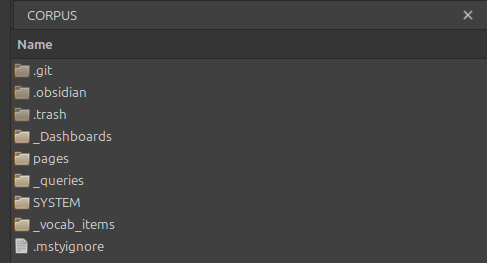
I have more vaults (these are the top level folders, with the vault names used by Obsidian, based on the folder name):

Given the same situation, I would need to copy CORPUS, Dusk, etc. folders to a drive and copy to the new PC, then I would need to install Obsidian and OPEN the folder as vault:

As you can see, I didn’t open many of my vault folders on Obsidian Linux yet…
Obsidian will index your files and then you can continue where you left off on the other PC. Basically you carried out a manual sync.