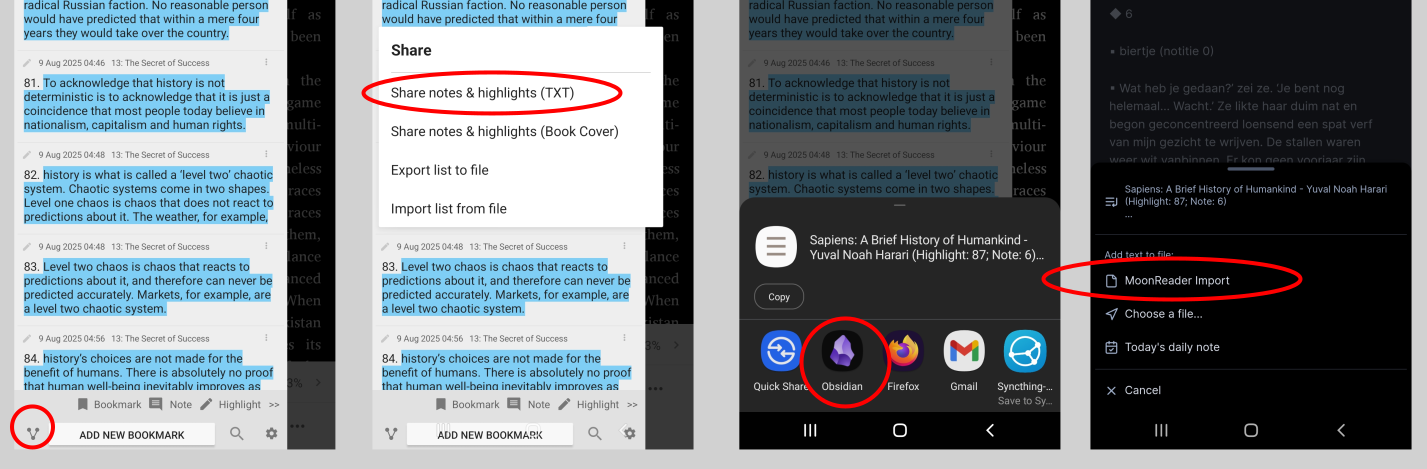
I created something to import highlights and notes that I create in the very nice Moon+Reader app for Android. The script works well for me. I’ll share the code with you below.
How to use the script
-
Save the script below in the folder where you keep your templates, and assign a hotkey to it. Name it, for example: MoonReader highlights and notes Template
-
Read, highlight, and add notes in MoonReader as you normally do.
-
In the MoonReader Bookmarks screen, as often as you like, share your highlights and notes from MoonReader to a file called “MoonReader Import” in Obsidian. If the file doesn’t exist yet, you can create it for your first use of the script.
This is an intermediate file that will be emptied after processing. The name of this file is hard-coded in the template, you should name it exactly “MoonReader Import”.
-
For the first import of a specific book, create a new file in Obsidian; this will be the master file for your book. You don’t need to give this master file a title or tags; the script will do that for you.
If you had previously imported highlights and notes for that book, open that file.
-
This Masterfile for your book you can incrementally update by the script, so you can expand it while you are still reading the book.
-
Run the Templater script in the master file (via a Templater button, command palette, or hotkey): Insert [[MoonReader highlights and notes Template]]
What does the script do?
-
Changes the file name of the master file to the title of the book. The title is cleaned of special characters so your OS won’t have problems with the file name.
-
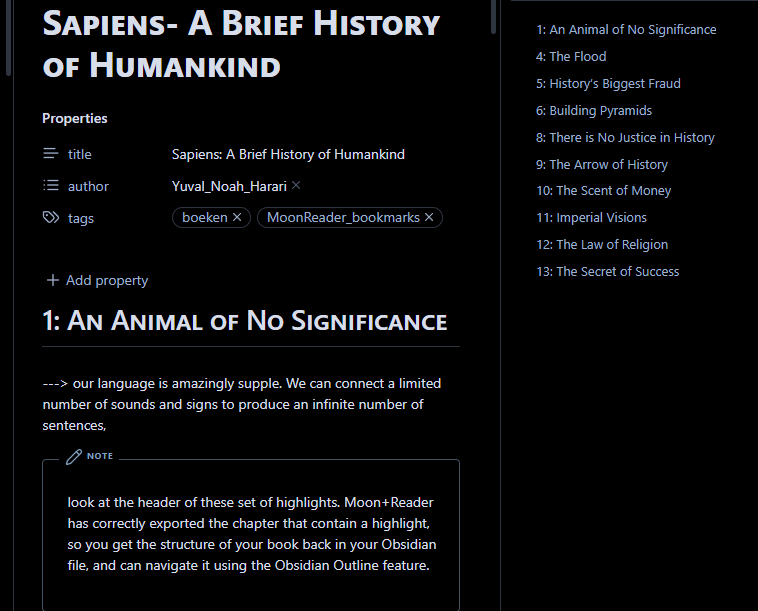
Adds front matter to the master file if it’s not already there (parsed from the first line of the import file):
- title
- author
- tags:
- #books
- #moonreader_bookmarks
-
Compares your existing master file with the ([[MoonReader Import]]). file exported from MoonReader
-
Searches for highlights you haven’t imported before and adds them in the correct place.
-
The chapter structure of the book is preserved (visible in the Outline).
-
If a Note is connected to a highlight, the script adds it below your highlight in Callout format (> [!note]).
-
You can keep annotating your master file in Obsidian. If you added new notes below a highlight or edited existing notes, these will not be overwritten by the import.
[!note]
Note: The highlighted text is the key for the comparison of import file and masterfile. If you edit a highlighted text in your master file, the script will not recognise it has been added before, and insert the original highlight a second time.
You can however safely edit a note below a highlight without issues.
- If you added a Note to an existing highlight in MoonReader after your last import, it will also be added to the same highlight in Obsidian.
- If you edited or added notes to a specific highlight both in MoonReader and Obsidian since your last import, the edit in Obsidian takes precedence.
- At the end of the script, the import file is cleared, ready for the next import.
Example
Sapiens- A Brief History of Humankind
title: “Sapiens: A Brief History of Humankind”
author: “Yuval_Noah_Harari”
tags:
1: An Animal of No Significance
—> our language is amazingly supple. We can connect a limited number of sounds and signs to produce an infinite number of sentences,
[!note]
look at the header of this set of highlights. Moon+Reader has correctly exported the chapter that contain a highlight, so you get the structure of your book back in your Obsidian file, and can navigate it using the Obsidian Outline feature.
—> Our language evolved as a way of gossiping. According to this theory Homo sapiens is primarily a social animal. Social cooperation is our key for survival and reproduction
[!note]
Notice how a highlight starts with —>. It can be multiple lines. Underneath the highlight there may be or not be a note. This right here is an example of a note that is added to a highlight. If you made an annotation within Moon+Reader, it will be added here like this. Callouts like this look even nicer with the Obsidian minimal theme (see the screenshots above)
If you added a note to a highlight in Moon+Reader after the last import, it will be added under the existing highlight in this masterfile for the book. If, since the last import, you added a note here in Obsidian, the note will be preserved during a future run of the import script.
If, since the last import, you added a note to a highlight both in Moon+Reader as in Obsidian, the Obsidian note will take precedence.
Templater Script:
<%*
// Config
const masterFile = tp.file.title + ".md";
const importFile = "MoonReader Import.md";

// Helpers
function getHighlightKey(text) {
    // Verwijder alles tussen haakjes aan het eind, inclusief spaties ervoor
    return text.replace(/\s*\([^)]*\)$/, '').trim();
}

function parseChapters(text, isMaster) {
    const chapterRegex = isMaster ? /^##\s*(.+)$/gm : /^◆\s*(.+)$/gm;
    let chapters = [];
    let match;
    let lastIndex = 0;
    let lastHeading = null;

    while ((match = chapterRegex.exec(text)) !== null) {
        if (lastHeading !== null) {
            chapters.push({
                heading: lastHeading,
                content: text.slice(lastIndex, match.index)
            });
        }
        lastHeading = match[1].trim();
        lastIndex = match.index + match[0].length;
    }

    if (lastHeading !== null) {
        chapters.push({
            heading: lastHeading,
            content: text.slice(lastIndex)
        });
    }
    return chapters;
}

function parseHighlights(content, isMaster) {
    const lines = content.split('\n');
    const highlights = [];

    let currentHighlight = null;
    let currentNote = "";
    let inHighlight = false;

    for (let i = 0; i < lines.length; i++) {
        let line = lines[i].trim();

        // Skip empty lines and page markers
        if (!line || line.match(/^Page \d+$/)) continue;

        // Check for start of a new highlight
        if (isMaster ? line.startsWith('--->') : line.startsWith('▪')) {
            // If we were processing a previous highlight, save it
            if (currentHighlight !== null) {
                highlights.push({
                    highlight: currentHighlight,
                    note: currentNote
                });
            }

            // Start a new highlight
            currentHighlight = isMaster ? line.replace(/^--->\s*/, '') : line.replace(/^▪\s*/, '');
            currentNote = "";
            inHighlight = true;

            // Check for note in parentheses at the end of the highlight line
            const parenMatch = currentHighlight.match(/^(.*?)\s*\(([^)]+)\)$/);
            if (parenMatch) {
                currentHighlight = parenMatch[1].trim();
                currentNote = parenMatch[2].trim();
                inHighlight = false; // We've already extracted the note
            }
        }
        // For master file, check for callout format notes with single >
        else if (isMaster && line.startsWith('>')) {
            if (line.includes('[!note]')) {
                // Start of a note callout
                inHighlight = false;
            } else {
                // Content of a note callout
                if (currentNote) currentNote += '\n';
                currentNote += line.replace(/^>\s*/, '');
            }
        }
        // For master file, check for old *Note: format
        else if (isMaster && line.startsWith('*Note:')) {
            currentNote = line.replace(/^\*Note:\s*/, '').replace(/\*$/, '');
            inHighlight = false;
        }
        // For import file, check for parenthesis note
        else if (!isMaster && line.startsWith('(') && line.endsWith(')') && inHighlight) {
            currentNote = line.substring(1, line.length - 1).trim();
            inHighlight = false;
        }
        // For import file, check for multi-line parenthesis note
        else if (!isMaster && line.startsWith('(') && inHighlight) {
            currentNote = line.substring(1).trim();
            inHighlight = false;

            // Continue reading until closing parenthesis
            let j = i + 1;
            while (j < lines.length) {
                const nextLine = lines[j].trim();
                if (!nextLine || nextLine.match(/^Page \d+$/)) {
                    j++;
                    continue;
                }

                if (nextLine.endsWith(')')) {
                    currentNote += ' ' + nextLine.substring(0, nextLine.length - 1).trim();
                    i = j;
                    break;
                } else {
                    currentNote += ' ' + nextLine;
                    j++;
                }
            }
        }
        // If we're still in the highlight, append this line to the highlight
        else if (inHighlight) {
            currentHighlight += ' ' + line;

            // Check if this line contains a note in parentheses
            const parenMatch = line.match(/^(.*?)\s*\(([^)]+)\)$/);
            if (parenMatch) {
                // The line ends with a note in parentheses
                currentHighlight = currentHighlight.replace(/\s*\([^)]+\)$/, ''); // Remove the note part from highlight
                currentNote = parenMatch[2].trim();
                inHighlight = false;
            }
        }
        // If we're not in a highlight and not in a note, this might be a continuation of a note
        else if (!isMaster && !inHighlight && currentHighlight !== null) {
            // This is likely part of a note that's not in parentheses
            // We'll ignore it for now, as notes should be in parentheses
        }
    }

    // Add the last highlight if there is one
    if (currentHighlight !== null) {
        highlights.push({
            highlight: currentHighlight,
            note: currentNote
        });
    }

    return highlights;
}

// Extract metadata from the line that contains the book info
function extractMetadata(importText) {
    // Find the line with book info (usually contains " - " and "Highlight:")
    const lines = importText.split('\n');

    for (let line of lines) {
        line = line.trim();

        // Pattern for Moon+Reader standard format: "Title - Author (Highlight: X; Note: Y)"
        const match = line.match(/^(.+?)\s*-\s*([^-(]+?)\s*\([^)]*\)$/);

        if (match && line.includes("Highlight:")) {
            return {
                title: match[1].trim(),
                author: match[2].trim().replace(/\s+/g, "_")
            };
        }

        // Alternative pattern: "Title - Author"
        const simpleMatch = line.match(/^(.+?)\s*-\s*([^-(]+)$/);
        if (simpleMatch && !line.startsWith("◆") && !line.startsWith("▪")) {
            return {
                title: simpleMatch[1].trim(),
                author: simpleMatch[2].trim().replace(/\s+/g, "_")
            };
        }
    }

    // Final fallback
    const firstContentLine = lines.find(line => line.trim() && !line.startsWith("◆") && !line.startsWith("▪") && !line.startsWith("─"));
    if (firstContentLine) {
        const parts = firstContentLine.split(" - ");
        if (parts.length >= 2) {
            return {
                title: parts[0].trim(),
                author: parts[1].split("(")[0].trim().replace(/\s+/g, "_")
            };
        }
    }

    return {
        title: "Unknown Book",
        author: "Unknown Author"
    };
}

// Extract frontmatter and content
function extractFrontmatterAndContent(text) {
    const frontmatterMatch = text.match(/^---\s*\n([\s\S]*?)\n---\s*\n([\s\S]*)$/);
    if (!frontmatterMatch) {
        return {
            hasFrontmatter: false,
            frontmatter: "",
            content: text
        };
    }

    return {
        hasFrontmatter: true,
        frontmatter: frontmatterMatch[1],
        content: frontmatterMatch[2]
    };
}

// Generate or update frontmatter
function generateOrUpdateFrontmatter(existingFrontmatter, metadata) {
    // If no existing frontmatter, create a new one
    if (!existingFrontmatter) {
        return `---
title: "${metadata.title}"
author: "${metadata.author}"
tags:
  - moonreader_bookmarks
---`;
    }

    // Update existing frontmatter
    let updatedFrontmatter = existingFrontmatter;

    // Update title if needed
    if (metadata.title) {
        if (updatedFrontmatter.includes("title:")) {
            updatedFrontmatter = updatedFrontmatter.replace(/title:\s*["']?(.*?)["']?$/m, `title: "${metadata.title}"`);
        } else {
            updatedFrontmatter += `\ntitle: "${metadata.title}"`;
        }
    }

    // Update author if needed
    if (metadata.author) {
        if (updatedFrontmatter.includes("author:")) {
            updatedFrontmatter = updatedFrontmatter.replace(/author:\s*["']?(.*?)["']?$/m, `author: "${metadata.author}"`);
        } else {
            updatedFrontmatter += `\nauthor: "${metadata.author}"`;
        }
    }

    // Ensure tags are present
    if (!updatedFrontmatter.includes("tags:")) {
        updatedFrontmatter += `\ntags:\n  - boeken\n  - moonreader highlights en notes`;
    } else if (!updatedFrontmatter.includes("boeken") || !updatedFrontmatter.includes("moonreader")) {
        // This is a simplified approach - in a real implementation you'd want to parse the YAML more carefully
        const tagsMatch = updatedFrontmatter.match(/tags:\s*\n([\s\S]*?)(?:\n\w|$)/);
        if (tagsMatch) {
            let tags = tagsMatch[1];
            if (!tags.includes("boeken")) {
                tags += "  - boeken\n";
            }
            if (!tags.includes("moonreader")) {
                tags += "  - moonreader_highlights_en_notes\n";
            }
            updatedFrontmatter = updatedFrontmatter.replace(/tags:\s*\n([\s\S]*?)(?:\n\w|$)/, `tags:\n${tags}`);
        }
    }

    return `---\n${updatedFrontmatter}\n---`;
}


// Format highlight with note as callout with single >
function formatHighlight(highlight, note) {
    if (note && note.trim() !== "") {
        // Handle multi-line notes by ensuring each line has the proper callout prefix
        const noteLines = note.split('\n');
        const formattedNoteLines = noteLines.map(line => {
            if (line.trim() === '') return '>';  // Empty line in callout
            return `> ${line}`;
        });

        return `---> ${highlight.trim()}\n> [!note]\n${formattedNoteLines.join('\n')}`;
    }
    return `---> ${highlight.trim()}`;
}

// Main execution
const masterPath = tp.file.find_tfile(masterFile);
const importPath = tp.file.find_tfile(importFile);

if (!masterPath || !importPath) {
    new Notice("❌ Bestand niet gevonden.");
    return;
}

const masterText = await app.vault.read(masterPath);
const importText = await app.vault.read(importPath);

// Check if import file is empty or contains no meaningful content
if (!importText.trim() || !importText.includes('▪')) {
    new Notice("⚠️ Import-bestand is leeg of bevat geen highlights. Geen wijzigingen aangebracht.");
    return;
}

// Extract metadata from import file
const importMetadata = extractMetadata(importText);

// Extract frontmatter and content from master file
const masterParts = extractFrontmatterAndContent(masterText);

// Parse chapters from both files
const masterChapters = parseChapters(masterText, true);
const importChapters = parseChapters(importText, false);

// Check if we found any chapters in the import file
if (importChapters.length === 0) {
    new Notice("⚠️ Geen hoofdstukken gevonden in import-bestand. Geen wijzigingen aangebracht.");
    return;
}

// Maak een map van bestaande highlights naar hun notes in de masterfile
const existingHighlights = new Map();
for (const chapter of masterChapters) {
    const highlights = parseHighlights(chapter.content, true);
    for (const h of highlights) {
        const key = getHighlightKey(h.highlight);
        existingHighlights.set(key, h.note);
    }
}

let mergedText = '';
let newHighlights = 0;
let newNotesAdded = 0;  // Teller voor nieuwe notes bij bestaande highlights

// Verwerk elk hoofdstuk uit import
for (const importChapter of importChapters) {
    const highlights = parseHighlights(importChapter.content, false);

    mergedText += `## ${importChapter.heading}\n\n`;

    for (const h of highlights) {
        const importKey = getHighlightKey(h.highlight);
        const importNote = h.note ? h.note.trim() : "";

        if (existingHighlights.has(importKey)) {
            const existingNote = existingHighlights.get(importKey) ? existingHighlights.get(importKey).trim() : "";

            // Als masterfile geen note heeft maar importfile wel, voeg die toe
            let noteToUse = existingNote || importNote;

            // Check of we een nieuwe note toevoegen aan een bestaande highlight
            if (!existingNote && importNote) {
                newNotesAdded++;
            }

            mergedText += formatHighlight(importKey, noteToUse) + '\n\n';
        } else {
            // Nieuwe highlight + note toevoegen
            mergedText += formatHighlight(h.highlight, h.note) + '\n\n';
            newHighlights++;
        }
    }
}

// Generate or update frontmatter
const updatedFrontmatter = generateOrUpdateFrontmatter(
    masterParts.hasFrontmatter ? masterParts.frontmatter : null,
    importMetadata
);

// Build final content
const finalText = updatedFrontmatter + '\n' + mergedText.trim();

// Only modify the master file if we have content to write
if (mergedText.trim()) {
    await app.vault.modify(masterPath, finalText);
	  let message = `✅ Import voltooid. \n${newHighlights} nieuwe highlights`; if (newNotesAdded > 0) { message += `\n ${newNotesAdded} nieuwe notes.`; } new Notice(message);

    // Clear import file
    await app.vault.modify(importPath, "");
    new Notice("🗑️ Import-bestand geleegd.");

    // Hernoem het bestand naar de titel uit de metadata
    if (importMetadata.title && importMetadata.title !== "Unknown Book") {
        const newFilename = sanitizeFilename(importMetadata.title);

        // Voeg .md extensie toe als die er nog niet is
        const baseFilename = newFilename.endsWith('.md') ? newFilename : newFilename + '.md';

        // Controleer of de nieuwe bestandsnaam verschilt van de huidige
        if (masterPath.name !== baseFilename) {
            try {
                // Genereer een unieke bestandsnaam als het bestand al bestaat
                const uniqueFilename = await getUniqueFilename(app, masterPath.parent.path, baseFilename);

                // Hernoem het bestand
                await app.fileManager.renameFile(masterPath, masterPath.parent.path + '/' + uniqueFilename);
                new Notice(`✅ Bestand hernoemd naar: ${uniqueFilename}`);
            } catch (error) {
                new Notice(`❌ Fout bij hernoemen: ${error.message}`);
            }
        }
    }
} else {
    new Notice("⚠️ Geen content om te importeren. Geen wijzigingen aangebracht.");
}

// Functie om een string te "sanitizen" voor gebruik als bestandsnaam
function sanitizeFilename(input) {
  // Vervang ongeldige karakters voor Windows bestandsnamen
  let sanitized = input
    .replace(/[\\/:*?"<>|]/g, '-') // Vervang verboden Windows karakters
    .replace(/\s+/g, ' ')          // Meerdere spaties worden één spatie
    .replace(/^\s+|\s+$/g, '')     // Verwijder spaties aan begin en eind
    .replace(/\./g, '_')           // Vervang punten door underscores
    .trim();                       // Trim spaties aan begin en eind

  // Beperk lengte (Windows heeft een limiet van 255 karakters)
  if (sanitized.length > 200) {
    sanitized = sanitized.substring(0, 200);
  }

  return sanitized;
}

// Functie om een unieke bestandsnaam te genereren als het bestand al bestaat
async function getUniqueFilename(app, folder, baseName) {
    // Voeg .md extensie toe als die er nog niet is
    let fileName = baseName.endsWith('.md') ? baseName : baseName + '.md';

    // Controleer of het bestand al bestaat
    let counter = 1;
    let testPath = folder + '/' + fileName;

    // Controleer of het bestand bestaat (maar niet als het het huidige bestand is)
    while (await app.vault.adapter.exists(testPath) && app.vault.getAbstractFileByPath(testPath) !== masterPath) {
        // Genereer een nieuwe naam met een nummer
        fileName = baseName.replace(/\.md$/, '') + ` (${counter}).md`;
        testPath = folder + '/' + fileName;
        counter++;
    }

    return fileName;
}
%>