This CSS snippet makes for a tidier appearance of Properties:
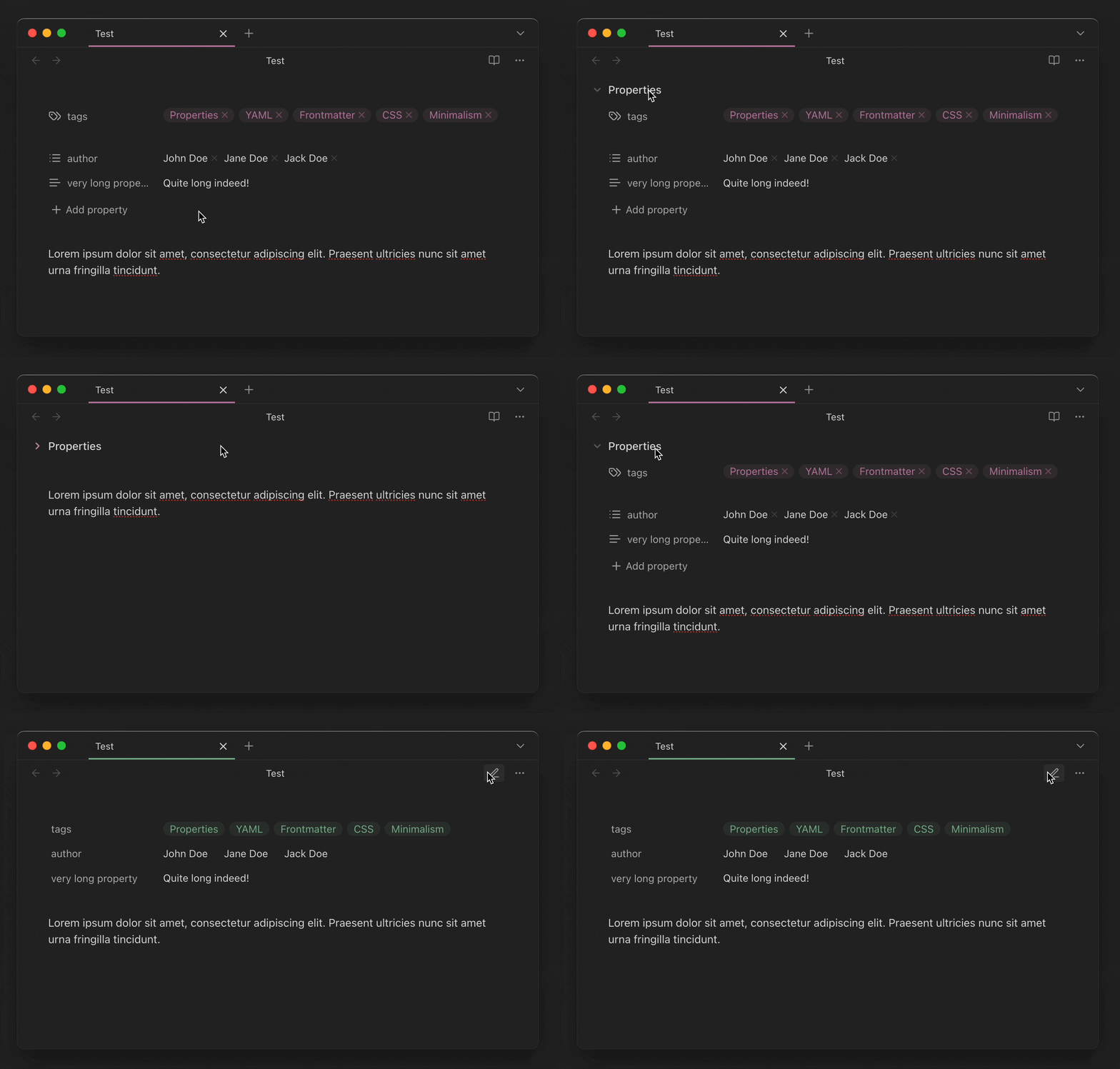
- On desktop, the Properties label is revealed only on hover and when folded.
- Add property and
xbuttons, as well as property icons are hidden in Reading view. - The margin above the Properties block is shrunk.
- The
Emptyplaceholder is replaced with an ellipsis (…).
Each modification is clearly labeled in the code: you can pick what you like and delete the rest.
I also included a few other options which are disabled by default; uncomment them to try them out.
CSS snippet
[Properties]_Minimal.css (4.0 KB)
/* Source: https://forum.obsidian.md/t/minimal-properties/104415 */
/* Last updated 2025-11-21 */

/* ----------------------------------------- */
/* 'Properties' label modifications */
/* ----------------------------------------- */

/* Hide when unfolded (desktop)
body:not(.is-mobile) .metadata-properties-heading:not(.is-collapsed) .metadata-properties-title {
    opacity: 0;
    transition: opacity 0.2s ease;
}
*/

/* ----------------------------------------- */

/* Show on hover when unfolded (desktop)
body:not(.is-mobile) .metadata-properties-heading:not(.is-collapsed):hover .metadata-properties-title {
    opacity: 1;
}
*/

/* ----------------------------------------- */

/* Always show when folded
body:not(.is-mobile) .metadata-properties-heading.is-collapsed .metadata-properties-title {
    opacity: 1;
}
*/

/* ----------------------------------------- */

/* Replace 'Properties' label with 'YAML' */
.metadata-properties-title {
    font-size: 0;
}

.metadata-properties-title::before {
    content: "YAML";
    font-size: 1rem;
}

/* ----------------------------------------- */

/* Replace 'Properties' label with Lucide info icon

.metadata-properties-title {
    font-size: 0;
}

.metadata-properties-title::before {
    content: "";
    display: inline-block;
    width: 16px;
    height: 16px;
    background-color: var(--text-muted);
    mask: url("data:image/svg+xml,%3csvg xmlns='http://www.w3.org/2000/svg' width='24' height='24' viewBox='0 0 24 24' fill='none' stroke='currentColor' stroke-width='2' stroke-linecap='round' stroke-linejoin='round'%3e%3ccircle cx='12' cy='12' r='10'%3e%3c/circle%3e%3cpath d='M12 16v-4'%3e%3c/path%3e%3cpath d='M12 8h.01'%3e%3c/path%3e%3c/svg%3e");
    -webkit-mask: url("data:image/svg+xml,%3csvg xmlns='http://www.w3.org/2000/svg' width='24' height='24' viewBox='0 0 24 24' fill='none' stroke='currentColor' stroke-width='2' stroke-linecap='round' stroke-linejoin='round'%3e%3ccircle cx='12' cy='12' r='10'%3e%3c/circle%3e%3cpath d='M12 16v-4'%3e%3c/path%3e%3cpath d='M12 8h.01'%3e%3c/path%3e%3c/svg%3e");
    mask-size: contain;
    -webkit-mask-size: contain;
    mask-repeat: no-repeat;
    -webkit-mask-repeat: no-repeat;
    font-size: 1rem;
    vertical-align: middle;
}
*/

/* ----------------------------------------- */
/* Reading view modifications */
/* ----------------------------------------- */

/* Hide all x buttons */
.markdown-reading-view .multi-select-pill-remove-button {
    display: none !important;
}
.markdown-reading-view .metadata-property .multi-select-container .multi-select-pill {
    padding-right: 0.65em;
}

.internal-embed.bases-embed .multi-select-pill {
    padding-right: 0.65em;
}


/* ----------------------------------------- */

/* Hide property icons */
.markdown-reading-view .metadata-property-icon {
    display: none;
}

/* ----------------------------------------- */
/* Miscellaneous */
/* ----------------------------------------- */

/* Reduce margin above the Properties section
.metadata-container {
    margin-top: -1em;
}
*/

/* ----------------------------------------- */

/* Hide property icons in all views
.metadata-property-icon {
    display: none;
}
*/

/* ----------------------------------------- */

/* Replace 'Empty' placeholder with ellipsis (…) */
.metadata-input-longtext[placeholder="Empty"]:empty::before,
.multi-select-input[placeholder="Empty"]:empty::before {
    content: "…";
    color: var(--text-faint);
}

.metadata-property-value {
    position: relative;
}

.metadata-input-number[placeholder="Empty"]::placeholder {
    opacity: 0;
}

.metadata-property-value:has(input[placeholder="Empty"]:placeholder-shown)::before {
    content: "…";
    position: absolute;
    left: 7.25px;
    top: 50%;
    transform: translateY(-50%);
    color: var(--text-faint);
}

/* ----------------------------------------- */

/* Shorten 'Add property' button text to 'Add' */
.metadata-add-button .text-button-label {
    visibility: hidden;
}

.metadata-add-button .text-button-label::before {
    content: "Add";
    visibility: visible;
}
Also, Pretty Properties allows to hide some properties from view (they will remain visible in Source view).