Steps to reproduce
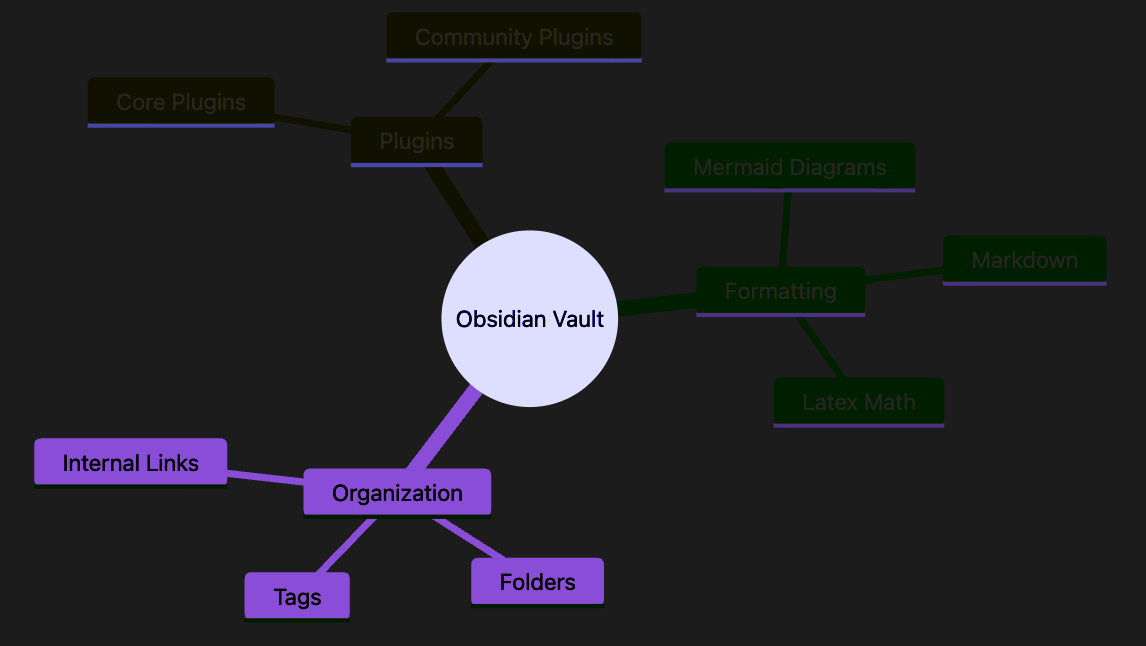
Mac OS, in dark mode, fresh install and no new CSS, a mindmap becomes virtually unreadable because of fine purple text on black CSS for one portion of the map. Leads to funny underlines as well on top corner. It actually looks like an ultraviolet theme that should be renamed “deep ultraviolet” or “x-ray”
Code for the mindmap is below:
mindmap
  root((Obsidian Vault))
    Plugins
      Core Plugins
      Community Plugins
    Formatting
      Markdown
      Mermaid Diagrams
      Latex Math
    Organization
      Folders
      Tags
      Internal Links
Did you follow the troubleshooting guide? Y
Expected result
Something legible
Actual result
Pasted below as a screenshot
Environment
SYSTEM INFO:
Obsidian version: 1.13.4
Installer version: 1.13.4
Operating system: Darwin Kernel Version 25.6.0: Sat Jul 11 15:27:04 PDT 2026; root:xnu-12377.161.13~4/RELEASE_ARM64_T6050 25.6.0
Login status: not logged in
Language: en
Insider build toggle: off
Live preview: on
Base theme: adapt to system
Community theme: none
Snippets enabled: 0
Restricted mode: on
RECOMMENDATIONS:
none
Additional information
Screenshot attached