Problem
I’m trying to change the theme of Mermaid.js diagrams & I’m struggling to get accurate colors. The diagrams seem to be inverting their colours. See the Render Below.
Debug Attempts & Speculation
I’ve been referring to the Mermaid.js theme rules to define discrete colours.
I understand that ‘darkMode’ rules typically just invert & hue-shift, or something along those lines that causes colours to not turn out as intended.
I am using an alternate vault with no CSS snippets or themes.
I do have LaTeX Suite, Unicode Search & Default Template installed however I believe they are irrelevant.
Source for my Mermaid
```mermaid

---
config:
  theme: 'base'
  themeVariables:
    primaryColor: '#f00'
    primaryTextColor: '#0f0'
    primaryBorderColor: '#00f'
    lineColor: '#ff0'
    secondaryColor: '#0ff'
    tertiaryColor: '#f0f'
    darkMode: 'false'
---


timeline
		title Facemask
		Breathing In : Dust caught in PP Filter
		: Humidity is repelled by outer layer
		: Aerosols are attracted by static electricity
		Breathing Out : Mask
```
Render on Default Obsidian with Dark / Light Mode
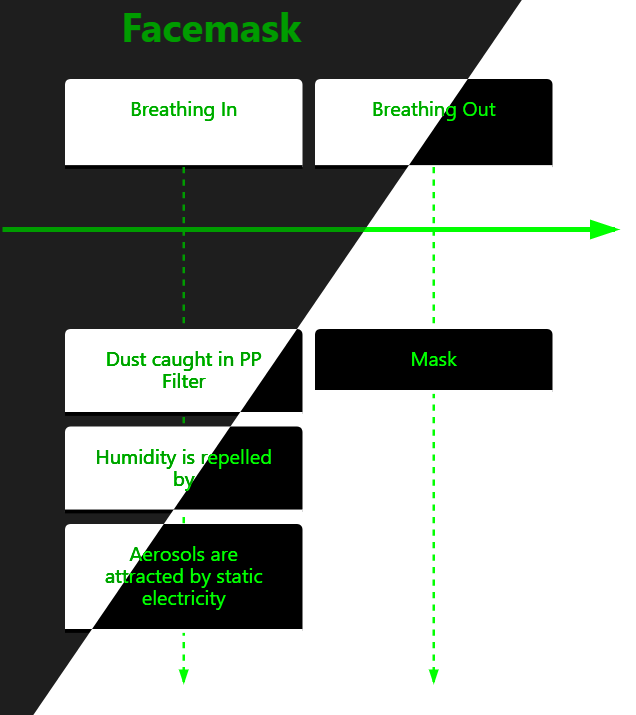
Ideal Solution
What I define as “fixed” is if I, as the user, am able to render Timeline Mermaid.js diagrams with colour accuracy. I shouldn’t have to define darkMode as true/false, as switching the themes should render that in Live & Reading views.
Further ‘Wants’
I would like to have more accessible options to change themes of Mermaid diagrams. I tag this as Help because I don’t know if there’s a simpler way to call a custom base theme that I can haved saved in snippets.
I’m unsure if I can change the category after pressing Create Topic, but this belongs in Feature requests or Bug reports … Help! I don’t get programmer etiquette!
Thankyou! - skelobones,carrd,co