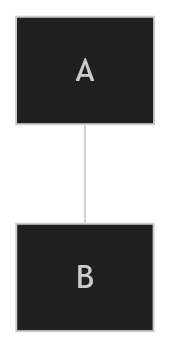
A line between A and B without arrow tips. It’s called an “open link” by Mermaid.
I cant share the link to the Mermaid documentation.
Marmaid Documentation → “Syntax” → “Flowchart” → “An open link”
Actual result
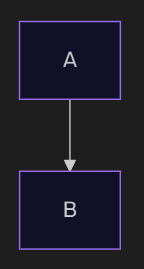
I see a link between A and B with an arrow head pointing towards B.
The rendered diagram is identical to the following code, it shouldn’t.
flowchart LR
A --> B
Environment
SYSTEM INFO:
Obsidian version: v1.8.9
Installer version: v1.6.7
Operating system: Windows 11 Home 10.0.26100
Login status: logged in
Language: en
Catalyst license: none
Insider build toggle: off
Live preview: on
Base theme: adapt to system
Community theme: none
Snippets enabled: 0
Restricted mode: on
RECOMMENDATIONS:
none
Additional information
Expected result (screenshot from Mermaid.js documentation)
There was a change in how Obsidian renders mermaid fairly recently (not sure exact version) that seems to have brought this bug. It was the change that caused the nodes to have purple outlines.
This issue (#6289) has been marked as fixed on Mermaid as of three weeks ago from the date of this post and is present in the latest release ([email protected], commit efe218a)
Environment
SYSTEM INFO:
Obsidian version: 1.12.7
Installer version: 1.12.4
Operating system: Windows 11 Pro 10.0.26200
Login status: not logged in
Language: en-GB
Insider build toggle: off
Live preview: on
Base theme: dark
Community theme: none
Snippets enabled: 0
Restricted mode: off
Plugins installed: 3
Plugins enabled: 3
1: Iconize v2.14.7
2: Export Image plugin v2.4.4
3: Code Styler v1.1.7
RECOMMENDATIONS:
Community plugins: for bugs, please first try updating all your plugins to latest. If still not fixed, please try to make the issue happen in the Sandbox Vault or disable community plugins.
In Obsidian for Windows 1.12.7, Mermaid flowchart links written as open links using --- are rendered with an arrowhead, visually the same as -->.
According to Mermaid flowchart syntax, --- should render as a plain line without an arrowhead, while --> should render as a line with an arrowhead.
Steps to reproduce
Create a note containing the following Mermaid block:
flowchart LR
    A(简单) --- B(关键)
Actual result
The line is rendered with an arrowhead, as if the code were:
Environment
App: Obsidian desktop
Platform: Windows
Obsidian version: 1.12.7
Additional notes
This makes it difficult to create Mermaid diagrams where the relationship is meant to be undirected or non-directional. The issue appears to be with the built-in Mermaid rendering behavior rather than the Mermaid syntax itself.


 )
)