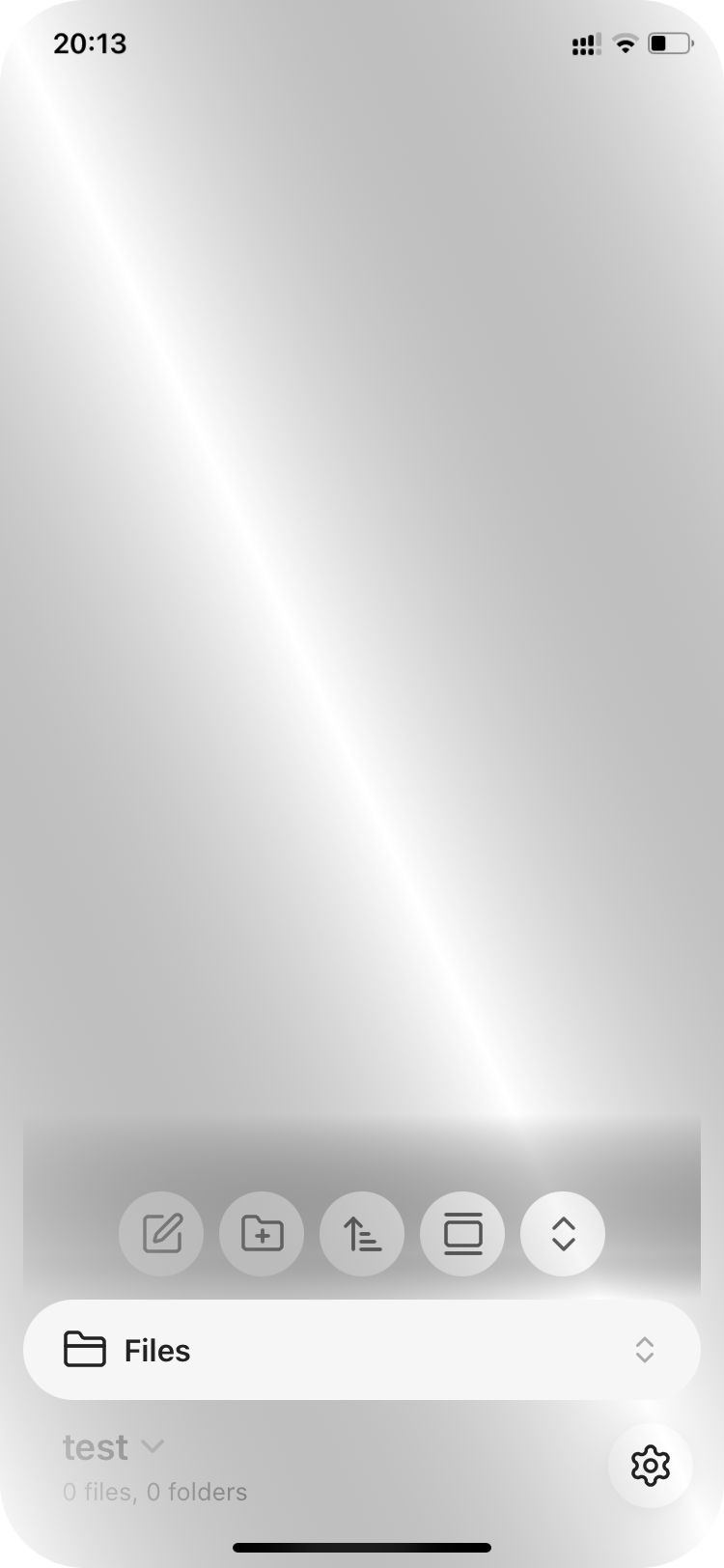
Menu and popover translucency issues on iOS15.8.5 with last version of Obsidian (ver. 1.11.4)

Hi

With the new version of obsidian for ios (1.11.4) the menus and popover are tranparent and non lisible. Impossible to put any color on it. That’s happening even with the standard theme, and with no plugin.

What can I do?

Thank you.

Regards

Cyril Sauvenay

Moved to help for not reading an follow the bug report template.

Likely due to some WebKit rendering changes and I have noticed trends for dropping support for older devices (such as the engine for this forum itself).

I have found a hack using Codescript Toolkit:
Script needs saved as a .ts file and loaded on startup:

import { App, Notice, Platform } from 'obsidian';

export async function invoke(app: App): Promise<void> {
    /* ===== MOBILE GUARD ===== */
    if (!Platform.isMobile) {
        return;
    }

    // Create and inject style element
    const styleId = 'ios-15-8-menu-fix';
    let styleEl = document.getElementById(styleId) as HTMLStyleElement;
    
    if (!styleEl) {
        styleEl = document.createElement('style');
        styleEl.id = styleId;
        document.head.appendChild(styleEl);
    }

    // Function to update styles based on current theme
    function updateStyles() {
        styleEl.textContent = `
            /* iOS Menu Translucency Override */
            .popover,
            .menu,
            .context-menu,
            .suggestion-container,
            .modal-container .modal,
            .tooltip,
            .prompt {
                background: var(--background-primary) !important;
                backdrop-filter: none !important;
                -webkit-backdrop-filter: none !important;
                opacity: 1 !important;
            }

            /* Kill pseudo-element overlays */
            .popover::before,
            .popover::after,
            .menu::before,
            .menu::after,
            .context-menu::before,
            .context-menu::after,
            .suggestion-container::before,
            .suggestion-container::after,
            .modal::before,
            .modal::after {
                content: none !important;
                display: none !important;
                background: none !important;
                backdrop-filter: none !important;
                -webkit-backdrop-filter: none !important;
            }

            /* Force GPU acceleration to prevent iOS rendering bugs */
            .popover,
            .menu,
            .context-menu,
            .suggestion-container {
                transform: translate3d(0, 0, 0) !important;
                -webkit-transform: translate3d(0, 0, 0) !important;
            }

            /* Override any Obsidian variable-based translucency */
            .popover,
            .menu,
            .context-menu {
                --background-modifier-cover: var(--background-primary) !important;
                --background-translucent: var(--background-primary) !important;
            }
        `;
    }

    // Initial application
    updateStyles();

    // Watch for theme changes
    const themeObserver = new MutationObserver((mutations) => {
        for (const mutation of mutations) {
            if (mutation.type === 'attributes' && mutation.attributeName === 'class') {
                updateStyles();
            }
        }
    });

    themeObserver.observe(document.body, {
        attributes: true,
        attributeFilter: ['class']
    });

    // Watch for new menus being added (reapply if needed)
    const menuObserver = new MutationObserver(() => {
        // Force a style recalculation when new menus appear
        const menus = document.querySelectorAll('.popover, .menu, .context-menu');
        menus.forEach((menu: HTMLElement) => {
            // Force repaint
            menu.style.display = 'none';
            menu.offsetHeight; // Trigger reflow
            menu.style.display = '';
        });
    });

    menuObserver.observe(document.body, {
        childList: true,
        subtree: true
    });

    // Cleanup function
    (window as any)._ios15MenuFixCleanup = () => {
        themeObserver.disconnect();
        menuObserver.disconnect();
        styleEl?.remove();
    };

    new Notice('📱 Menu transparency fix active');
}

Installation tips in that thread. I didn’t test it thoroughly, due to my not using this device anymore.

Be aware that due to the same webkit lib issues, you’ll need to install an earlier version of said plugin for mobile (which you’ll have to remember not to update or edit the manifest.json to stop this from happening). This one:

P.S: I edited the title of the thread to better reflect problem.

Well… Thanks a lot… I will try to understand and apply…

Create a folder that you remember to add to the plugin’s startup folder. (I’ll give an example later.)
Save the script I shared above with Translucency-Fix-for-Mobile.ts in that folder (this filename will be used later).
In the same folder as this file, create a main.ts file with:

export async function invoke(app: App): Promise<void> {
  try {
    const module = await requireAsync('//path/to/Translucency-Fix-for-Mobile.ts');
    await module.invoke(app);
  } catch (error) {
    new Notice(`✗ Mobile startup failed: ${error.message}`, 3000);
  }
}

Notice the //path/to/Translucency-Fix-for-Mobile.ts part, where you need to add the relative path from vault root with // to start with to work with older webkit libbed mobile devices. So if you saved your .ts file in SCRIPTS/codescript_toolkit_scripts/startup, your line will be like:
const module = await requireAsync('//SCRIPTS/codescript_toolkit_scripts/startup/Translucency-Fix-for-Mobile.ts');

Holler back if you run into issues. I did not run this code (I have a more elaborate one).

1 Like

Thank you ! It worked well but was taking too much memory so I stopped it.

Instead, helped by Gemini, I put a CSS snippet :

/* FORCE L’OPACITÉ TOTALE SUR IPAD */

/* 1. Le fond principal */
body, html, .app-container {
background-color: var(–background-primary) !important;
background: var(–background-primary) !important;
}

/* 2. Les menus contextuels (clic droit/appui long) /
.menu, .popover {
background-color: var(–background-primary) !important;
backdrop-filter: none !important; /
Désactive le flou iOS */
-webkit-backdrop-filter: none !important;
opacity: 1 !important;
}

/* 3. Les panneaux latéraux */
.workspace-split, .workspace-ribbon, .workspace-tab-header-container {
background-color: var(–background-primary) !important;
}

/* 4. Désactive l’effet de transparence natif d’Obsidian /
.is-translucent {
background-color: var(–background-primary) !important;
backdrop-filter: none !important;
}
/
— CORRECTIF POUR LES POP-UPS & MODALES — */

/* 1. La fenêtre principale des réglages et fenêtres flottantes /
.modal, .modal-container, .modal-bg {
background-color: var(–background-primary) !important;
backdrop-filter: none !important;
-webkit-backdrop-filter: none !important; /
Force brute iOS */
opacity: 1 !important;
}

/* 2. La palette de commande et l’ouverture rapide (Ctrl+P / Ctrl+O) */
.prompt, .prompt-input, .prompt-results {
background-color: var(–background-primary) !important;
border: 1px solid var(–background-modifier-border) !important;
backdrop-filter: none !important;
}

/* 3. Les suggestions (quand vous tapez [[ pour faire un lien) */
.suggestion-container {
background-color: var(–background-secondary) !important;
backdrop-filter: none !important;
}

/* 4. Les notifications (petits messages en haut à droite) */
.notice {
background-color: var(–background-secondary) !important;
}

It seems to work very well, and this is light.

Thanks again!

Cyril

1 Like

Gemini wins (over ChatGPT+ClaudeAI+me). :slight_smile:
I surely don’t want to inject if a pure css snippet suffices (it didn’t initially work for me).

Hi, I tried your css snippet under obsidian11.5.4, not working. How do you config and make it work?

Steps to reproduce

Freshly installed obsidian from iOS appstore, latest version. Create a new vault.

Did you follow the troubleshooting guide? [Y/N]

Y

Expected result

A pure white default light scheme theme. Changing theme works under light scheme.

Actual result

Silver metal appearance. Changing theme does not work under light scheme. Dark scheme seems working fine.

Environment

SYSTEM INFO:
Operating system: ios 15.1 (Apple iPhone12,1)
Obsidian version: 1.11.5 (279)
API version: v1.11.5
Login status: not logged in
Language: en
Live preview: on
Base theme: adapt to system
Community theme: none
Snippets enabled: 0
Restricted mode: on
RECOMMENDATIONS:
none


Additional information

The screenshot.

Dark scheme not working properly too. I think this is a bug related to outdated WebKit version under ios15 and devs did not test the release under ios15.

Latest app does not support iOS 15 properly. Seeking for a solution now.

Can’t you update this device to a newer version of iOS?

Your device should be able to go up to the current iOS 26.2?

Due to some restrictions, I can not update system. Any alternative solution appreciated!

You can try with some of the third party themes and see if they work better.
We won’t be able to assist you with this. Sorry!

I find an alternative solution as installing v1.10.6 through trollstore (since old iOS version supports it.) I will leave a ipa url here for later users who are in trouble.

Decrypted iOS IPA App Store

Since it is not an official release(I hope github release has it, but it does not), so use it at your own risk. If you do not trust it, there is tutorial to get older release from itunes.

A even better solution could be: official sets v1.11 for ios16 or higher. So users using ios15 or lower will automatically download v1.10 as its last supported version for ios15 and lower

15.8.2 Obsidian makes this work:


/* Context menus and popovers */
.menu,
.popover {
    background-color: var(--background-primary) !important;
    backdrop-filter: none !important;
    -webkit-backdrop-filter: none !important;
    opacity: 1 !important;
}

/* Modals and dialogs */
.modal,
.modal-container,
.modal-bg {
    background-color: var(--background-primary) !important;
    backdrop-filter: none !important;
    -webkit-backdrop-filter: none !important;
    opacity: 1 !important;
}

/* Command palette and quick switcher */
.prompt,
.prompt-input,
.prompt-results {
    background-color: var(--background-primary) !important;
    backdrop-filter: none !important;
}

/* Suggestions (link autocomplete, etc.) */
.suggestion-container {
    background-color: var(--background-secondary) !important;
    backdrop-filter: none !important;
}

/* Disable Obsidian's translucent class */
.is-translucent {
    background-color: var(--background-primary) !important;
    backdrop-filter: none !important;
    -webkit-backdrop-filter: none !important;
}

/* Tooltips */
.tooltip {
    background-color: var(--background-primary) !important;
    backdrop-filter: none !important;
}
1 Like