Maybe useful for some.
With the input from this post (https:// forum.obsidian.md/t/is-there-a-way-to-add-text-to-the-left-side-of-the-margin/71734 - sorry, can’t post links) and AI help I was able to put together a custom css that enables you to render short text inside the right side margin, looking like this:
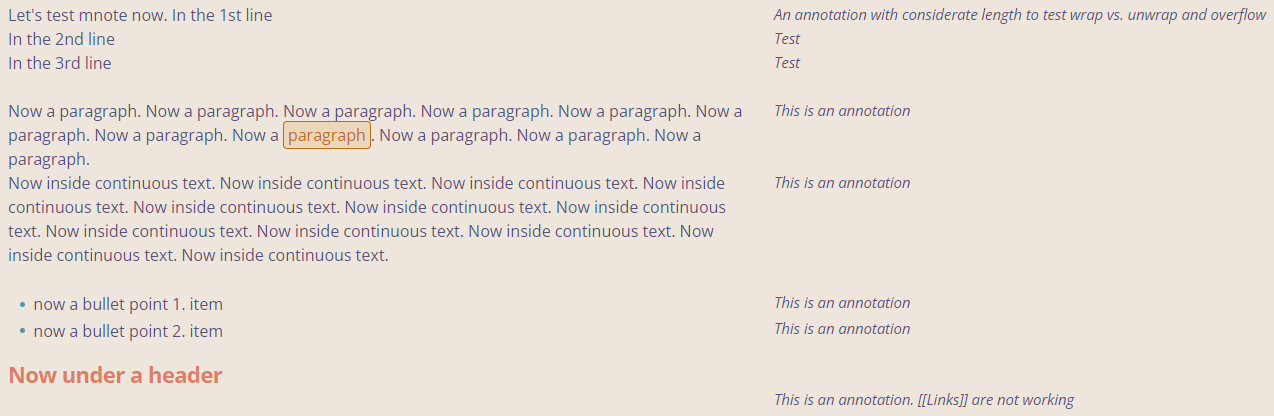
The syntax is to write <a class="mnote" data-mnote="This is an annotation"></a> in the line or paragraph where the margin note should appear next to. The command itself will then be hidden by the css and the text from data-mnote rendered at the top of the current paragraph next to the text. In source mode the command appears where it was originally written.
The text color can be set using style settings. If you want to prevent the text from overflowing too far to the right, you can enable line breaks by setting white-space: wrap; in the CSS. The rendered text is clickable to quickly edit the annotation. It will not be included in an exported PDF, nor will the <> command syntax itself, which I personally find convenient.
I mainly use the snippet in Live-Preview but it works in Reading mode as well. For an even smoother workflow you can set a hotkey (I use ALT+M) with Templater plugin to execute a template only containing <a class="mnote" data-mnote="<% tp.file.cursor(1) %>"></a> and enable the cursor-jump-option in the Templater plugin, so you start typing in the data-mnote-field after executing the hotkey.
Since my knowledge of Obsidian CSS is quite limited I expect a few bugs still and would appreciate someone with more experience to optimize the script further.
Have fun, here is the CSS:
/* === Inline Margin Notes (render on right margin, beginning of paragraph) =========== */
/* @settings

name: Margin notes (snippet)
id: marginnote-style
settings:
    -
		id: mnote-color
		title: Text color
		description: "Default is `--text-normal`."
		type: variable-color
		format: hex
		opacity: false
		default: '#000000'
*/


body{
  --mnote-width: 26ch;
  --mnote-gap: 1rem;
  --mnote-color: var(--text-normal);
  --mnote-font-size: 0.92em;
  --mnote-style: italic;
  --mnote-bg: var(--background-primary);
}

/* Creating space on the right, not cutting anything off - Live-Preview  */
.markdown-source-view.mod-cm6 .cm-scroller{
  padding-right: calc(var(--mnote-width) + var(--mnote-gap) + 1rem);
}

/* Render margin note from data-attribute - Live-Preview */
.markdown-source-view.mod-cm6 a.mnote::after{
  content: attr(data-mnote);
  position: absolute;
  right: calc(-1 * (var(--mnote-width) + var(--mnote-gap)));
  top: 0; /* beginning of paragraph - can be set to 1 for exact line */
  width: var(--mnote-width);
  font-size: var(--mnote-font-size);
  font-style: var(--mnote-style);
  color: var(--mnote-color);
  white-space: nowrap;
}

/* Optional: Show only the first note per line (prevents overlapping) */
.markdown-source-view.mod-cm6 .cm-line a.mnote:not(:first-of-type)::after{
  content: none;
}

/* Render margin note from data-attribute - Reading-view*/
.markdown-reading-view .markdown-preview-sizer{
  padding-right: calc(var(--mnote-width) + var(--mnote-gap) + 1rem);
}

.markdown-reading-view p, .markdown-reading-view li,
.markdown-reading-view blockquote, .markdown-reading-view h1,
.markdown-reading-view h2, .markdown-reading-view h3,
.markdown-reading-view h4, .markdown-reading-view h5, .markdown-reading-view h6{
  position: relative;
}

.markdown-reading-view a.mnote::after{
  content: attr(data-mnote);
  position: absolute; right: calc(-1 * (var(--mnote-width) + var(--mnote-gap)));
  top: 0; width: var(--mnote-width);
  font-size: var(--mnote-font-size);
  font-style: var(--mnote-style);
  color: var(--mnote-color);
  white-space:nowrap;
}

/* Optional: Show only the first note per line (prevents overlapping) */
/*
.markdown-reading-view .cm-line a.mnote:not(:first-of-type)::after{
  content: none;
}
*/

/* Narrow screen: Do not relocate marginalia */
@media (max-width: 900px){
  .markdown-source-view.mod-cm6 .cm-scroller,
  .markdown-reading-view .markdown-preview-sizer{ padding-right: 1rem; }
  .markdown-source-view.mod-cm6 a.mnote::after,
  .markdown-reading-view a.mnote::after{
    position: static; display: inline; right: auto; width: auto;
  }
}