Disclaimer block (required by category template):
- Open source: yes, MIT
- Free: the plugin is free. It embeds the magzdown. com reader, which is also
free; the webapp sells an optional one-time Pro unlock (extra color themes,
fonts, PDF/EPUB export). Nothing in the plugin’s reading flow requires it. - Vibe-coded: no
- Community directory: community.obsidian.md/plugins/magzdown
Hi all !
Magzdown just got accepted into the community directory, so I can finally share it here properly.
What it does?
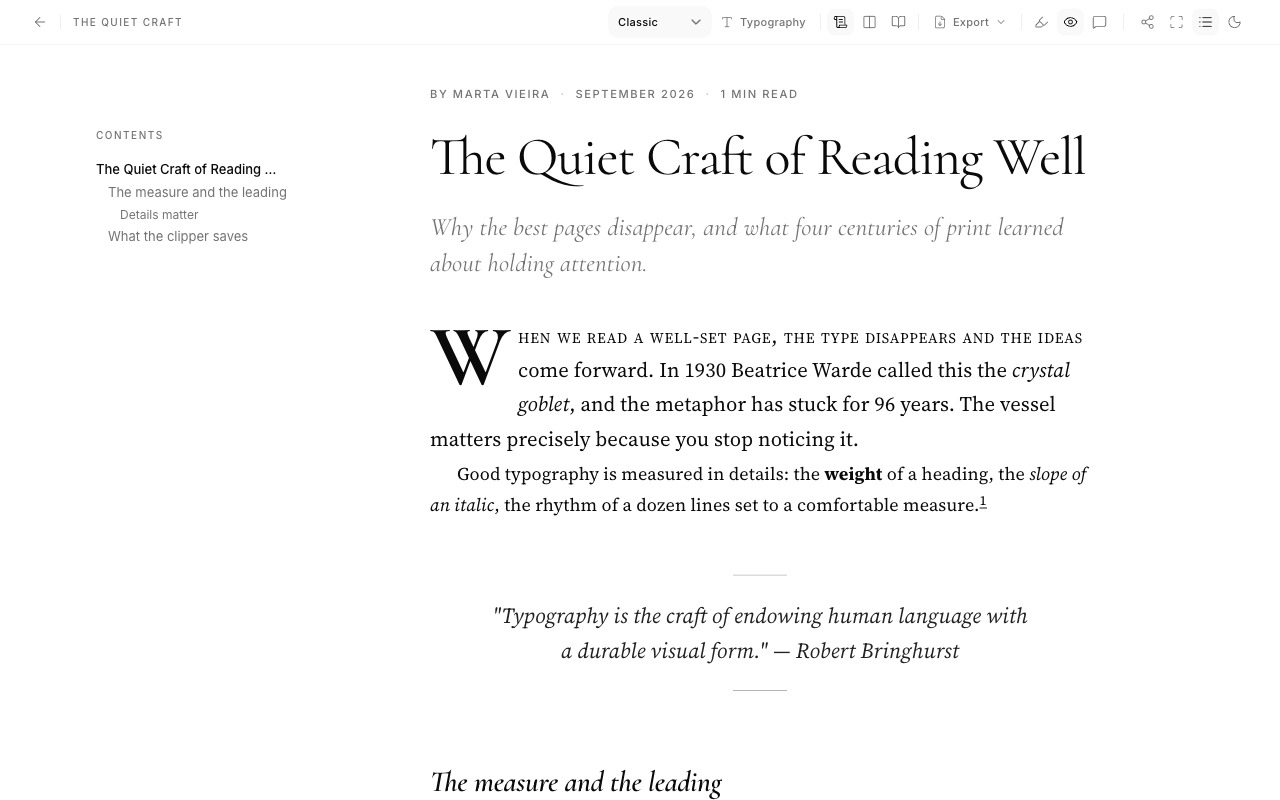
Opens a reading pane beside your editor and mirrors the active note into it live, typeset like a magazine page. You write markdown on the left; on the right you get a real headline, a deck pulled from your first italic line, a byline built from your frontmatter (autor, date, plus a computed reading time), drop caps, and footnotes that move into the margin when the pane is wide enough.
Why I built it?
I kept writing long notes I never re-read, because re-reading them in editor monospace felt like proofreading, not reading. Seeing the same note set in a different font, with actual typographic hierarchy, turned out to change how I read my own writing. Mistakes and weak arguments jump out in a way they don’t in the editor.
The styles?
Eight presets, each modeled on a real magazine genre, a literary serif in the New Yorker tradition, a dense news-weekly style, a fashion-glossy one with centered Didone headlines, a slab-serif music-mag style, and so on. Plus scroll, two-column, or paginated layouts (paginated gets print-style running heads and page numbers).
How it works, honestly?
The pane is an iframe loading magzdown. com’s embed page; your note’s markdown goes to it via postMessage, scoped to that origin. Rendering is fully client-side — the site has no backend and stores nothing. It does mean the plugin needs an internet connection and is desktop-only (mobile Obsidian doesn’t do iframes). If either of those is a dealbreaker for you, fair enough — wanted it stated plainly.
Install: Settings → Community plugins → Browse → “Magzdown”.
Happy to answer anything, and bug reports are very welcome 
github. com/xarl3z/magzdown-obsidian/issues