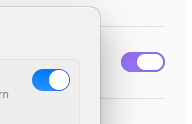
Steps to reproduce
Update Obsidian to version 1.11.4 Desktop or newer on macOS, which has introduced “native” styling. See the changelog notes at obsidian.md/changelog/2026-01-12-desktop-v1.11.4/ for v1.11.4:
## Improvements
 - ...
 - macOS: Toggles and sliders are now styled to match their native counterparts.
Did you follow the troubleshooting guide?
Yes.
Expected result
Obsidian should either match the native styling present on the host system, or disable it in favor of its own. It is apparent that the new macOS style is intended to replicate the system appearance of macOS Tahoe (and later). As such, it looks entirely out of place on macOS Sequoia and earlier. For those that are intentionally holding off on upgrading, or aren’t able to upgrade due to hardware limitations, this introduces a weird mismatch between the system UI, Obsidian’s supposedly native UI, and several themes/customizations meant for the (previous) default UI.
It seems impossible to opt-out of and disable this change, even on older versions of macOS.
Actual result
Regardless of which settings are adjusted, such as Appearance > Native menus, the new “native” style persists. A toggle for this feature specifically is missing.
Environment
SYSTEM INFO:
	Obsidian version: 1.12.7
	Installer version: 1.10.6
	Operating system: Darwin Kernel Version 24.6.0: Mon Jul 14 11:30:29 PDT 2025; root:xnu-11417.140.69~1/RELEASE_ARM64_T6000 24.6.0
	Login status: logged in
	Language: en
	Catalyst license: none
	Insider build toggle: off
	Live preview: on
	Base theme: adapt to system
	Community theme: none
	Snippets enabled: 0
	Restricted mode: on

RECOMMENDATIONS:
	none