Steps to reproduce
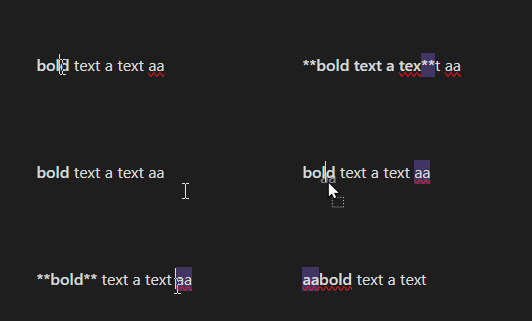
Select ** at the end of some bolded text.
Move the selection / highlight to the right in the same sentence.
Expected result
The two stars go where they should.
Actual result
The two stars go 4 characters more to the right, relative to where they should be
Environment
SYSTEM INFO:
Obsidian version: v1.9.12
Installer version: v1.8.9
Operating system: Windows 10 Pro 10.0.19045
Login status: not logged in
Language: en
Insider build toggle: off
Live preview: on
Base theme: adapt to system
Community theme: none
Snippets enabled: 0
Restricted mode: on
RECOMMENDATIONS:
none
Additional information
The formatting seems to be rendered before moving the selected text:
https://discord.com/channels/686053708261228577/1286754583846064138/1420777919634083892
1 Like
Are you moving the selection highlight, or moving the selected text? Either way, how are you doing it? Shift →? Cut & paste? Something else?
Very interesting. I wonder if you are the first to spot this. This is a much broader problem.
Steps to reproduce
- In Obsidian v0.13.14 or v0.13.19, open new document in “Live Preview” mode.
- Paste following text into Obsidian (without surrounding code-block backticks).
permanent line above
moved line 1
moved line 2
[markdown](link)
permanent line below
- Select “moved lines” including initial line-break after “permanent line above”.
- Drag and drop them before “permanent line below”, i.e. after markdown link from which only “markdown” is visible in live preview.
Expected result
Dropped text should is intended and expected to be pasted after the link.
permanent line above
[markdown](link)
moved line 1
moved line 2
permanent line below
Actual result
Dropped text is pasted between visible and hidden part of link.
permanent line above
[markdown
moved line 1
moved line 2](link)
permanent line below
Current workaround
- select the text to be dragged.
- cut it by Ctrl+X
- click to target location (This places cursor correctly after markdown link.)
- paste the text by Ctrl+V
Environment
- Operating system: Windows 7