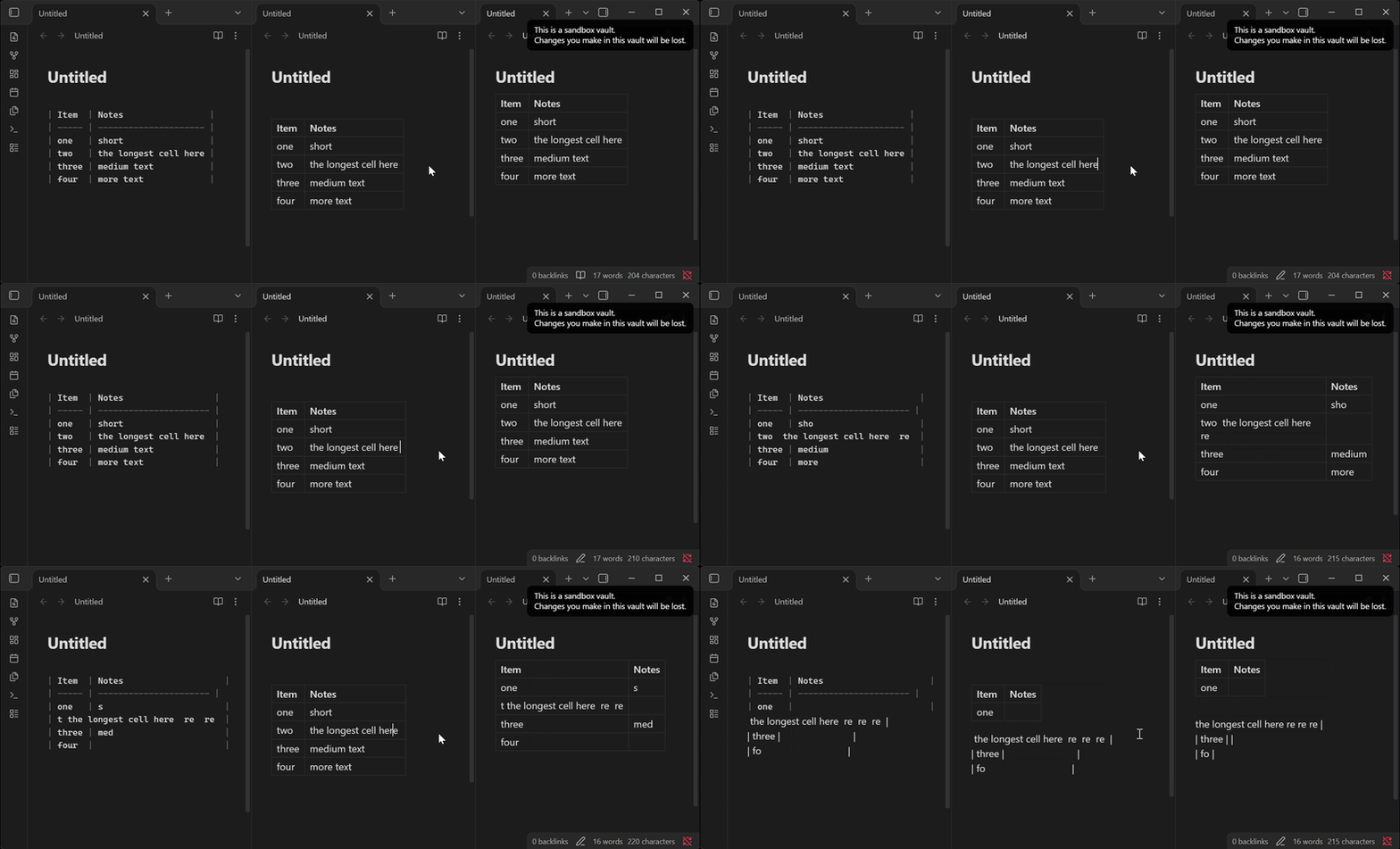
Steps to reproduce
- Create a note with this table and view it in Live Preview:
| Item  | Notes                 |
| ----- | --------------------- |
| one   | short                 |
| two   | the longest cell here |
| three | medium text           |
| four  | more text             |
- Click at the very end of
the longest cell here(the longest cell in its column), so the cursor is in that cell after “here”. - Type a space.
- Press the Left arrow key.
The arrow press on its own does the damage; nothing else needs typing.
The same happens if, instead of step 4, you switch to another app and back (Cmd+Tab) and then type any letter. The Right arrow does the same when the cursor stays inside the cell. From the code, Up, Down and Cmd+Left/Right should too, again only when the cursor stays inside the cell. An arrow press that leaves the cell repairs the table instead (see below).
Did you read and follow the Troubleshooting Guide ? Yes
Expected result
The table is re-padded and no text changes, apart from the space typed.
Actual result
After the Left arrow:
| Item  | Notes                   |
| ----- | ---------------------- |
| one   | sho                     |
| two  the longest cell here  re  |
| three | medium                  |
| four  | more                    |
With an app switch and x instead:
| Item  | Notes                    |
| ----- | ----------------------- |
| one   | sho                      |
| two  the longest cell here x re  |
| three | medium                   |
| four  | more                     |
The text at the end of every other row’s cell is deleted (counting the header as line 0, the row on line n loses n characters), the edited row is written a few characters too early so its | is lost, and the separator row ends one dash short. This is silent: the damaged rows are usually not where you are looking, and in a large table they can be off screen.
It happens naturally while writing, because a cell’s text ends in a space between every two words. Typing a word and a space at the end of the longest cell, then pressing an arrow key to fix a typo, or switching apps to copy something, is enough. We hit it twice in one editing session in a real 10-row table and only noticed days later.
Workaround: if you notice it before closing the note, press Tab, or click another cell. Obsidian then rewrites the whole table from its own copy, which was never cut, and the text comes back.
Environment
SYSTEM INFO:
Obsidian version: 1.14.4
Installer version: 1.14.4
Operating system: Darwin Kernel Version 27.0.0: Tue Aug 11 21:22:49 PDT 2026; root:xnu-13432.1.9~1/RELEASE_ARM64_T6000 27.0.0
Login status: logged in
Language: en-GB
Catalyst license: none
Insider build toggle: off
Live preview: on
Base theme: adapt to system
Community theme: none
Snippets enabled: 0
Restricted mode: on
RECOMMENDATIONS:
none
Additional information
What we think happens, from reading app.js (method names as they appear there):
- In the table cell editor, the keymap handlers for ArrowUp, ArrowDown, ArrowLeft, ArrowRight, Mod-ArrowLeft and Mod-ArrowRight call
table.trimCell(cell)before deciding whether the cursor leaves the cell. The cell editor’sblurDOM handler callstable.trimCell(cell)too. A window losing focus fires that blur. - When the cell’s text has leading or trailing whitespace,
trimCellsetsisMalformedand callsupdateCell(cell, trimmedText).updateCellupdates the cells’start,end,padStartandpadEndandcolWidthsin place, and returns the changes, buttrimCelldiscards them and leavesthis.docand the document untouched. If the cell is the widest in its column, the model’s column is now one character narrower than the document’s, so every later line’s offsets are short by one more character per line. - If focus stays in the cell, the next
dispatchUpdate(the arrow’s own cursor move, or the next keystroke) runsupdateCellagain from those offsets. Each row’s padding range[end - padEnd, end)is replaced at positions shifted into its text, and the edited cell is written early. Its changes carry the table’s own annotation (rUin 1.14.5’s minified code), soreceiveUpdateaccepts them as the widget’s own. - Tab, Enter and clicking another cell go through
setCellFocus, which callsdispatchTablewhenisMalformedis set. That rebuilds the table from the model, which is why those restore the text.
A possible fix would be for trimCell to dispatch the changes updateCell returns, as dispatchUpdate does. Another would be to leave trimming to setCellFocus, which already rebuilds a malformed table, instead of trimming on arrow keys and blur.