Steps to reproduce
Using either a single or two , it will not render properly in the editing mode.
As long as one uses a single character * or two characters *, the inconsistency between the editing mode and the reading mode will occur.
Did you follow the troubleshooting guide? [Y/N]
Yes, the bug can be reproduced without the use of any third-party plugins/css snippets/default themes.
Expected result
One * and two * can both be displayed normally in the editing mode.
Actual result
This is what it looks like in edit mode:
Only two * were used, and there was no indication of the package on the right.
In the editing mode, it automatically became bold.
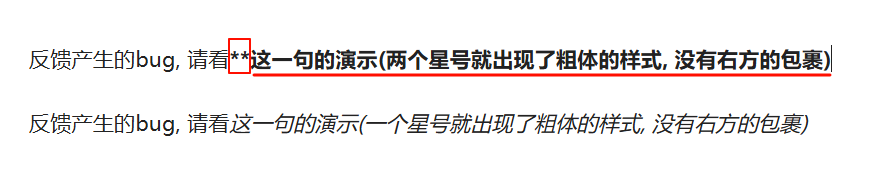
Similarly, here only one * is used, and there is no * on the right side. However, in the editing mode, it automatically appears in italic.

This is what it looks like in source mode:

This is what it looks like in reading mode:

I just want the real-time preview result when using the editing view to be consistent with the reading mode.
However, the effect I desire can only be seen in the reading mode. So when I’m editing using the editing mode, how can I ensure that this real-time preview is the same as the reading mode?
I hope to solve this problem as soon as possible. It seriously affects the user experience. I have to spend a lot of time checking whether the content I wrote is consistent with the final format.
And after being bolded or italicized here, I might consider using \* instead of * during the editing process to achieve the desired presentation effect.However, after adding \, the reading mode will also have \.
But actually, all I wanted to do was just display two *.