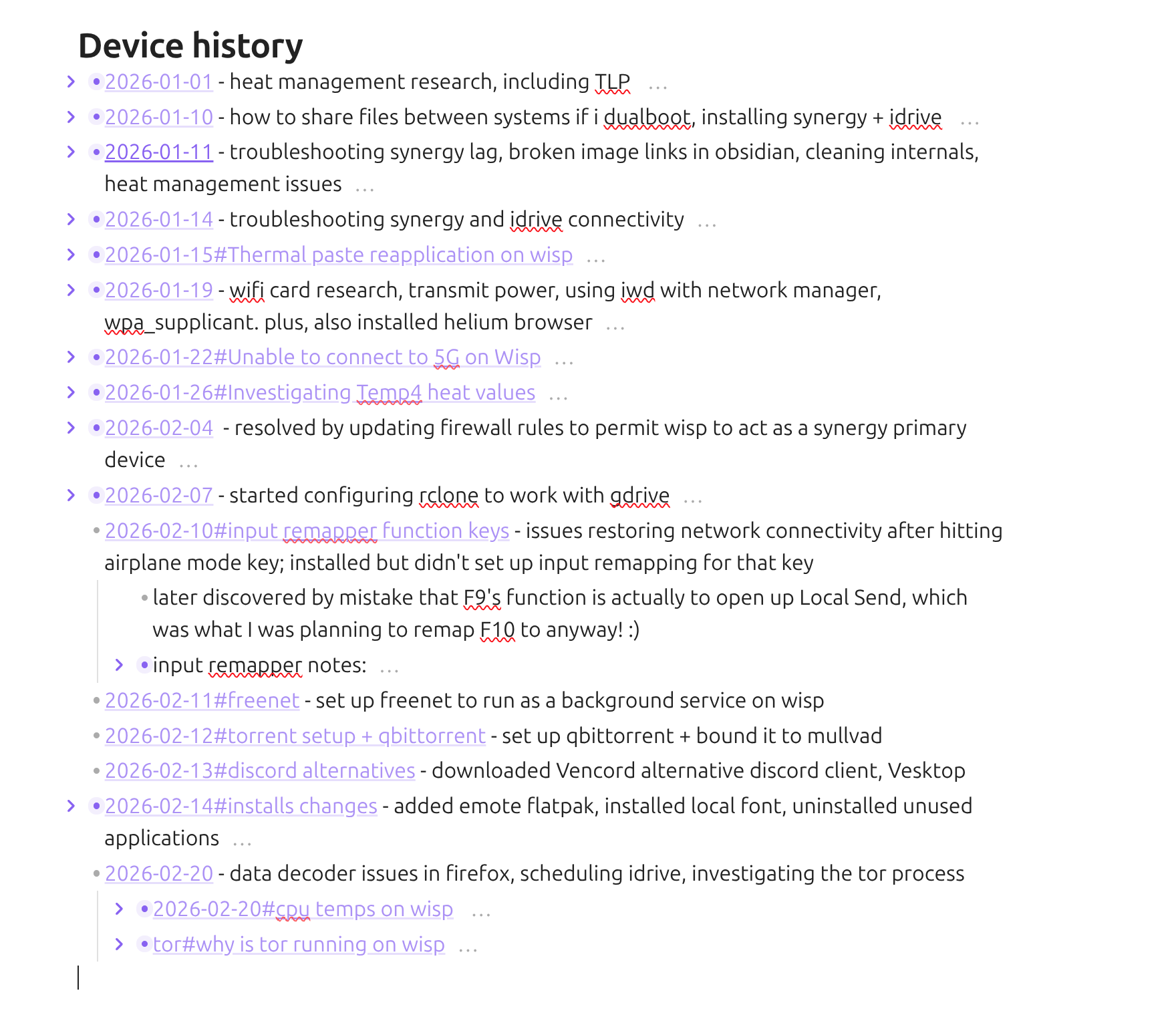
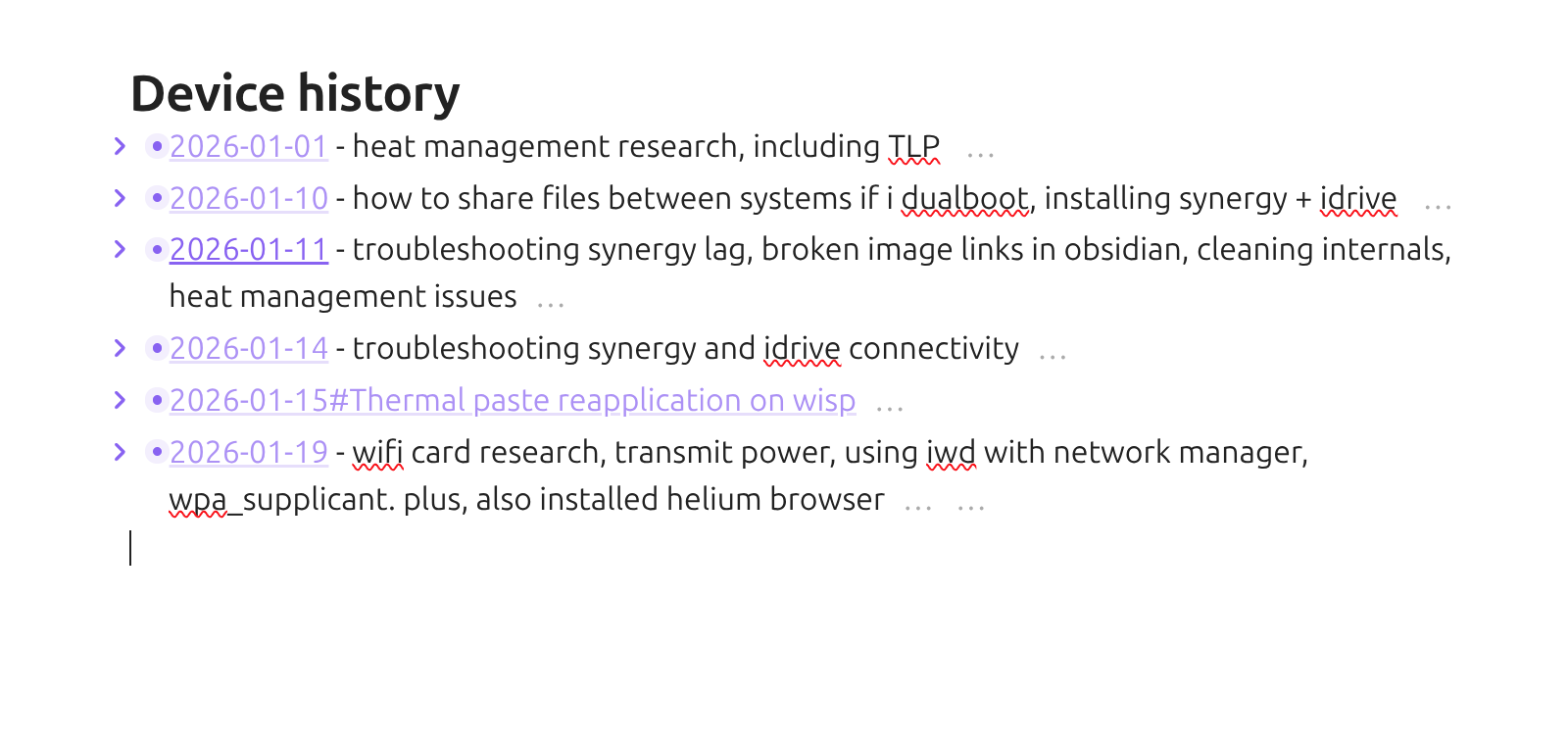
For D to not be collapsed under B and remain visible.
Actual result
D was collapsed under B and no longer visible after switching from Reading mode back to Edit mode.
Environment
SYSTEM INFO:
Obsidian version: v1.8.10
Installer version: v1.8.10
Operating system: Windows 11 Pro 10.0.26100
Login status: not logged in
Language: en
Insider build toggle: off
Live preview: on
Base theme: adapt to system
Community theme: none
Snippets enabled: 0
Restricted mode: on
RECOMMENDATIONS:
none
Additional information
Recorded a video in the sandbox vault to demonstrate the issue (youtube video):
www[DOT]youtube[DOT]com/watch?v=9oDtHu4E_UE
There is a existing bug report that is related to folding, but this seemed different enough of a situation I didn’t want to assume it was the same issue:
forum[DOT]obsidian[DOT]md/t/fold-unfold-nested-list-items-doesnt-render-them-correctly/101337
Yeah just came across this issue too. Even if you create a 50 line gap between them it still hides the content when switching modes. Hope this will get fixed.
I’m running into similar issues, but I don’t even have to fold/unfold a bullet to cause odd behavior when switching back and forth.
Here are some screencaps of the test I ran in the sandbox vault, using a bulleted list. (To get the list used in the screencaps, I copied markdown text from my original vault. The markdown text for the list itself can be found at the end of the post, in case anyone wants to take a look).
# Device history
- [[2026-01-01#wisp|2026-01-01]] - heat management research, including TLP
	- ![[2026-01-01#wisp]]
- [[2026-01-10#Dualbooting wisp|2026-01-10]] - how to share files between systems if i dualboot, installing synergy + idrive
	- [[2026-01-10#Dualbooting wisp]]
		- ![[2026-01-10#Dualbooting wisp]]
	- [[2026-01-10#Synergy - KVM keyboard mouse sharing]]
		- ![[2026-01-10#Synergy - KVM keyboard mouse sharing]]
	- [[2026-01-10#iDrive Backup]]
		- ![[2026-01-10#iDrive Backup]]
- [[##2026-01-11#Backup Status update wisp maintenance|2026-01-11]] - troubleshooting synergy lag, broken image links in obsidian, cleaning internals, heat management issues
	- ![[2026-01-11#Assorted Sidequests]]
	- ![[2026-01-11#Backup Status update wisp maintenance]]
- [[2026-01-14]] - troubleshooting synergy and idrive connectivity
	- [[2026-01-14#Troubleshooting Synergy on wisp]]
	  ![[2026-01-14#Troubleshooting Synergy on wisp]]
	- [[iDrive#Unable to connect to server 1 14 26]]
	   ![[iDrive#Unable to connect to server 1 14 26]]
- [[2026-01-15#Thermal paste reapplication on wisp]]
	- ![[2026-01-15#Thermal paste reapplication on wisp]]
- [[2026-01-19]] - wifi card research, transmit power, using iwd with network manager, wpa_supplicant. plus, also installed helium browser
	- [[2026-01-19#Helium]]
		- ![[2026-01-19#Helium]]
	- [[2026-01-19#Network connectivity problems]]
		- ![[2026-01-19#Network connectivity problems]]
- [[2026-01-22#Unable to connect to 5G on Wisp]]
	- ![[2026-01-22#Unable to connect to 5G on Wisp]]
- [[2026-01-26#Investigating Temp4 heat values]]
	- ![[2026-01-26#Investigating Temp4 heat values]]
- [[2026-02-04]]  - resolved by updating firewall rules to permit wisp to act as a synergy primary device
	- [[Synergy#primary control issues pt 3 2 4 26]]
	  ![[Synergy#primary control issues pt 3 2 4 26]]
- [[2026-02-07]] - started configuring rclone to work with gdrive
	- [[rclone#rclone configuration with gdrive wisp]]
	- ![[rclone#rclone configuration with gdrive wisp]]
- [[2026-02-10#input remapper function keys]] - issues restoring network connectivity after hitting airplane mode key; installed but didn't set up input remapping for that key
	- later discovered by mistake that F9's function is actually to open up Local Send, which was what I was planning to remap F10 to anyway! :)
	- input remapper notes:
		- ![[2026-02-10#input remapper function keys]]
- [[2026-02-11#freenet]] - set up freenet to run as a background service on wisp
- [[2026-02-12#torrent setup + qbittorrent]] - set up qbittorrent + bound it to mullvad
- [[2026-02-13#discord alternatives]] - downloaded Vencord alternative discord client, Vesktop
- [[2026-02-14#installs changes]] - added emote flatpak, installed local font, uninstalled unused applications
	- ![[2026-02-14#installs changes]]
- [[2026-02-20]] - data decoder issues in firefox, scheduling idrive, investigating the tor process
	- [[2026-02-20#cpu temps on wisp]]
		- ![[2026-02-20#cpu temps on wisp]]
	- [[tor#why is tor running on wisp]]
		- ![[tor#why is tor running on wisp]]
Once you’ve done the above, delete everything above this line.
Steps to reproduce
Create a new note with the following content:
A
B
C
D
Open the note in Editing mode / Live Preview.
Collapse the nested list.
Switch between Reading mode and Editing mode multiple times.
Return to Editing mode / Live Preview and observe the collapsed list.
Optional confirmation steps:
Unfold all and then refold all in Editing mode; this can also temporarily restore the correct rendering.
Click directly below the misrendered collapsed list; this can sometimes temporarily restore the correct layout.
Did you follow the troubleshooting guide? [Y/N]
Y
Expected result
The collapsed nested list should render consistently and correctly in Editing mode, even after switching between Reading mode and Editing mode.
Actual result
After collapsing the nested list and toggling between Reading mode and Editing mode multiple times, the collapsed list sometimes renders incorrectly in Live Preview.
Clicking directly below the misrendered collapsed list can sometimes temporarily fix it.
Unfolding everything and then refolding in Editing mode can also temporarily restore the correct rendering.
Environment
Environment
SYSTEM INFO:
Obsidian version: 1.12.4
Installer version: 1.7.7
Operating system: Windows 11 Pro 10.0.26200
Login status: not logged in
Language: en
Insider build toggle: off
Live preview: on
Base theme: dark
Community theme: Typewriter 2.2.4
Snippets enabled: 0
Restricted mode: off
Plugins installed: 68
Plugins enabled: 48
1: Dictionary v2.22.0
2: Advanced Tables v0.22.1
3: Buttons v0.9.13
4: Charts v3.9.0
5: Style Settings v1.0.9
6: Reading Time v1.1.2
7: Quick Switcher++ v6.0.0
8: Outliner v4.10.0
9: Note Refactor v1.8.2
10: Multi-Column Markdown v0.9.1
11: Mind Map v1.1.0
12: Kanban v2.0.51
13: Iconize v2.14.7
14: Hover Editor v0.11.28
15: Hotkeys++ v0.2.7
16: Homepage v4.3.1
17: Highlightr v1.2.2
18: Hider v1.6.1
19: Full Calendar v0.10.7
20: Focus Mode v1.11.5
21: Custom Frames v2.5.0
22: Commander v0.5.4
23: Checklist v2.2.14
24: Banners v1.3.3
25: Text Format v3.1.0
26: Image Toolkit v1.4.3
27: Pane Relief v0.5.9
28: cMenu v1.1.2
29: Advanced Canvas v6.0.0
30: Minimal Theme Settings v8.2.1
31: Meta Bind v1.4.6
32: Tracker v1.19.0
33: Linter v1.31.2
34: Cloze v0.1.18
35: Media Extended v4.1.5
36: Lazy Plugin Loader v1.0.21
37: Remember cursor position v1.0.9
38: DB Folder v3.5.1
39: Image Converter v1.4.1
40: Better Word Count v0.10.1
41: Calendarium v2.1.0
42: Dataview v0.5.68
43: Mousewheel Image zoom v1.0.24
44: Vertical Tabs v0.16.6
45: Day and Night v1.2.1
46: Paste Reformatter v1.4.0
47: Janitor v1.1.1
48: Tag Wrangler v0.6.4
RECOMMENDATIONS:
Custom theme and snippets: for cosmetic issues, please first try updating your theme and disabling your snippets. If still not fixed, please try to make the issue happen in the Sandbox Vault or disable community theme and snippets.
Community plugins: for bugs, please first try updating all your plugins to latest. If still not fixed, please try to make the issue happen in the Sandbox Vault or disable community plugins.
The issue has been reproduced in the sandbox
Additional information
Reading mode itself appears normal.
The issue persists with all community plugins disabled.
The issue persists with the default theme.
CSS snippets were disabled during testing.
Reproduced on another installation as well.
Reproduced in the Obsidian Help / Sandbox vault as well.
Older version 1.7.7 did not show this behavior.
The issue appears related to collapsed nested list rendering in Live Preview rather than the markdown content itself.
The bug is intermittent, but collapsing the list first and then switching between Reading mode and Editing mode multiple times makes it easier to reproduce.
Because the issue is reproducible in the Help / Sandbox vault, it does not appear to depend on vault-specific plugins, theme, or note content.
This issue seems to have started sometime after Obsidian 1.7.7. I’ve been meaning to report it for a long time, but only now managed to put together reliable repro steps. I was also able to reproduce it on a friend’s Obsidian installation, which is why I had advised him to remain on 1.7.7. This has been affecting me for over a year, so apologies for the delayed report.
I’d really appreciate it if this could be fixed, since it affects note editing and makes nested collapsed lists unreliable in daily use. Please
I can reproduce this consistently on Obsidian 1.12.7 on Windows 11, with all community plugins disabled.
Minimal example:
- a
    - b
        - c
- d
Steps to reproduce:
Open the note in Editing Mode / Live Preview.
Run Fold all headings and lists.
Switch to Reading Mode.
Switch back to Editing Mode.
Manually expand the folded list item.
Actual result:
The earlier list item can retain an incorrect fold range and hide the later sibling d. In larger outlines, a preceding item may also hide later sibling items or unrelated list levels. Running Unfold all headings and lists restores the missing content.
Expected result:
Fold boundaries should follow Markdown indentation and list markers. Switching between Reading Mode and Editing Mode must not cause one list item to hide a later sibling or an unrelated list level.
This core folding bug also negatively affects outline-oriented community plugins such as Outliner and Block Reference Enhancer (the latter is a plugin I am developing). The issue is reproducible with all community plugins disabled, so it does not originate from either plugin. Plugin developers cannot reliably work around it without intercepting or overriding Obsidian’s core fold state, which risks breaking intentional user folds and relying on internal implementation details.