Topic
Summary
- How to show only the file link that does not contain an uncompleted task tagged with #next?
- PS.However, I’d like to exclude from the list any file that actually has at least one (uncompleted task marked as #next)
Test
Summary
- dataview: v0.5.46
Input
Summary
dictionary files
- Location: “100_Project/02_dataview/Q13_Tasks/Q13_test_data”
03
- filename :
dic_19980301
---
Date: 1998-03-01
---

## input
### main tasks
- [ ] 1998-03-01 add this feature_a #Test/d01 [[Note P]] , [[Note Q]]
- [ ] 1998-03-02 add this feature_b #Test/d02  [[Note P]]
- [ ] 1998-03-03 add this feature_c [[Note Q]]
- [ ] 1998-03-04 add this feature_d #Test/d04
- [x] 1998-03-05 add this feature_e #Test/d05 [[Note Q]]
- [ ] 1998-03-06 add this feature_f #Test/d06
- [ ] 1998-73-07 add this feature_g #Test/d07
- [ ] 1998-03-08 add this feature_h [[Note P]] , [[Note Q]]
- [ ] 1998-03-09 add this feature_i
- [ ] 1998-03-10 add this feature_j
- [ ] It is finished!
04
- filename :
dic_19980401
---
Date: 1998-04-01
---

## input
### main tasks
- [ ] 1998-04-01 add this feature_a #Test/d01 [[Note P]] , [[Note Q]]
- [ ] 1998-04-02 add this feature_b #Test/d02  [[Note P]]
- [ ] 1998-04-03 add this feature_c [[Note Q]]
- [ ] 1998-04-04 add this feature_d #Test/d04
- [x] 1998-04-05 add this feature_e #Test/d05 [[Note Q]]
- [ ] 1998-04-06 add this feature_f #Test/d06
- [ ] 1998-74-07 add this feature_g #Test/d07
- [ ] 1998-04-08 add this feature_h [[Note P]] , [[Note Q]]
- [ ] 1998-04-09 add this feature_i
- [ ] 1998-04-10 add this feature_j
- [ ] It is finished!
05_excluded
- filename :
dic_19980501
---
Date: 1998-05-01
---

## input
### main tasks
- [ ] 1998-05-01 add this feature_a #Test/d01 [[Note P]] , [[Note Q]]
- [ ] 1998-05-02 add this feature_b #Test/d02  [[Note P]]
- [ ] 1998-05-03 add this feature_c  [[Note Q]]
- [ ] 1998-05-04 add this feature_d #Test/d04
- [x] 1998-05-05 add this feature_e  #Test/d05 [[Note Q]]
- [ ] 1998-05-06 add this feature_f  #Test/d06
- [ ] 1998-75-07 add this feature_g #Test/d07
- [ ] 1998-05-08 add this feature_h [[Note P]] , [[Note Q]]
- [ ] 1998-05-09 add this feature_i
- [ ] 1998-05-10 add this feature_j
- [ ] It is finished! #next
06_excluded
- filename :
dic_19980601
---
Date: 1998-06-01
---

## input
### main tasks
- [ ] 1998-06-01 add this feature_a #Test/d01 [[Note P]] , [[Note Q]]
- [ ] 1998-06-02 add this feature_b #Test/d02  [[Note P]]
- [ ] 1998-06-03 add this feature_c  [[Note Q]]
- [ ] 1998-06-04 add this feature_d #Test/d04
- [x] 1998-06-05 add this feature_e  #Test/d05 [[Note Q]]
- [ ] 1998-06-06 add this feature_f  #Test/d06
- [ ] 1998-76-07 add this feature_g #Test/d07
- [ ] 1998-06-08 add this feature_h [[Note P]] , [[Note Q]]
- [ ] 1998-06-09 add this feature_i
- [ ] 1998-06-10 add this feature_j  #next
- [ ] It is finished! #next
07_excluded
- filename :
dic_19980701
---
Date: 1998-07-01
---

## input
### main tasks
DQL10_flatten_fLists_and_display_fLinks_only
Summary
Main DQL
| Code Name | Data type | Group By | Purposes | Remark |
|---|---|---|---|---|
| DQL10_flatten_fLists _and_display_fLinks_only |
task items | yes | 1.To flatten file.lists 2.To gather uncompleted task items 3.To groupBy file.link as G1 4.To filter by uncompleted task items where none item is tagged with #next 5.Omitted: To gather uncompleted task items where any item isn’t tagged with #next 6.To display each G1 as rows.file.link[0] |
The DQL10 is based on the DQL90 in the following topic. - Solutions: by Justdoitcc |
Notes
Summary
The same codes: to filter by rows.L.tags
- To filter the data by rows.L.tags where none rows.L.tags contains “#next”
Original Example10
WHERE none(rows.L.tags,(e) => contains(e, "#next"))
Another Example11
WHERE !any(rows.L.tags,(e) => contains(e, "#next"))
Another Example12
WHERE !filter(rows.L.tags,(e) => contains(e, "#next"))
Code DQL10_flatten_fLists_and_display_fLinks_only
Summary_code
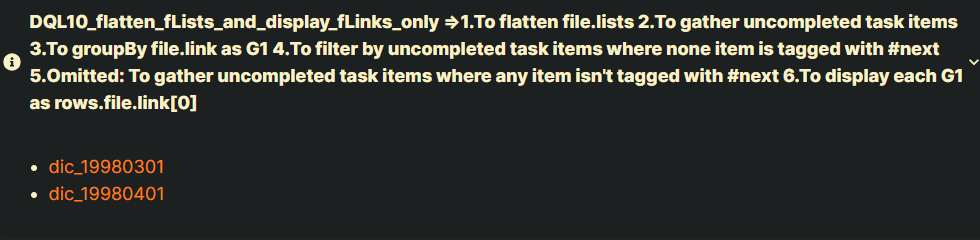
title: DQL10_flatten_fLists_and_display_fLinks_only =>1.To flatten file.lists 2.To gather uncompleted task items 3.To groupBy file.link as G1 4.To filter by uncompleted task items where none item is tagged with \#next 5.Omitted: To gather uncompleted task items where any item isn't tagged with \#next 6.To display each G1 as rows.file.link[0]
collapse: close
icon:
color:
```dataview
LIST WITHOUT ID
     rows.file.link[0]
FROM "100_Project/02_dataview/Q13_Tasks/Q13_test_data"
FLATTEN file.lists AS L
WHERE L.task AND !L.completed
GROUP BY file.link AS G1
WHERE none(rows.L.tags,(e) => contains(e, "#next"))

```
Screenshots(DQL10)
DVJS10_flatten_fLists_and_display_fLinks_only
Summary
Main DVJS
| Code Name | Data type | Group By | Purposes | Remark |
|---|---|---|---|---|
| DVJS10_flatten_fLists _and_display_fLinks_only |
task items | yes | 1.To groupBy page.file.link as G1 (G1=group.rows) 2.To flatten page.file.lists 3.To filter by uncompleted task items where none item is tagged with #next 4.To gather uncompleted task items where any item isn’t tagged with #next 5.To display each G1 as file.link |
The DVJS10 is based on the DVJS90 in the following topic. - Solutions: by Justdoitcc |
Code DVJS10_flatten_fLists_and_display_fLinks_only
Summary_code
title: DVJS10_flatten_fLists_and_display_fLinks_only => 1.To groupBy page.file.link as G1 (G1=group.rows) 2.To flatten page.file.lists 3.To filter by uncompleted task items where none item is tagged with \#next 4.To gather uncompleted task items where any item isn't tagged with \#next 5.To display each G1 as file.link
collapse: close
icon:
color:
```dataviewjs
// M11. define pages: gather all relevant pages
// #####################################################################
let pages = dv
    .pages('"100_Project/02_dataview/Q13_Tasks/Q13_test_data"');


// M21. define groups:
// To groupBy page.file.link AS G1 (G1=group.rows)
// #####################################################################
let groups = pages
    .groupBy((page) => page.file.link);
    //.sort((group) => group.key, "desc");


// M31. output groups:
// #####################################################################
for (let group of groups) {

    // M31.FR09 define b_filtered_lists :
    // added at 2022-09-20 16:00
    // FLATTEN page.file.lists and gather them:
    // get uncompleted task items where none item is tagged with "#next"
    // However, I’d like to exclude from the list any file that actually has at least one (uncompleted task marked as \#next)
    // #####################################################################
    let b_filtered_lists = group.rows
            .flatMap((page) => page.file.lists)
            .where(
                (L) => L.task &&
                       !L.completed &&
                       dv.func.contains(L.tags, "#next")
            );


    // M31.FR11 check b_filtered_lists.length :
    // added at 2022-09-20 16:00
    // #####################################################################
    if (b_filtered_lists.length !== 0){
        continue;
    }


    // M31.FR13 define a_filtered_lists:
    // FLATTEN page.file.lists and gather them:
    // get uncompleted task items where any item isn't tagged with "#next"
    // #####################################################################
    let a_filtered_lists = group.rows
        .flatMap((page) => page.file.lists)
        .where(
            (L) => L.task &&
                   !L.completed &&
                   !dv.func.contains(L.tags, "#next")
        );


    // M31.FR15 check a_filtered_lists.length :
    // #####################################################################
    if (a_filtered_lists.length === 0){
        continue;
    }


    // M31.FR21 output page.file.link :
    // #####################################################################
    //dv.header(3, group.key);
    dv.el("li", group.key);


    // M31.FR23 output a_filtered_lists.text: [with the desired structure]
    // #####################################################################
    //dv.taskList(a_filtered_lists, false);
}


```
