Steps to reproduce
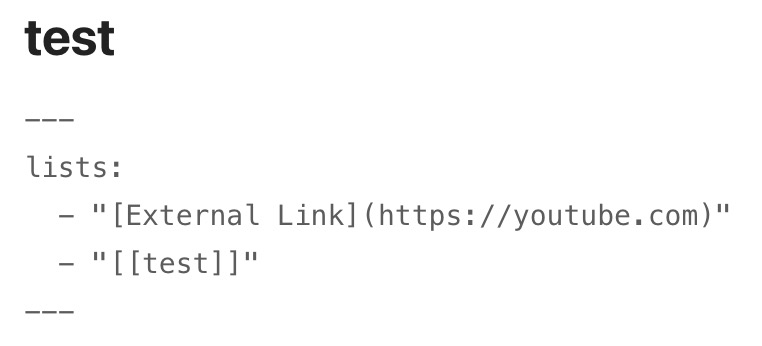
- Add property_1 to file_1 with a value which is a markdown link - e.g.
[myLink](http://example.com) - Create base_1 and filter to include files which contain property_1
- Create a table view and include property_1
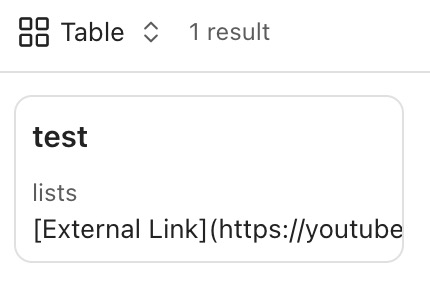
- Create a list view and include property_1
Did you follow the troubleshooting guide? [Y/N]
Yes - I tried this in the sandbox vault
Expected result
I expect to see a link (rendered so it is “clickable”) in both the table view and the in the list view
Actual result
- The link is correctly rendered in the table view and is “clickable”

- The link is not rendered correctly in the list view - instead the markdown syntax for the link is displayed as a string - `
[myLink](http://example.com)` ❌
Environment
SYSTEM INFO:
Obsidian version: v1.11.3
Installer version: v1.7.7
Operating system: Darwin Kernel Version 25.2.0: Tue Nov 18 21:08:48 PST 2025; root:xnu-12377.61.12~1/RELEASE_ARM64_T8132 25.2.0
Login status: logged in
Language: en
Catalyst license: insider
Insider build toggle: on
Live preview: on
Base theme: adapt to system
Community theme: none
Snippets enabled: 0
Restricted mode: off
Plugins installed: 0
Plugins enabled: 0
RECOMMENDATIONS:
none