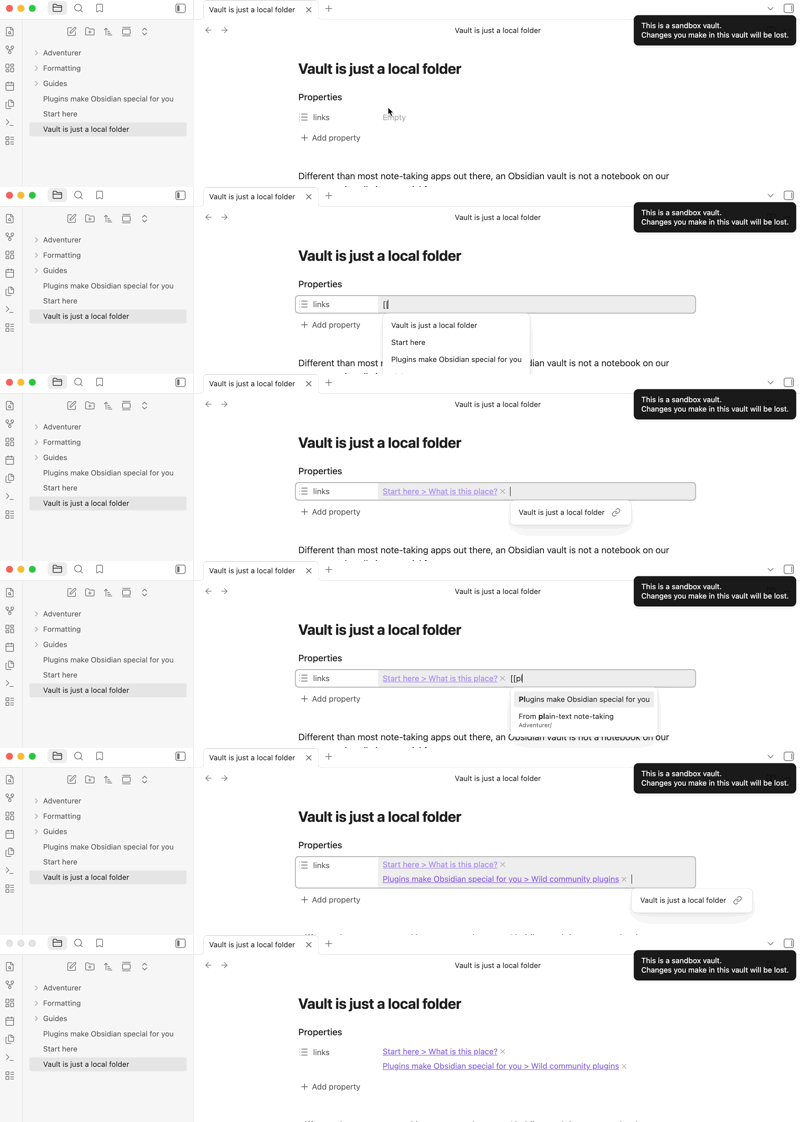
type in [[ and start typing in the file you want to link to
use autofill to find the right file and press enter
now click into text property field to edit the link ( or use arrow keys and press enter when using a list]
type # to try to link a heading of the file
by now the text should change to the name of the file you have open not the one you want to link to
NOTE: This only happens with autofilled files, when typing in the full name by yourself it works as intended.
Yes, I did please refer to my video where I repro this bug in a sandbox vault.
Expected result
I expect to edit the file name of the just autofilled file that is already linked.
Actual result
It reverts to the file name you have currently open and replaces your autofilled file name / link.
Environment
SYSTEM INFO:
Obsidian version: 1.13.3
Installer version: 1.8.10
Operating system: Windows 10 Pro 10.0.19045
Login status: logged in
Language: en
Catalyst license: insider
Insider build toggle: on
Live preview: on
Base theme: adapt to system
Community theme: none
Snippets enabled: 0
Restricted mode: on
RECOMMENDATIONS:
none
What happens if you type [[ → start typing the note name (don’t press enter) → arrow down to the note if it’s not at the top → type # to bring up the heading suggestions?
This works as intended but when I have linked a specific file ( in the past for example) and I want to specify that I am referencing a particular heading then it still resets it back to the name of the currently opend file.
Whenever the link suggester is open, pressing Esc exits the suggestions, freeing you to append a heading without inserting the highlighted file.
Extra details that might or, admittedly, might not be of help regarding:
It inserts whichever file is highlighted in the suggester when you press #. If you don’t arrow or press escape or type a closing bracket, then you get the file highlighted at the top of the list, which will be the file that had the most recent of certain actions (such as a save), which is typically (though not always) the open note.
Ah now I am getting where the currently open file comes from and it makes perfect sense why it suggests it. Thank you, I will use the escape key from now on but doesn’t this still seem a bit counter intuitive, or is it just me?
EDIT: Marked your answer as solution since it is indeed not a bug.
Not just you! I think I recall someone else had a help post about the same thing.
At times, having to press escape annoys me. At other times, I really appreciate that auto-fill, as I frequently link to blocks, and the fill-in keeps me in flow. But then I dream of a suggester that can read my mind to always choose the one I want.
I’m offhand unable to think up a system to accurately predict it, other than maybe individuals’ specific uses: like if you always want the fill-in while in Properties but never in the note body, or something.