Create a note with a property containing a list of links (e.g., target: [[NoteA]], [[NoteB]]).
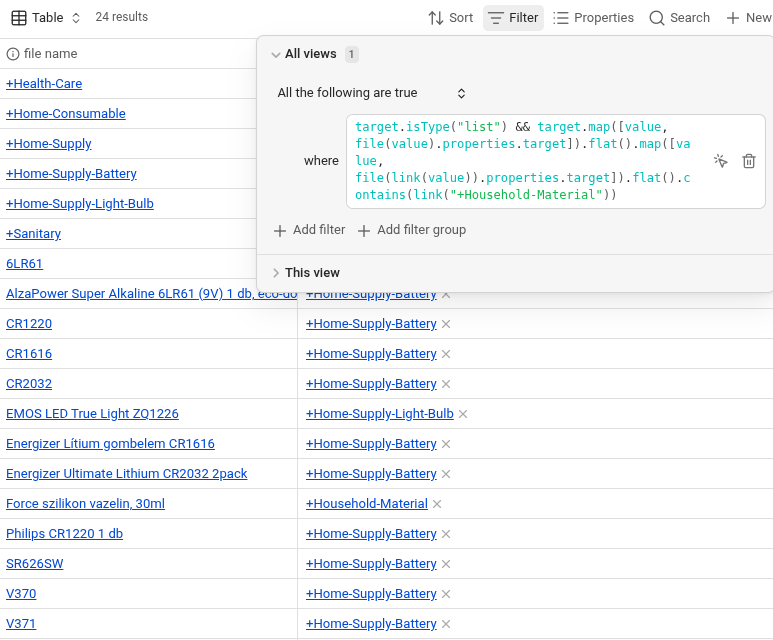
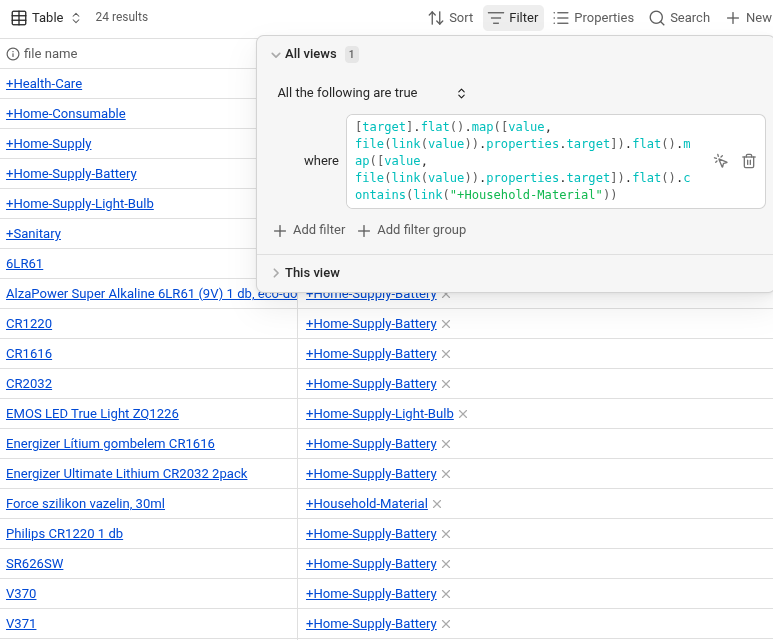
In the Bases Advanced Filter, use the following expression to trace properties through a flattened array: [target].flat().map([value, file(value).properties.target])
Observe that property resolution fails after the .flat() operation.
Did you follow the troubleshooting guide? Y
Expected result
Link objects inside a flattened array should maintain their functional properties. The file(value) function should be able to resolve metadata for these links correctly, consistent with how they behave when accessed directly from target.map().
Actual result
Link objects lose their functional identity after the .flat() operation, and file(value) fails to resolve their properties. However, wrapping the value in link(value) (e.g., file(link(value))) restores this functionality and allows the filter to work.
The code below demonstrates that the first map (before .flat()) works without link(), but the second map (after .flat()) requires link() to function, even though the logical data is identical.
My vault utilizes a tree structure for categories (e.g., Sanitary → Home-Supply → Household-Material). Recursive tracing is essential for filtering items based on ancestor nodes in this tree.
My Intent
My intent is to demonstrate that Bases is capable of powerful recursive link tracing. By sharing this link() workaround, I hope to help other users avoid this “type loss” trap when building complex database structures.
Proposal
I am unsure if this is a fixable bug or an architectural limitation.
Bug Fix: Ideally, Link objects would maintain integrity after .flat().
Documentation: If a fix is difficult, documenting that link(value) is required after flattening would be an excellent solution for the community.
your [target].flat() would return this list of two strings:
[[NoteA]], [[NoteB]]
Those strings don’t have the correct syntax to be file objects, but they are the syntax for links.
Notice that file("[[NoteA]]") is incorrect syntax. It would need to be file("NoteA").
Whereas link("[[NoteA]]") is acceptable syntax. As is link("NoteA").
So it makes sense to me that doing .map(file(value) on your list doesn’t return files. And it makes sense that .map(link(value)) does return links.
As for your map filter, you can use link(value) to parse the string into a link then use .asFile() to return a file object from the link. From there, you can access the file’s .properties. So just:
Thank you for the feedback. I realized my previous steps were inadequate, so I’ve rewritten the reproduction steps from scratch.
Corrected Steps to Reproduce:
Create three notes: NoteA, NoteB, and NoteC.
In NoteB, set a property target to [[NoteA]].
In NoteC, set a property target to [[NoteB]].
In the Bases Advanced Filter, use the following expression to trace the property through a manually flattened array: [target].flat().map([value, file(value).properties.target]).flat().contains(link("NoteA"))
Observe that property resolution fails, and NoteC is not returned in the results.
Technical Comparison:
If the expression accesses the list directly without wrapping it in a manual array (avoiding the first [target].flat()), it works as expected and returns both NoteB and NoteC:
The issue seems to be that while the target property itself contains Link objects, elements in a list created/processed via certain array operations (like [target].flat()) lose their functional “Link object” properties. As a result, file(value) fails to resolve metadata.
To make it work within the flattened structure, I must explicitly use link(value) to “repair” the type:
elements in a list created/processed via certain array operations (like [target].flat()) lose their functional “Link object” properties.
I believe this shows that Link objects are losing their prototype or internal type-tagging when handled within these array structures.
The result of [file("A")] is very much a file. Putting files and links in arrays isn’t changing them. You can confirm it with:
[file("A")].map(value.isType("file"))
… Also by replacing those two instances of file with link.
I’m not bashing your bug report. Whether the devs think the lack of ability to resolve links as files (or link syntax as file syntax in strings) is a bug is their call. It just seems like you be missing that you’re trying to feed link syntax into the file() function.
Oops, I responded to the reasoning you laid out and hadn’t looked closely at your new filter. My mistake. Your filter in step 4 should indeed include both NoteB and NoteC in the base.
I believe it will when set up the way you described.
Interestingly, contains(link()) still works after flat(), yet file(value) fails unless I use link(value).This suggests a specific loss of the Link object’s functionality.