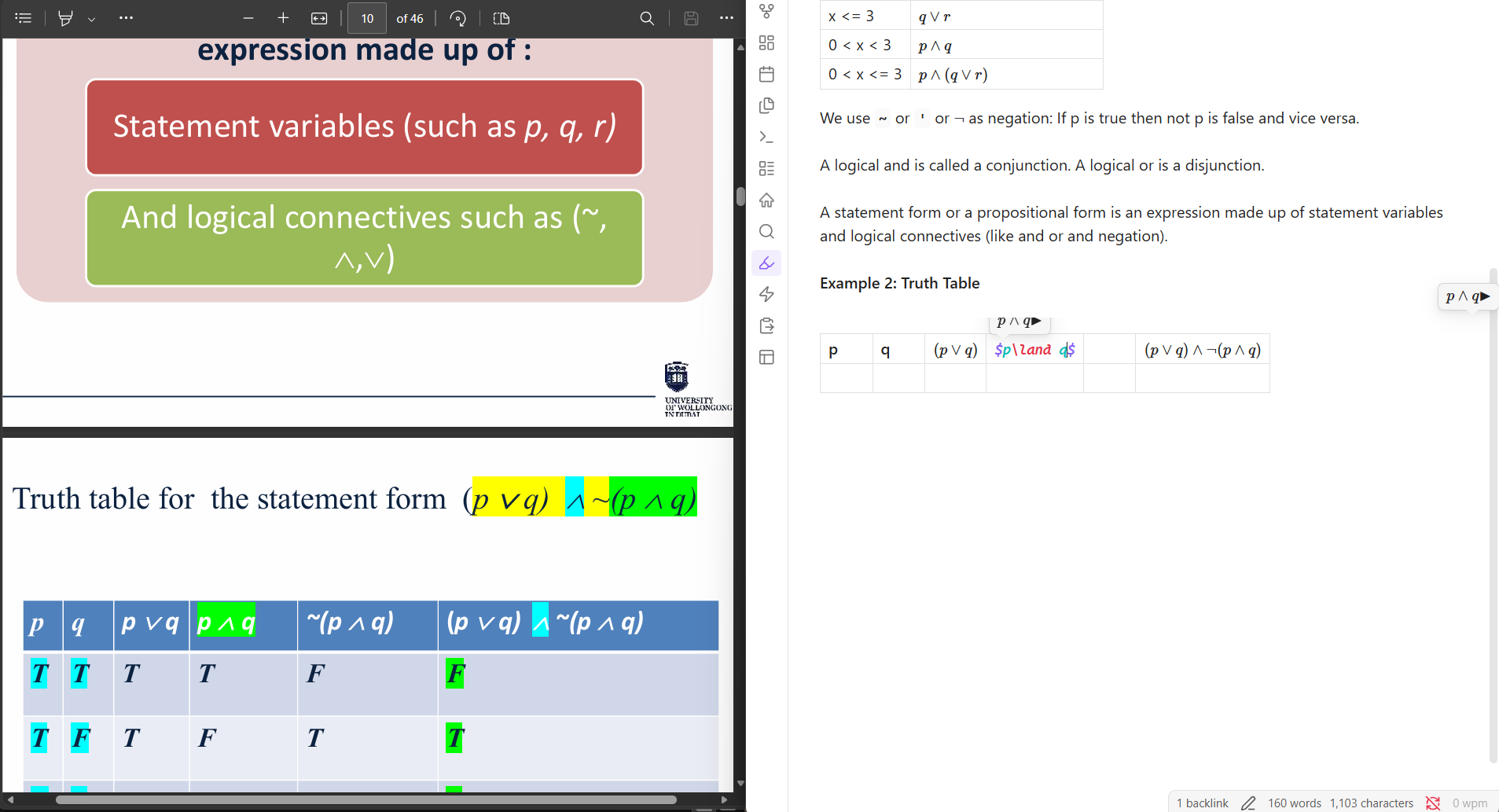
a properly rendered LaTeX overview right above where we write the LaTeX.
Actual result
a LaTeX overview that is rendering incorrectly. Applies to all screen sizes I tried
Environment
SYSTEM INFO:
Obsidian version: 1.12.7
Installer version: 1.9.10
Operating system: Windows 11 Home 10.0.26200
Login status: not logged in
Language: en
Insider build toggle: off
Live preview: on
Base theme: light
Community theme: none
Snippets enabled: 2
Restricted mode: off
Plugins installed: 17
Plugins enabled: 15
1: Dataview v0.5.68
2: Emoji Toolbar v1.0.0
3: Tag Wrangler v0.6.4
4: Typing speed v1.3.0
5: Style Settings v1.0.9
6: Strip Internal Links v1.1.0
7: Table of Contents v0.2.0
8: PDF++ v0.40.31
9: Recent Files v1.7.10
10: Tasks v8.3.0
11: Homepage v4.4.4
12: TagFolder v0.18.19
13: Latex Suite v1.11.5
14: Omnisearch v1.29.3
15: Multi Properties v1.4.2
RECOMMENDATIONS:
Custom theme and snippets: for cosmetic issues, please first try updating your theme and disabling your snippets. If still not fixed, please try to make the issue happen in the Sandbox Vault or disable community theme and snippets.
Community plugins: for bugs, please first try updating all your plugins to latest. If still not fixed, please try to make the issue happen in the Sandbox Vault or disable community plugins.
Before opening an issue, I would disable the other plugins and any snippets to make sure it’s not from a conflict between them and the responsible plugin.
It is? maybe I am wrong and its somehow configured wrongly, but with a normal tooltip I get the same duplication and tooltip cutoff.
which is handled by obsidian/codemirror
opened the sandbox just now, typed thatdudeimaad’s math ($p\land q$), and do not see an overview/tooltip, checked the three editing and reading views, tried with cursor on line and mouseover
Where in default Obsidian are you seeing it that I might be missing?
OP is asking about what they called the “overview”—the text above the math in their image
the overview is created by using codemirror tooltips
took way too long to figure it out. the table is another codemirror view… so the tooltip gets cut off…
for a mwe see CodeMirror Tooltip Example.
the duplication is a bug? that can’t be fixed i think. I thought I got rid of it while testing but no and wouldn’t make sense as there are 2 editorview.
As for the cutting off, that’s fixable but would still attribute it to obsidian as its undocumented