Unsure if this is the correct place.
I’m wondering if a feature is available in Obsidian, which I am TOTALLY new to. Just started migrating notes today.
The problem is I don’t know what the feature and functions is called, so I’ve failed my search attempts, so I need some human input from explaining the feature instead:
Do Obsidian have a function to have a an input-box for text. That gets added to another part of the text, like a variable.
Example:
A very simplified and scaled down example of what I edit day to day.
ffmpeg -i input.mp4 -c:a copy -c:v libsvtav1 -preset 4 -crf 35 output.mp4
I edit the input.mp4, the 35, and the output.mp4 every time, and in reality the command is much larger and multi-line so it’s quite time consuming.
I’d wonder if there’s some way to:
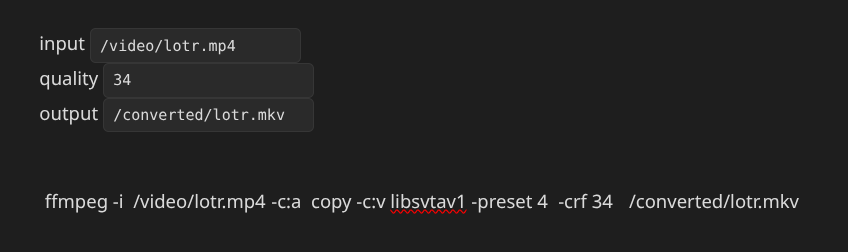
input [variable box to input to, linked to $variable1]
quality [variable box to input to, linked to $variable2]
output [variable box to input to, linked to $variable3]
And then this line, in same document gets edited by what’s in the input-boxes, and is easy to copy from:
*ffmpeg -i $variable1 -c:a copy -c:v libsvtav1 -preset 4 -crf $variable2 $variable3
Is that possible with Obsidian?
I get that it’s perhaps not the main thing for Obsidian, and in theory sounds better to generate a webapplet doing it, but the issue is it’s not only the variables that get changed, they get changed every time, but everything else aren’t static and also gets frequently changed, so I need something with agility, which Obsidian seems to really be.
Today I still use unformated txt and do it manually by eye, because everything else I’ve tested have been too static.