Disclaimer
Is this project open source? Yes
Is this project completely free? Yes
Is this project vibe-coded beyond the author’s ability to comprehend how it works? No
Community Directory: Math Chords - Obsidian Plugin
Title: [Plugin] Math Chords - Insert LaTeX formulas with LyX-inspired keyboard shortcuts
Hi everyone,
I’m excited to share a new plugin I built via Vibe coding: Math Chords (v0.1.6).
If you frequently type LaTeX in Obsidian, you know that writing complex formulas by hand can significantly slow down your note-taking flow. Math Chords solves this by letting you insert LaTeX snippets via rapid, configurable key sequences—inspired by the math-mode bindings of LyX.
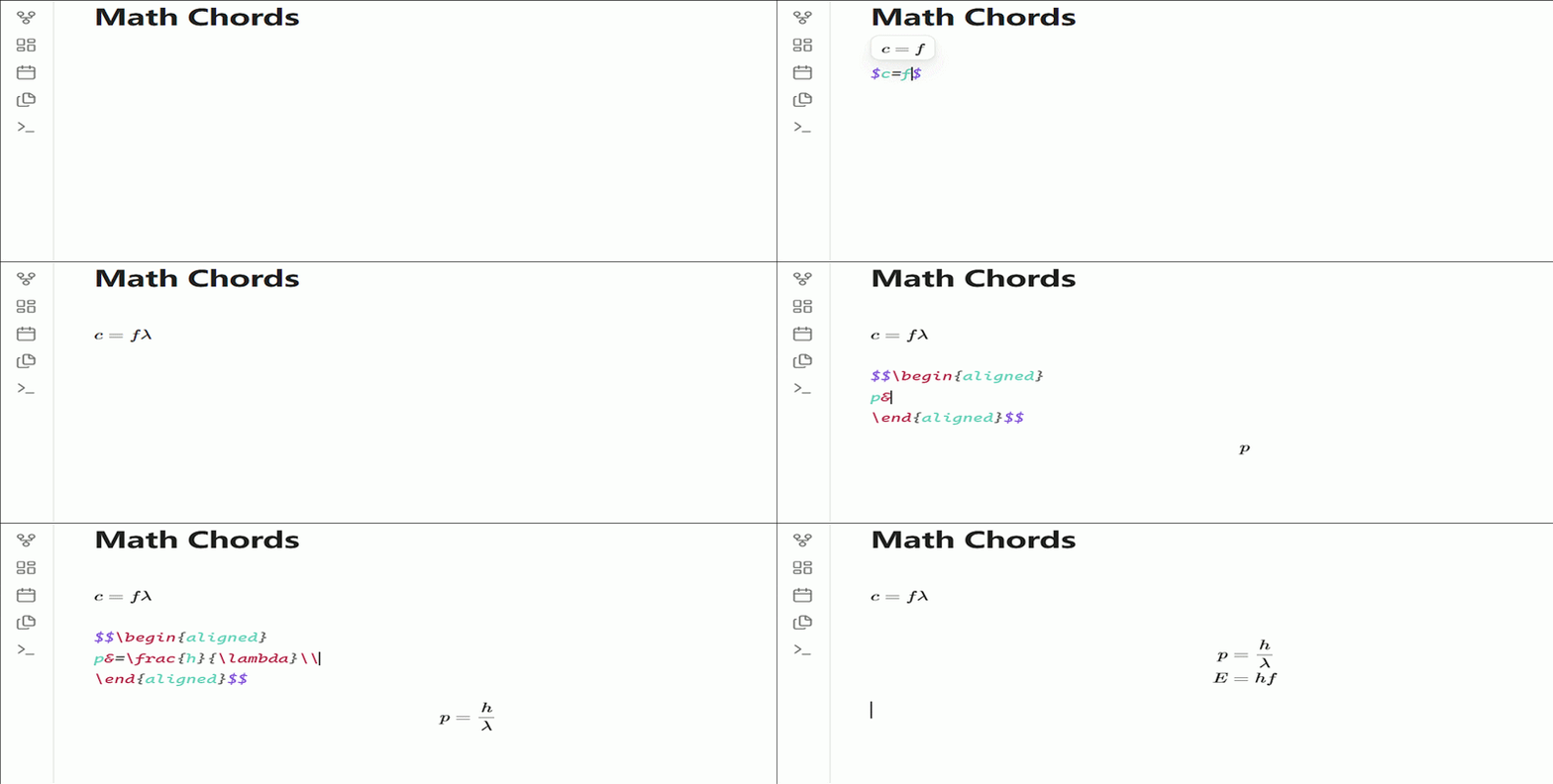
Key Features
- Leader-Key Shortcuts: Press a global prefix (default
Alt+M), followed by a short key sequence to immediately output LaTeX commands. - Caret Placeholder: Command templates place your cursor exactly where it needs to be (e.g.,
Foutputs a fraction with the cursor ready in the numerator). - Auto
$…$Wrapping: Automatically detects if you are outside a math environment and wraps the inserted snippet in inline math delimiters. - Inline Live Preview: Renders a floating MathJax preview directly above your cursor while editing inside
$…$. - Display-Math Environment Wrap: Wrap block content with environments like
aligned,matrix, orcasesvia a fuzzy-search picker (triggered byShift+Eafter the leader). - YAML-Based Configuration: Edit your custom shortcuts seamlessly through the settings UI or directly within the shortcuts配置文件. Your custom keybindings will never be overwritten during updates.
Show, Don’t Tell (Quick Start Examples)
- Put your cursor in a note and press
Alt+M(Leader key). - Fractions: Press
F$\rightarrow$\frac{}{}(cursor auto-placed in the numerator). - Greek Letters: Press
GthenA$\rightarrow$\alpha. - Display Math: Press
D$\rightarrow$$$\n\n$$. - Environment Wrap: Press
Shift+Einside or outside a block to trigger the fuzzy-search picker for environments likealigned.
(Note: 101 built-in default shortcuts are ready out of the box.)
Shortcut Reference (Short Summary)
Here is a quick glance at some default sequences (triggered after pressing Alt+M):
| Category | Keys | Inserts | Description |
|---|---|---|---|
| Structures | F |
S |
D |
| Operators | U |
I |
P |
| Accents | H |
V |
\hat{} |
| Delimiters | ( |
[ |
` |
| Greek (Lower) | G A |
G B |
G L |
| Extensions | W R |
O T |
T B |
How to Install
- From Community Directory: Go to Settings $\rightarrow$ Community plugins $\rightarrow$ Browse, search for Math Chords, and click Install / Activate.
- Manual Installation: Download
main.js,manifest.json, andstyles.cssfrom the official releases page on GitHub (search for ichenh/obsidian-math-chords). Place them into your vault’s.obsidian/plugins/math-chords/directory.
Requirements & Compatibility
- Requires Obsidian 1.5.0+.
- This plugin is highly keyboard-heavy, so a desktop environment is highly recommended.
Feedback & Contributions
The plugin currently stands at v0.1.6. If you find any edge cases, have feature requests, or want to contribute to the shortcut catalog, please feel free to open an issue or submit a pull request on the GitHub repository.