Use the default Obsidian theme with no CSS snippets or community plugins.
Enter an inline expression such as:
$A + B = B + A$
Move the cursor into the rendered expression to edit its LaTeX source.
Did you follow the troubleshooting guide?
Partially. The problem occurred with the default theme, no CSS snippets, and no community plugins. It was not separately tested in the Sandbox vault.
Expected result
The LaTeX source should appear as normally styled editable text when the cursor is inside the expression, as it did in Obsidian 1.12.7.
Actual result
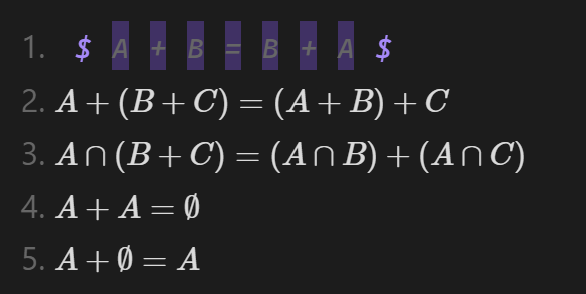
Every non-whitespace token inside the expression receives its own purple rectangular background. This produces a row of separate purple tiles behind the letters and operators. The $ delimiters are purple but do not have the same background.
The expression renders normally after the cursor leaves it. The problem only affects the active editing state in Live Preview.
The issue first appeared immediately after updating from 1.12.7 to 1.13.4 in the same vault.
Environment
SYSTEM INFO:
Obsidian version: 1.13.4
Installer version: 1.12.7
Operating system: Windows 11 Pro 25H2, build 26200.8875
Login status: logged in
Catalyst license: none
Live preview: on
Base theme: adapt to system (dark)
Community theme: none
CSS snippets enabled: 0
Community plugins installed: 0
Community plugins enabled: 0
Additional information
Rendered MathJax remains correct, and the underlying Markdown/LaTeX is unchanged. The problem is limited to how active inline math source is displayed in Live Preview.
The application has since been rolled back to 1.12.7. A screenshot of the behavior in 1.13.4 is attached.
This report was prepared with the assistance of an AI tool. The reported behavior, screenshot, and environment details were reviewed by the reporter.
Create a Callout block or a bullet list line. Write an inline math expression on the same line right after > or - with anything included
Write an inline math expression in a new line after the first one.
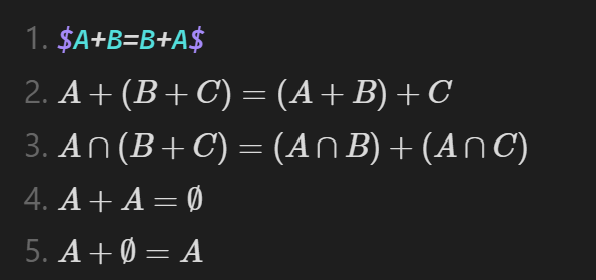
Under the editing view, observe that the last two math environment fails to be recognized, losing its syntax highlighting.
Expected result
Inline math on lines starting with - or > should be correctly recognized as math environments in editing view, maintaining proper syntax highlighting and scope, just like in previous versions.
Actual result
The math environment is broken although it works in reading view. It makes many trouble to use plugins for Latex (e.g. LatexSuite)