Create a line of text which ends in multiple formatting tags. For example:
1. **I am a line of bolded text.**
2. ==I am a line of highlighted text.==
3. ==**I am a line of bolded, highlighted text!**==
4. *~~I am a line of striked-out, italicized text~~*
Then click on the end of each line. On lines 1 and 2, the cursor is placed outside the formatting. On lines 3 and 4, the cursor is placed inside the formatting.
As a result, if you click on lines 3 or 4 and then hit enter to insert a new line, the formatting tags will be carried over to the next line instead of left in place.
Did you follow the troubleshooting guide? [Y/N]
Yes.
Expected result
It should be possible to click at the end of a line of text and press enter to create a new, blank line below. Formatting on the clicked line should remain in place.
Actual result
When clicking the end of a line which ends in multiple formatting tags, the editor places the cursor before the end of the closing tag. This has the effect of making it impossible to insert a new line with a single click + keystroke.
Environment
SYSTEM INFO:
Obsidian version: 1.12.7
Installer version: 1.12.7
Operating system: Darwin Kernel Version 24.4.0: Fri Apr 11 18:33:46 PDT 2025; root:xnu-11417.101.15~117/RELEASE_ARM64_T8112 24.4.0
Login status: not logged in
Language: en
Insider build toggle: off
Live preview: on
Base theme: adapt to system
Community theme: Minimal 7.7.19
Snippets enabled: 1
Restricted mode: on
After following a link to a heading, clicking to place the cursor at the end of any line that concludes with Markdown formatting (bold, italics, link brackets, etc.) causes the cursor to appear before the formatting characters rather than at the actual end of the line.
Steps to reproduce
Find or create a file with at least one heading and one line that ends with Markdown formatting characters.
Create a link to that heading.
Follow the heading.
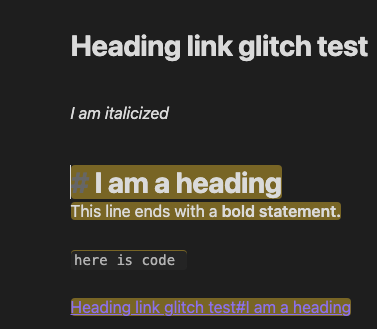
With the section still highlighted (see Figure 1 below), click to place the cursor at the end of a line ending with Markdown formatting.
The following demo file content works nicely:
[Heading link glitch test.md]

*I am italicized*

# I am a heading
This line ends with a **bold statement.**

```here is code ```

[[Heading link glitch test#I am a heading]]
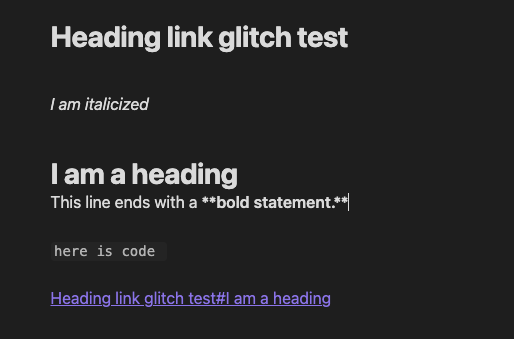
Cursor appears at the true end of the line (no characters after it). See Figure 2 below.
Actual result
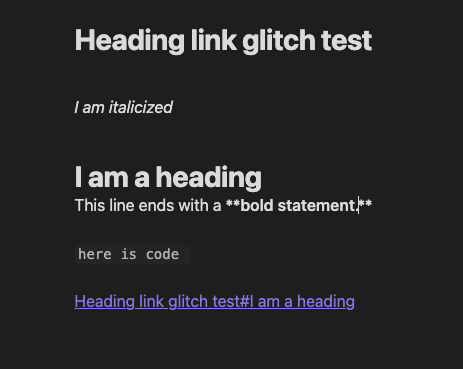
Cursor appears inside any markdown formatting characters present at the end of the line. See Figure 3 below.
Environment
SYSTEM INFO:
Obsidian version: v1.4.2
Installer version: v1.3.5
Operating system: Darwin Kernel Version 21.6.0: Mon Apr 24 21:10:53 PDT 2023; root:xnu-8020.240.18.701.5~1/RELEASE_X86_64 21.6.0
Login status: logged in
Catalyst license: supporter
Insider build toggle: on
Live preview: on
Legacy editor: off
Base theme: dark
Community theme: none
Snippets enabled: 0
Restricted mode: on
RECOMMENDATIONS:
none
Additional information
It appears to be connected with the fact that the section pertaining to that heading is highlighted. As long as the highlighting remains, clicking on an affected line will cause the behavior (unless the syntax is already exposed. The only exception I have found is if you have already exposed the syntax by moving the cursor with the arrow keys.
Figure 1: Highlighted section after following the heading link.
I also just discovered that the same thing occasionally happens when clicking to the end of those lines straight from another window (Obsidian or otherwise), at least in Windows 10*. I can’t see any consistent factor that correlates with whether it will happen or not, though, so I don’t know if it’s related. It also appears to never happen when just clicking between tabs in split view or clicking into a file after having a sidebar in focus.
* I can’t test it in macOS (Monterey or Ventura) since you can’t click straight to a specific line when the window isn’t in focus (clicking on the window just brings it into focus with the cursor wherever you left it last).
+1 Very frustrating. I thought “source mode” might fix the problem, but it happens there as well. The only way to access that chunk of text is to click after it, and move backwards 100s of spaces.
Not sure about the “move backwards 100s of spaces” part (you might be experiencing something else), but I’m definitely still seeing the behavior I saw happening in v1.7.4.
This happens every time I click on text with markdown formatting or a link anywhere in Live Preview mode (on Mac). I thought it was just standard behavior. That said I would like it to change. When I click directly after a word with formatting it’s much more likely that I want to type after that word rather than change the word (if I wanted to change the word I could click inside the word). For me it only happens in Live Preview mode though, not Source mode.
This is still reproducible and feels unintuitive, especially in Live Preview mode.
When I click immediately before or after formatted text (bold, italics, links, etc.), I expect the caret to be placed exactly where I clicked. Instead, it often jumps inside the formatted span, making quick editing frustrating.
It may seem like a small UX issue, but if you edit notes all day it becomes surprisingly disruptive. Hopefully this can be revisited, as making caret placement more predictable would noticeably improve the editing experience.