Disclaimer
Is this plugin open source? Yes
Is this plugin completely free? Yes
Is this plugin vibe-coded beyond the author’s ability to comprehend how it works? No
Community Directory: In-place Diff View
In-place Diff View — review AI edits (or any text corrections) inline, then accept or reject each one
Repo: https://github.com/glechic/inplace-diff-view
I do a lot of my writing with an AI agent in the loop, and I kept hitting the same wall: the agent would “fix” a note by rewriting whole sentences, and I couldn’t see what actually changed without diffing versions in another tool. So I built a small workflow, and this plugin is the viewing half of it.
The idea: corrections are written into a copy of your note using tiny inline markers:
I've been using for {a half | half a} year now, and {coping | copying} files every day.
Watch out {note|ambiguous — did you mean X or Y?}
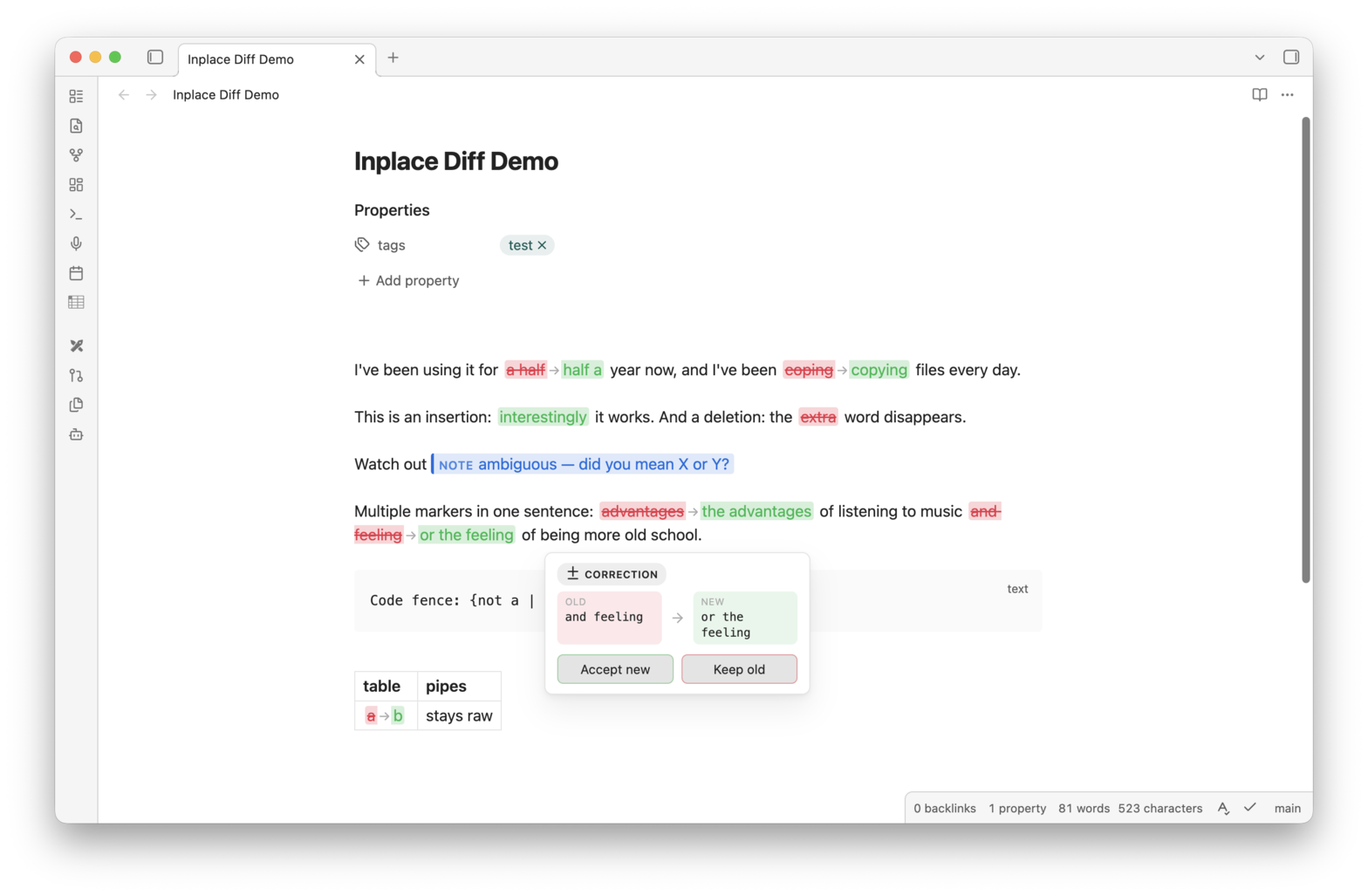
The plugin renders those in Reading view and Live Preview:
{old | new}— old text in struck-through red, new in green, arrow between{|word}— pure insertion (green){word|}— pure deletion (red strikethrough){note|...}— a blue chip for observations and questions that aren’t corrections
Hover a marker and you get a tooltip:
- Corrections: Accept new / Keep old
- Notes: Delete note
Each action is a single undoable editor transaction — ⌘Z reverts it. There are also commands for the lazy path: Accept all corrections, Keep original text for all corrections, Delete all notes.
Where the markers come from is up to you — the syntax is deliberately trivial. I generate them with an AI agent skill (the README documents the full syntax contract and how to encode it as a skill for whatever agent you use). But it works just as well for human proofreading: paste a text into a copy of a note, mark it up by hand, then sweep through with the tooltip.
A few implementation notes for the curious:
- markers inside code fences and YAML frontmatter are ignored, so code snippets with braces never break
- pipes inside markdown tables are escaped (
{a \| b}) and still render as markers - only word-level changes belong in markers — the old side must match the original exactly, or it stays raw text (a nice property: broken markers are inert, they just look like text)
- in Live Preview, the marker under your cursor stays raw so you can edit it, then re-renders when the cursor moves away
Install (pending review for the community directory):
- Grab
main.js,manifest.json,styles.cssfrom the 0.1.1 release - Drop them into
<vault>/.obsidian/plugins/inplace-diff-view/ - Enable “In-place Diff View” in Settings → Community plugins
Or install via BRAT: add glechic/inplace-diff-view as a beta plugin.
Happy to hear feedback, especially on the marker syntax — if you’d use this with a different workflow (git-based review, languagetool output, whatever), I’m curious how the syntax would need to bend.
- More themes / appearance options
- Settings (marker colors, hover delay)
- Editor suggest: type
{and get marker autocomplete - Ability to change
|as a separator to another symbol in the settings like to,