Is it possible? Yes. Is it easy, don’t think so, but I got to change some stuff, and got some pointers as to how you could proceed trying to change your vitals. Here is my mermaid chart, with custom css:
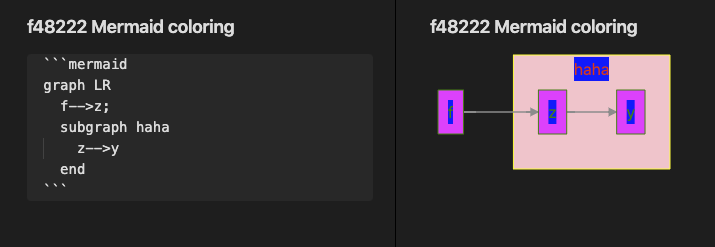
And no, I didn’t say it was beautiful, but here is the css which produced this result:
.label > g > foreignObject  {
  color: red;
  background-color: blue;
}

.node > g > g > foreignObject > div {
  color: green;
  stroke: blue;
}
.mermaid svg .cluster rect {
    fill: pink !important;
    stroke: yellow !important;
}

.mermaid svg .node rect {
    fill: magenta !important;
    stroke: green !important;
}
To get the selectors I went into the Developer Tools, and navigated the DOM until I got the proper highlight of the box or thing I wanted to change color of. I then went over to see the computed styles, and copied the selector used for it (by following the arrow). Tried it, and if it failed, I added the !important designator in addition. That usually did the trick.
Finally, I changed into more generic selects, aka I replaced the ID’s provided with the more generic stuff like .mermaid .svg instead of #L-f-z or similar. Also note how sometimes you’ll need to change color/background-color, and sometimes you’ll need to change fill/stroke.
Hope this helps you on your quest to getting it to look better. Mine doesn’t look better, but I did change the colors.