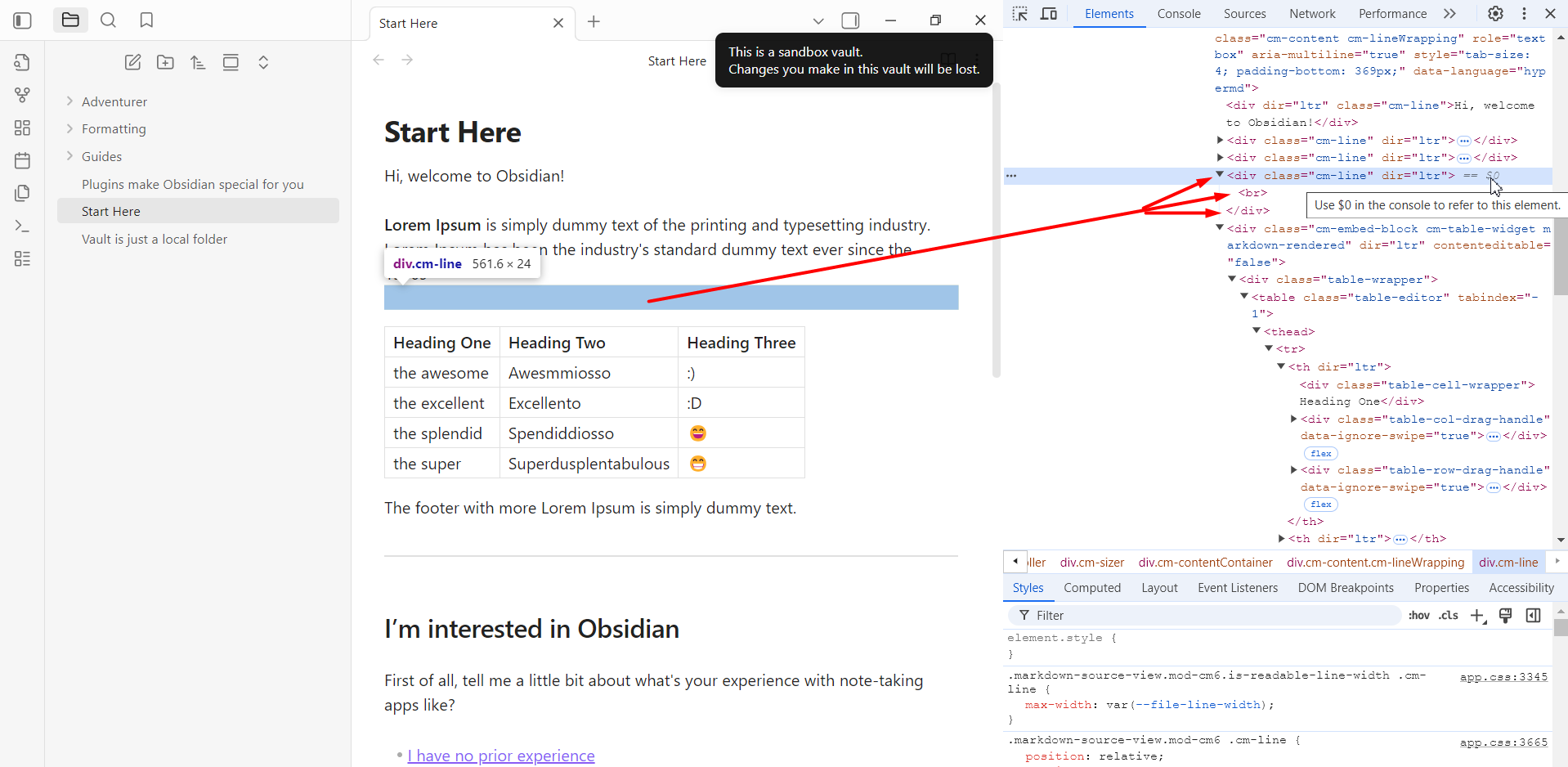
Steps to reproduce
- Open a Sandbox Vault
- Write down a line (paragraph)
- Add a table right below the line (with a simple ⏎Enter/⏎Return)
You will see the unnecessary gap due to a <br> tag.
Did you follow the troubleshooting guide? [Y/N]
Y
Expected result
No <br> tag is necessary, as there are <div> embracing everything and <div> is a block-level element, so no such <br> is necessary.
Actual result
An unnecessary <br> tag is being produced, keeping the table far apart from the preceding line.
Environment
SYSTEM INFO:
	Obsidian version: v1.9.12
	Installer version: v1.8.10
	Operating system: Windows 11 Pro 10.0.26100
	Login status: not logged in
	Language: en
	Insider build toggle: off
	Live preview: on
	Base theme: adapt to system
	Community theme: none
	Snippets enabled: 0
	Restricted mode: on

RECOMMENDATIONS:
	none