What I’m trying to do
I want to change a css snippet so it works in reading view.
(Got the following css from a commenter on reddit, it was originally for reading and source mode and they changed it to work in live preview. I’ve been exporting many files to pdf, but the way the headers are displayed make it difficult to navigate/look rather confusing and the commenter has deleted their account as well as the comments.)
Here the css snippet:
.markdown-source-view.is-live-preview {
	.cm-content { padding-left: 7ch; }
	.table-wrapper .cm-content { padding-left: 0px; }

	.cm-formatting-header { display: none; }
	.HyperMD-header::before { color: var(--text-faint); padding-right: 1ch; }

	.HyperMD-header-1::before { margin-left: -2.1ch; content: "#"; color:yellow }
	.HyperMD-header-2::before { margin-left: -3.2ch; content: "##"; color:maroon}
	.HyperMD-header-3::before { margin-left: -4.3ch; content: "###"; color:aqua}
	.HyperMD-header-4::before { margin-left: -5.4ch; content: "####"; color:orange}
	.HyperMD-header-5::before { margin-left: -6.5ch; content: "#####"; color:limegreen}
	.HyperMD-header-6::before { margin-left: -7.6ch; content: "######"; color:orchid}
}
I also added some images to show what it looks like in live preview and as a pdf (I’d like the pdf to look the same as the file does in preview):
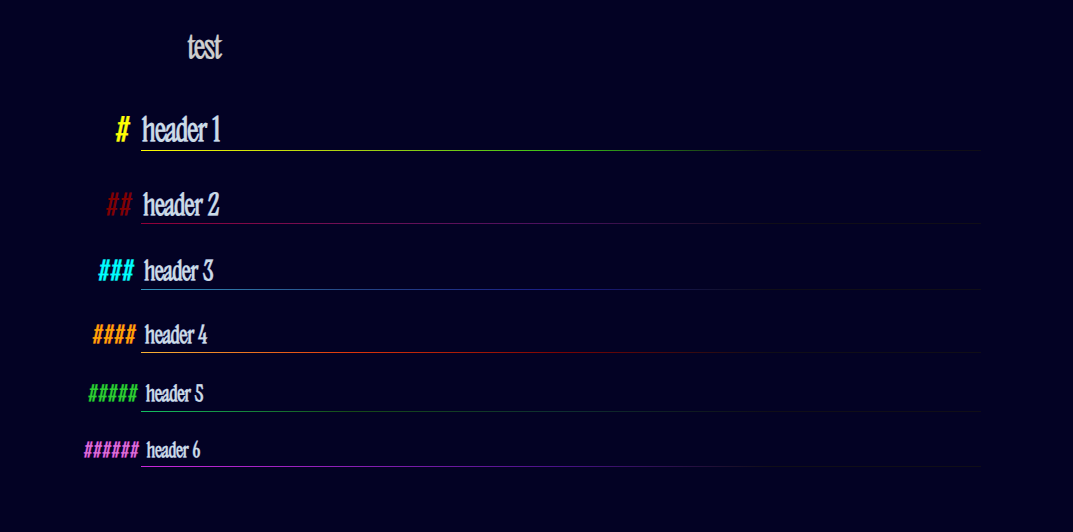
and
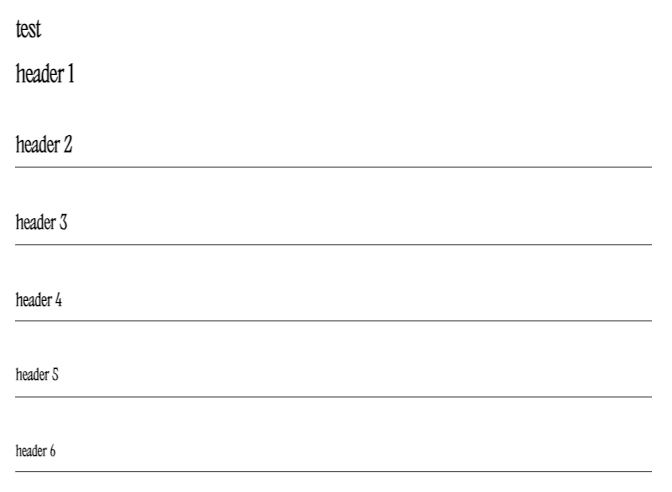
Things I have tried
I tried simply changing it to
.markdown-source-view.is-reading-view {
and
.markdown-reading-view {
I also read somewhere that h1 and so on is for reading view, so I swapped the .HyperMD-header-1 out for it (and the other headers) and also tried to add it at the end, but I didn’t know where exactly.
None of this worked, which isn’t surprising given my very limited knowledge about this. I guess it’s a formatting error, but I don’t know.