What I’m trying to do
I’m simply trying to include a pipe in an inline code block within a table. This is my markdown code:
### Completions Database

| Tool                    | Add to PROFILE                                                          |
|:----------------------- |:----------------------------------------------------------------------- |
| Kubernetes (kubectl)    | `. "C:\BIN\completions\_kubectl.ps1"`                                   |
| fnm (Fast Node Manager) | `fnm completions --shell powershell \| Out-String \| Invoke-Expression` |
The above renders as:
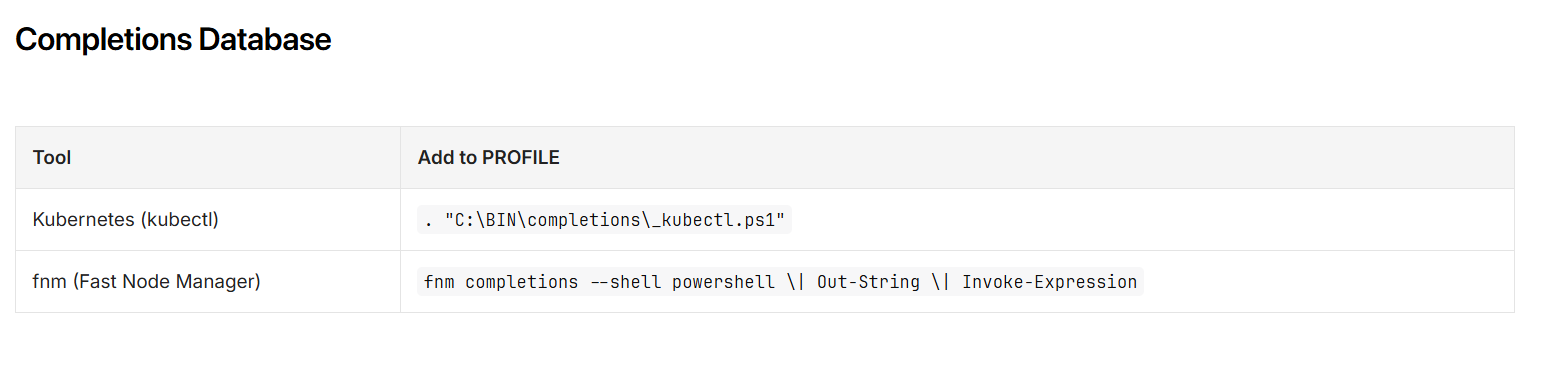
I assume the backslash escapes the pipe (since a bare pipe would add another column), but the backslash should most definitely not be rendered.
How can I get Obsidian to render the pipe without a backslash in my inline code?
Things I have tried
Nothing. I’m not sure of any alternative syntax to try.
Can someone direct me to a solution here?
Update: Using <code>
I managed to get it to work with:
<code>fnm completions --shell powershell | Out-String | Invoke-Expression</code>
So my table now looks like this:
| Tool | Add to PROFILE |
|:----------------------- |:----------------------------------------------------------------------- |
| Kubernetes (kubectl) | `. "C:\BIN\completions\_kubectl.ps1"` |
| fnm (Fast Node Manager) | <code>fnm completions --shell powershell | Out-String | Invoke-Expression</code> |
But a remaining question exists. In GitHub Flavored Markdown (GFM), the backslash escape before a pipe works properly. Are there any future plans to get the backslash escape syntax to work in a normal inline code block?

