“I customized an attribute. How can I make sure the entire content of this attribute is displayed? Showing only one line is not enough.”
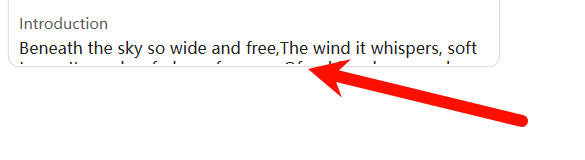
“I borrowed some techniques from forums and wrote a CSS, but it still didn’t solve the problem. The content still cannot be fully displayed.”
Here’s the translation of your sentence:
“Here is my CSS code.”
.bases-cards-line.bases-rendered-value{
  font-size: var(--font-ui-small);
  line-height: 1.2;
  height: 2.8em;
  overflow: hidden;
  text-overflow: ellipsis;
  white-space: normal;
  display: -webkit-box;
  -webkit-line-clamp: 5;
  -webkit-box-orient: vertical;
}