Horizontal spacing wrong: How to fix?

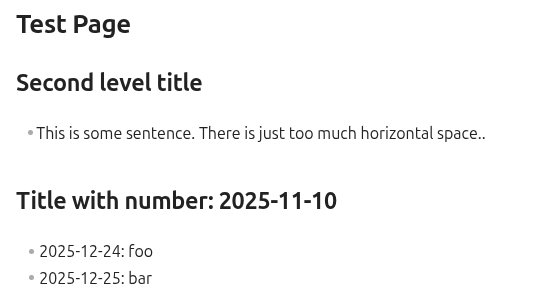
I just installed Obsidian on fresh install of Linux Mint. Once I opened my vault, I see that the horizontal spacing is wrong; each space takes way too much space. In addition the numbers in titles are in wrong color.

Live mode:

Source mode:

Live mode with default theme and disabled CSS snippets:

Source code:

Details:

  • OS: Linux Mint 22.2
  • Obsidian: 1.10.6 (Flatpak, Flathub)

Any ideas what’s wrong and how to debug or fix this?

How does it look in the Sandbox vault?

In a new vault (probably not same as “the Sandbox vault”?), it looks okay:

Got it!

So it’s some setting/theme/css snippet/plugin/etc in that vault causing the issue.

This is with

  • Default theme
  • Custom CSS snippets disabled
  • Restricted mode on (All community plugins disabled)

Edit: It looks the same also if I disable ALL the Core Plugins. What else could I try?

Found it! I had selected “Roboto” as main font, and “Noto Color Emoji” as the second one. Likely one of those was not installed on this system. Now if I put “Inter” as the first font, it looks fine

This topic was automatically closed 28 days after the last reply. New replies are no longer allowed.