Ubuntu, v0.9.22
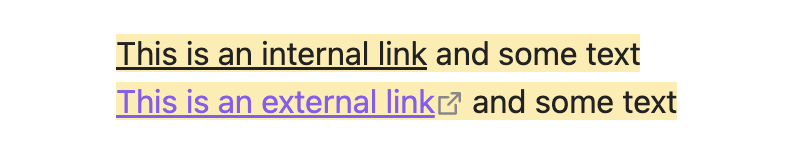
Highlighted links are black, and thus have no contrast with regular text. Desired behavior would be purple, like all other links.

I searched and did not find another topic about this.
Ubuntu, v0.9.22
Highlighted links are black, and thus have no contrast with regular text. Desired behavior would be purple, like all other links.
I searched and did not find another topic about this.
There is a difference in preview. We’ll see if we can fix this in the editor
similarly, some themes make some text just bloody hard to see, and the previews don’t show that in advance: previews of themes probably should (if possible) include an explicit example of all forms of text highlighting, including links, footnotes, literal highlight markings, etc.
open a feature request for that. This is not the appropriate thread.
Steps to reproduce
Highlight text that contains bidirectional links.Please, follow the Troubleshooting Guide before answering Yes.
### Environment

<!-- Paste your debug info below, which can be accessed by Command Palette (Ctrl/Cmd-P on Desktop, Swipe down from the top on mobile) enter "Show debug info", and click "Copy to clipboard". --><!-- Paste your debug info below, which can be accessed by Command Palette (Ctrl/Cmd-P on Desktop, Swipe down from the top on mobile) enter "Show debug info", and click "Copy to clipboard". -->SYSTEM INFO:
	Obsidian version: 1.13.4
	Installer version: 1.6.7
	Operating system: Darwin Kernel Version 24.4.0: Fri Apr 11 18:28:23 PDT 2025; root:xnu-11417.101.15~117/RELEASE_X86_64 24.4.0
	Login status: not logged in
	Language: zh
	Insider build toggle: off
	Live preview: on
	Base theme: adapt to system
	Community theme: none
	Snippets enabled: 1
	Restricted mode: off
	Plugins installed: 20
	Plugins enabled: 9
		1: Text Format v3.1.0
		2: Clear Unused Images v1.1.1
		3: Dynamic Outline v1.19.0
		4: File Explorer Note Count v1.2.4
		5: Image Toolkit v1.4.3
		6: Mousewheel Image zoom v1.0.24
		7: Minimal Theme Settings v9.0.0
		8: Quiet Outline v0.5.17
		9: Style Settings v1.0.9
RECOMMENDATIONS:
	Custom theme and snippets: for cosmetic issues, please first try updating your theme and disabling your snippets. If still not fixed, please try to make the issue happen in the Sandbox Vault or disable community theme and snippets.
	Community plugins: for bugs, please first try updating all your plugins to latest. If still not fixed, please try to make the issue happen in the Sandbox Vault or disable community plugins.

<!-- LINUX ONLY:
Distro Name: Ubuntu/Fedora
Distro Version:
Desktop Environment: KDE/GNOME
Installation method used: Snap/Flatpak/Appimage
-->

---

### Additional information

<!--
Anything else you think would help our investigation, like a screenshot, screenrecording, or a log file?
You can drag and drop screenshots to this box.
For large amount of text, try putting them into something like Pastebin and add link here as `inline code`.
For videos, upload them somewhere and add link here as `inline code`.
-->I can’t reproduce. Download and reinstall Obsidian. Post a screen recording of this happening in the sandbox vault
But the same issue occurs when I re-download the latest version of Obsidian on another computer, and even on iOS — it’s really strange. Also, uncreated links have color, but once created, they turn black.
2d6299ee6834217a6f6f7c8a9bf1d4f1.mp4.zip (3.8 MB)
Here is the video I recorded on version 1.13.4. I noticed that this bug has been present since version 1.11.7.
For folks bumping into this, this snippet seems to sort it out. It should only target internal links within highlights. Worth a try.
.cm-s-obsidian .cm-highlight.cm-hmd-internal-link,
.markdown-rendered mark > a.internal-link {
    color: var(--link-color);
}
This snippet fixed most of my highlighted links, however, there were still a few in Reading mode that weren’t working. I am not a CSS guy but I inspected them and they had type .markdown-rendered mark .internal-link, so I simply added that to the snippet, and it fixed them too. Not sure if this is the “right” or “best” way to do it though.
.cm-s-obsidian .cm-highlight.cm-hmd-internal-link,
.markdown-rendered mark > a.internal-link,
.markdown-rendered mark .internal-link {
    color: var(--link-color);
}