Hello!
TLDR: I’m looking for some help to preserve formatting of line breaks / multiple spaces in Obsidian’s live preview when using html to highlight text.
- I almost exclusively use obsidian’s editing view - live preview to write
- I’ve been using the Highlightr plugin to highlight text: functionally, it makes it more user friendly to quickly use <\mark> as a hotkey/shortcut in a subset of predetermined colors
Ideally, I’d like to select text across multiple line breaks and apply highlight:
(This example uses the markdown to highlight)
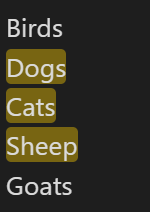
When selecting across multiple lines and using html <\mark> to highlight, the code reads;
Birds
<mark style="background: #FF5582A6;">Dogs
Cats
Sheep </mark>
Goats
And looks like this in live preview (I don’t like this):

And looks like this in reader (I like this):
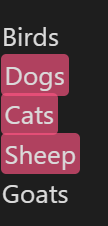
Because I so rarely use reader, is there any way to get live preview to preserve the formatting of line breaks and match what is output in reader?
Highlighting every line with <\mark> individually as a workaround is annoying.
Thanks!
P.S. Here’s what I’ve tried:
I don’t know how to code, but I read other forum posts and tried tossing this into a css snippet:
.cm-line {
    white-space: pre-wrap;
}
But it didn’t work out. I feel like the clause ‘.cm-line’ is incorrect, but don’t know what the correct clause would be to affect obsidian’s live preview.
 For now I will mark the post as solved