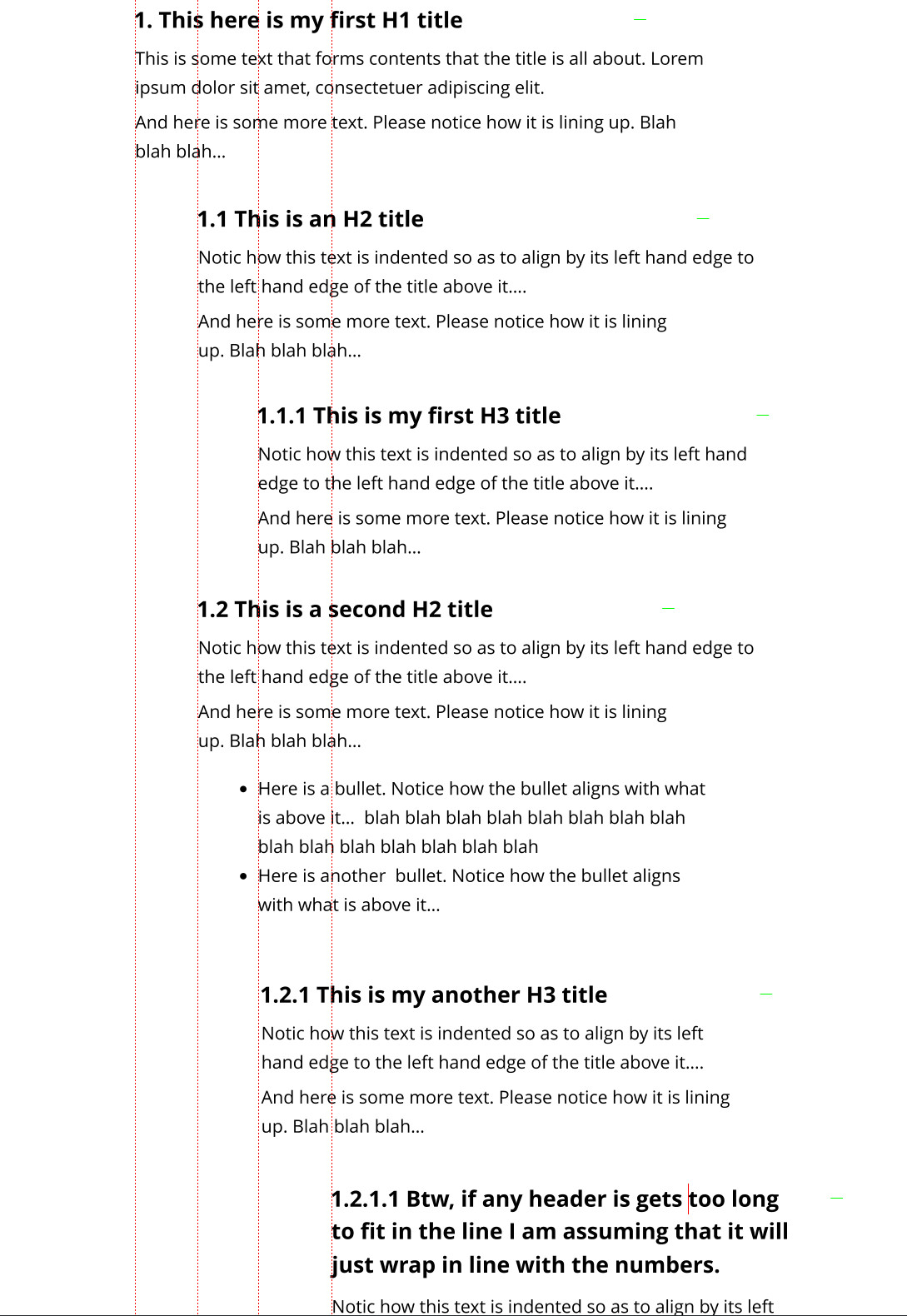
Number automatically in a hierarchical style (e.g. 1., 1.1, 1.1.1, 1.1.1.1)
Wrap neatly so multi-line headings align under the heading text, not under the number
Environment:
Obsidian desktop on Windows 10
Theme: Default
Plugins tried: Number Headings, Heading Level Indent
Things I have tried
Number Headings gives numbering, and Heading Level Indent helps with indentation, but I haven’t found a setup that cleanly combines numbering + level-based indent + neat wrap in both Live Preview and Reading view.
Does anyone have a recommended plugin, CSS snippet, or setup that achieves this?
Mainly I want this to work in both Live Preview and Reading view.
I do use Source mode to check what’s going on, but I don’t particularly need Source mode styled.
Also, just to clarify — I don’t need wrapped text to align only with the title words. I want it to align with the entire heading (including the automatically generated numbers).
So the goal is:
Indent headings by level (H1–H6).
Number headings automatically in a hierarchy (e.g., 1., 1.1, 1.1.1, etc.).
Keep all the content under the heading indented in line with the full heading (numbers + words), in both Live Preview and Reading view.