Very minor issue I’d like to solve. The rounded corners only apply to the start and end of text, while the part where the text wraps has straight corners (see pic).
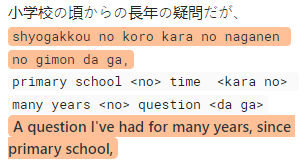
I’m trying to achieve the same appearance when highlighting inline code like the first highlighted line in the pic, where the corners are rounded even where the text wraps. That’s default behavior that shows up even without the custom CSS. The second highlighted line at the bottom is from my CSS.
Here’s my code:
/* HIGHLIGHT COLOR EDITOR */

.cm-s-obsidian span.cm-formatting-highlight, .cm-s-obsidian span.cm-highlight {
    	background-color: #ffc097;
	color: #2e3338;
	padding-left:   5px;
	padding-right:  5px;
	padding-top:    1px;
	padding-bottom: 1px;
	border-radius: 5px;
}

/* HIGHLIGHT COLOR PREVIEW */

.markdown-preview-view mark {
    	background-color: #ffc097;
	color: #2e3338;
	padding-left:   5px;
	padding-right:  5px;
	padding-top:    1px;
	padding-bottom: 1px;
	border-radius: 5px;
}