I also have this issue using Sonoma 14.6.1 and Obsidian 1.6.7 (installer 1.4.13). It doesn’t seem to occur in the sandbox vault, so I moved all my files to a new vault with all the plugins turned off, then I incrementally turned on plugins and checked to see if the problem reappeared. It did not for any one plugin, but it does still occasionally appear for no reason that I’ve been able to figure out. Restarting Obsidian often fixes the issue, but only temporarily.
I recently started using Notion again after about a year of avoidance. It appears to have a similar issue, where attempts to click certain menus–those in the top, right-hand corner–is difficult. Clicking the very bottom of the menu icons works every time, but the top ~3/4 of the icons just briefly changes my mouse pointer, but it does not open the menus. The same is true of Obsidian’s tabs: clicking the bottom ~1/4 of the tab works every time, but anything above that just causes my pointer to change. Strangely, Notion’s tabs do not appear to be affected.
I mention the issue with Notion because I believe both Notion and Obsidian are Electron apps, which might be relevant. Maybe there’s some toolkit used for certain interactive elements that is interacting with Mac’s menu bar in unexpected ways? The menu bar isn’t visible in fullscreen mode, but maybe the OS still reserves that space in some way that conflicts with certain Electron elements. Just spitballing.
Writing the last paragraph above got me thinking, so I went to System Settings > Control Center and changed Automatically hide and show the menu bar from In Full Screen Only to Always. This fixed the issue in Notion immediately. Also, the issue returns when I change back to In Full Screen Only, then disappears again when I switch back to Always, so the causation is very clear. Obsidian also seems to be working well.
It looks like the menu bar leaves some sort of “residue” in fullscreen mode that some Electron apps don’t know how to deal with.
Any hope this will get resolved? Still hitting it years later - only in full screen, and only on an external screen. Makes it unusable unless it’s not full screen. Thanks!
Obsidian is positioned on External monitor, set as fullscreen.
Try to click top area UIs. (tabs or top of sidebar buttons)
Better reproduced when trackpad ‘press to click’ than ‘tap to click’
Did you follow the troubleshooting guide? [Y/N]
Yes. It also reproduces on Sandbox Vault
Expected result
Tabs selected
Actual result
shows Drag UI
Environment
SYSTEM INFO:
Obsidian version: 1.12.4
Installer version: 1.5.12
Operating system: Darwin Kernel Version 25.3.0: Wed Jan 28 20:53:15 PST 2026; root:xnu-12377.81.4~5/RELEASE_ARM64_T6000 25.3.0
Login status: not logged in
Language: ko
Insider build toggle: off
Live preview: on
Base theme: adapt to system
Community theme: none
Snippets enabled: 0
Restricted mode: on
RECOMMENDATIONS:
none
Additional information
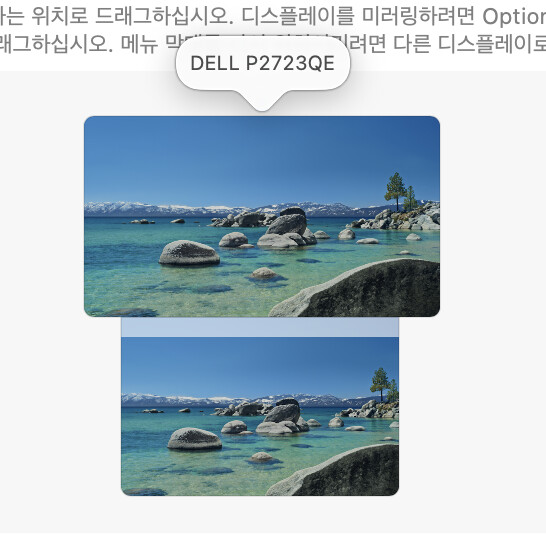
Only reproduced when monitor aligned on top of my macbook (move pointer upward to secondary display) AND macbook resolution changed. Only happens on external monitor, app is fullscreen.
when file explorer list is long, you can see a file on bottom is highlighted briefly.
 …
…