I’m using Obsidian v1.9.12 with Web Clipper 0.11.9 in Vivaldi on NixOS.
I usually have 3-4 vaults open at a time. I want my default Web Clipper template to only place content in the vault located at ~/01.personal-vault. Things work as expected when I set the template’s Vault setting to Last used and close all vaults except that one. However, if I try to enter a specific vault in the Web Clipper general settings, then select it in the default template, I get an error that the vault carrot be found whenever I try to clip something using that template.
The instructions above say to put in the vault’s name and hit enter, but that’s a bit confusing to me so I may be doing it wrong. I’ve tried:
- The full path of the vault:
/home/hedgemage/01.personal-vault - The path of the vault relative to my home directory:
~/01.personal-vault - The name of the directory the vault is in, which is also it’s display name in the vault chooser:
01.personal-vault - The name of the vault in Obsidian Sync on my account:
personal
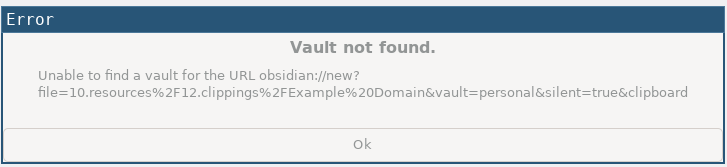
The general settings page accepts any of these. After I’ve entered one there, I can go to the Default template and select the vault. However, I get the following error when I try to clip:
I’m probably just using the wrong syntax to specify the vault… can anyone help me?