You can open the same document in a split tab - with source view on the left and reading view on the right. That’s essentially the same thing with a full note “bubble”.
Use case or problem
I’ve been a dedicated user of Obsidian for some time now, transitioning from Typora, and observed that the styling between the editing mode(Live Preview mode) and reading mode remains distinct.
In Typora, the style in which you edit is exactly how the final content appears, but obsidian not, even in the new live preview mode.
Obsidian is a wonderful markdown files manager, and the editor is also great, I hope this feature can be implemented to enhance its functionality.
And if there are some reason to maintain the reading mode, are there other ways to implement this?
Related feature requests (optional)
A Typora-like editing mode (edit and preview at the same time) - Feature archive - Obsidian Forum
It’s not ideal. It takes up twice the space and forces me to shift my eyes away from the area I’m working on. Additionally, when it makes the other split view become ‘View Only,’ and if I change notes and open a lot of them repetitively, it can be confusing to determine ‘where is the edit’ and ‘where is the view,’ making it less ergonomic.
I’m quite proficient with CSS, so I’m writing some code snippets to fix the things that annoy me the most. Now I can work with the program in a more reasonable way. If anyone is interested, I can publish it on GitHub to collaborate and improve it.
One note: I write from both right-to-left (RTL) and left-to-right (LTR) intermittently.
Currently I have seen that you can choose the editor type in the settings and the mode (editor or preview) in the notes themselves.
I would like the editor type to be selectable directly in the note, while in the settings I would leave the choiche of default editor.
That way I could keep the editor types and even the preview open in different views so that I could see changes in real time and usually use the WYSIWYG editor and the markdown editor when WYSIWYG is not working as I would like.
Currently the advanced editor is a hybrid of markdown and preview. That’s fine, but I add to the request for a full WYSIWYG editor where you can add formatting effects either with hotkeys or with buttons in a toolbar, as happens in Word. In addition to the pre-existing ones.
Reading the (many) previous comments perhaps this may be an optional plugin, at least in part.
I think it is not a good idea to use an external editor, because Obsidian does not use pure markdown but adds new functions, very useful ones, which I fear would conflict with external editors. And it would mean using an additional program.
Given the structure of Obsidian, when I talk about WYSIWYG I exclude printed page size, since it is possible to export as web, although I would like to be able to specify for a block the alignment or font size.
This would make it easier to insert bulleted lists and links.
I would like for selecting a word to have a command to choose one from existing pages to link to, starting with those that recognize the word as an indirect alias. In this regard, disconnected mentions are activated, and show the number, only after I click on them.
I have encountered an unpleasant problem: If I paste a windows path into a note, the \ are hidden in the display, because they are interpreted as a special character. And even if I write the character manually. A visual editor would paste the text preserving all the characters. By storing them with the corresponding escape sequences.
I would also like there to be the possibility of storing a block of text as-is, similar to the PRE of HTML.
Even here, as I write this post, I had to enter the character twice. I find it “strange” in a semi-visual editor to write the source.
In fact, I expect escape characters surrounded by spaces to be identified as characters and not escapes. And that common objects, such as paths, should also be identified as such.
About the editor, I also noticed these problems:
- DataView does not support fields with spaces, also intellisense would be nice.
- “`” is a character not present on keyboards of all languages and pressing Alt+96 3 times comes long. Is there a command to speed up entering the 3 accents on non-English keyboards?
A graphical editor for yaml and queries would be greatly appreciated
Any news on the fully wysiwyg mode?
I agree. I love live preview, but AFAIK to get true WYSIWYG—where what you see on the screen is an exact duplicate of the page you’ll get when it comes out of the printer or is exported as a pdf—requires rich text. And then you lose the benefits of plaintext.
Rich text is great in word processors and page layout programs, and there are notes apps that use it for those who prefer it, but I wouldn’t want to see it in Obsidian.
like the live preview but without the drill down to the md syntax, wrappers etc.
I want to see the formatted text like in reading view, but I want to edit just the text (clicking on links won’t do anything but you can edit the text of the link).
If you want to add formatting, bold, links, heading and other md syntax; switch back to the source edit mode.
it doesn’t have to replace the current live preview mode, but it’d be nice to have in addition.
Joplin has what is to me the perfect way to deal with markdown: a WYSIWYG mode that completely hides the syntax, and a dual view mode with pure markdown on one side and a preview on the other. This makes editing pure MD viable, without things jumping around every time you try to edit something, or, better yet, just edit directly the document.
I think that the current implementation of live preview is horrible, and the WYSIWYG table editor in live preview suffers with a mismatch of concepts that do not work. It makes no sense to have WYSIWYG tables and MD for everything else.
I believe the best experience for editing I’ve seen has been from blocknote, which is directly inspired by the Notion interface, and could be stored with markdown formatting.
The focus of Obsidian is knowledge managemente (it used to be announced as a Zettlekasten app), there shouldn’t be this turf war with regards to the interface (which can have many editing modes). And currently no other app on the market today has such a full set of features as obsidian, with decent offline mode.
Joplin’s WYSIWYG uses rich text, not markdown, and has a number of limitations acknowledged by its developer, including not working with their mobile app. I doubt Obsidian will ever have a rich text mode, as most Obsidian users chose it because we prefer markdown and plaintext to .rtf files or storage of notes in a database. If that’s what you want, you’d be better off looking for a rich text PKM app.
Obsidian’s live preview is true markdown and works exactly as it’s supposed to: the markdown is visible when you’re writing or editing it, but hidden otherwise. Most Obsidian users are happy with it (and were overjoyed when it was first released), and those who don’t like it generally use source mode instead.
You can open the same note side by side in source and reading modes in Obsidian, which is similar to Joplin’s dual view mode.
This thread is not intended as a feature request. It is more like a conceptual exploration/discussion of a potential feature request. I’d imagine it to have already been requested, but I don’t know how to name it and thus to search for it.
The idea
I would like a viewing mode in which I only see the “preview” – in this mode, I don’t ever see asterisks, hash symbols, and so on (at least, not the ones that are used for formatting).
I could press ctrl+i to italicize selected text, and while in the “hard preview” mode, I would only ever see the italicized text. Same with headings, and all other formatting. I could potentially also use asterisks, hash symbols, underscores, as part of my writing, without worrying about them messing with the formatting. I can blissfully use the asterisk in the conventional way, to signal that an idea will be returned to later in the text; the “hard preview” mode will automatically add to the underlying markdown whatever is necessary to prevent this from creating bold or italics.
The rationale for this suggestion is that it is often unhelpful and unintuitive for the view to jump around between the source view and the “preview”. For example, when I want to edit a heading, I click on it, and then the hash symbols reappear – thus, the text I’m trying to edit is jumping around on the screen. This is distracting. Similarly, if I want to use an asterisk to signpost something, I have to think “okay, how do I negate the bold/italics stuff”. Instead of thinking about my ideas, I’m thinking about formatting.
Stuff I’d like to discuss:
- Whether this idea has already been suggested
- Is the idea is even possible, or if it would take an insane amount of work
- Or, perhaps the idea goes against the ethos of the app, so the devs would not be interested in making it, or Obsidian users just love markdown, so there would be no user support for it
- Whether the idea would best be requested as a plugin, or a core feature request (perhaps a fully-fledged “hard preview” mode is just too complex to be implemented as a community plugin)
Yes, this FR already exists with plenty of discussion, and I’m going to merge your post there.
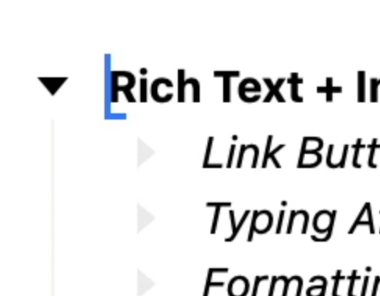
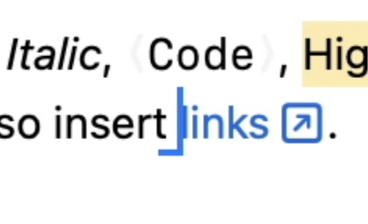
Bike Outliner is an interesting note-taking app. I believe it is rich-text formatting though. It hides any syntax characters, and he calls it “Typing Affinity”. When you are editing at the border of a format, it has a special caret that points left or right so you know which section of the formatting you are editing into.
Suppose this feature, a WYSIWYG viewing mode, was implemented as a “core plugin” that you could choose to install if you wanted to.
Would that bother you?
I think lots of people would use the option, and would find it extremely helpful. Those people would get to enjoy Obsidian’s flexibility and its other functionality, without the downsides that they experience with the source/live-preview views.
As for you, what would be the downside? I don’t think there would be any. Yes, “devs would spend time that they could be spending on better features.” I’m speculating, but I don’t think that’s why you oppose this idea – otherwise you would be vocally opposing all ideas that you don’t personally desire. Rather, I speculate that you oppose the idea because it goes against what you perceive to be the ethos of Obsidian.
Is that correct? And in any case, can you explain more why having this function would bother you so much?
I find the sentiment quite hard to relate to… “Please, for the love of God, do NOT add a table editor to this app. There are other apps that have table editors – people who want an app with a table editor should use one of those!”
It seems vanishingly unlikely, unless I’ve missed something.
WhiteNoise said they “don’t think we are gonna go down the path” of this feature request. I’ve scanned the thread, and couldn’t see any posts from the Obsidian team to suggest otherwise. Thus, 100% of the Obsidian team’s comments evaluating this idea have been along the lines of, “that’s not a direction we want to go with this app”.
If anyone from the Obsidian team has ever remarked that they find the idea potentially worth implementing, I’d love to know, as I would love to use this feature!
This feature request is open, so anything can happen. It’s not currently on the roadmap.
Well… That’s probably one of the most requested things, you’ve instead worked on things not that much needed. For example a markdown editor didn’t need a canvas; I mean it was a great addon but not needed, there was already excalidraw plugin and I don’t see why a markdown editor should have one.
You’re doing a wonderful job with obsidian but I think you should expand the editor vertically and not horizontally, there are already apps that do a lot of things badly (…eg notion). Obsidian was an expandable markdown editor at it’s core, so I think removing friction between reading view and editing view should be on the top priority.
I see. What do you think of the following pros and cons?
Pros
- a considerable number of users think it would smoothen the process of writing down ideas; a smooth, effortless process of writing down ideas seems core to the ethos of Obsidian
- it could make the software attractive to more “normie” types, who might also be scared of markdown but also of SyncThing (i.e., lots of people who might pay for Obsidian Sync)
Cons
- Obsidian is an app that aims to preserve the “markdown feeling”; some users would find it objectionable for this feature to be added, as it goes against that spirit
- this viewing mode might produce documents that are “messy at the source” (response: the mode is optional, and also, some care about tidying the source only after they have got their ideas down)
Do those capture the main downsides, in your view of the Obsidian team’s opinion?
That’s not information you should necessarily expect the dev team to provide. You can check the roadmap for what they are planning.
Thanks for adding your thoughts to this thread, but a friendly reminder to please take it easy with “campaigning” for a feature request. That would be against our Code of Conduct.
I’d like to show support to @Ham_n_pineapple’s request for a word editor interface and also commend him for his goodwill when elaborating his points in such a candid manner.
I’ve seen this feature frequently requested here on this forum and elsewhere (particularly reddit), and the reason people insist on it instead of just moving to an alternative is because there is no competitor to the full set of features obsidian that mantains a file-first approach.
Several people to whom I have recommended Obsidian also pointed out the editing experience as a reason they haven’t adhered to it, because they feel it makes it cumbersome, particularly with visual elements other than pure text, such as images, tables, callouts or link previews .
I love Obsidian and I think people who make this suggestion are trying to contribute to make it a better experience for everyone. Also, a lot more people would use Obsidian it if it was available, and this can only strengthen the community.