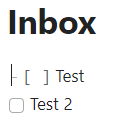
When you open a note in live preview, the cursor is placed in the first position, resulting in an less clean view because the markdown code is visible, see screenshot below:
When opening a note, do not put focus on the note, or do not yet place the cursor. Do this only when the user clicks in the note.
Current workaround (optional)
If you click the cursor in a position that is not the first position of a line, and then click on the obsidian window outside of the note, the cursor, and hence the markdown code is hidden, and the note looks better. Would be nice if this would be the default state before the user takes any action.
Another workaround could be to always use frontmatter or always put an empty line at the top (maybe obsidian linter can help automate that). I know, not ideal for you
This looks great! I hope you consider submitting it to the official Obsidian plugin repository soon. Until then I’ll download and install directly from Github.
This isn’t a perfect solution, but another option (in addition to the cool plugin mentioned above) is a variation on this CSS snippet I created to hide the header markdown when it’s the first line of a note.
/* Hide header markdown on the first line of a note.*/

div:first-child > .cm-formatting-header {
  display: none;
}
Yeah, this is especially annoying if you have a link in your first line that can’t be clicked until you move your cursor to another line. I know it’s probably this way so that you can immediately interact with a note via the keyboard without needing to use the mouse but it would be great to have the option to not have the note focused until you click somewhere in it.
this is really annoying if you have callout at the top as well. The above plugin helps though, thanks for suggesting that (I had tried searching for a plugin but wasn’t finding one)
EDIT: The one thing that I didn’t like about using the cursor goaway plugin as a solution is that it applies to daily notes (I like to start typing immediately after creating a daily note, but for all other note types I don’t do that)
The alternate plugin solution that I found is the “Reader Mode” plugin, which makes it so that notes default to reader mode when you click on them (even when you open them in the same tab - the built in obsidian setting unfortunately only applies to new tabs)
This works better for me because it doesn’t apply to newly created notes, so I can start typing immediately in a newly created daily note for example
My Daily Note template just has a space before the first word: the cursor lands there but it doesn’t activate the markdown. This works for any note, too, of course.
Regarding daily notes, another plugin that I came across is “pinned daily notes”
this opens daily note in a pinned tab, and updates the pinned tab with today’s note when you use the shortcut.
since it’s a pinned tab, if I’m in a daily note (in edit mode) and then open another note, it opens in a new tab and adheres to the obsidian setting for new tabs to open in reader mode which works pretty well for my use case
EDIT: I had some issues with that plugin. The final solution I ended up with is the “Homepage” plugin:
I configured Obsidian to use Reader mode as the default for new tabs
I configured Homepage to use my Daily note as homepage and replace the last tab when manually triggered
I configured Homepage to open the homepage in Live preview mode (mimicking the behavior of the daily notes plugin)
I configured homepage to switch the editing mode back to Reading mode after navigating away from the Homepage
I disabled the default open daily note shortcut and configured the shortcut to open Homepage instead
This mimics the default daily notes behavior (switches to daily note in editing mode), and automatically switches back to reading made when I navigate away from homepage to another note- exactly what I was looking for.
Hi guys, new Obsidian user here (Obsidian is great so far btw. ) and also hit by this little cosmetic problem.
I think, the most natural solution would be to place the cursor at the end of the note rather than at the beginning. Usually the user wants to continue writing where he stopped the last time, which is at the end of the note. As a byproduct, the formatting of the first line wouldn’t be broken. To prevent the last line from getting borked, maybe add an trailing empty line, then place the cursor into it.
Obviously, I’m not able to create a plugin implementing the idea, but if anybody likes the proposal and has the necessary skills and time resources… would be great!
When I open a document the cursor is placed at the start of the body of the document. This causes that line to be displayed as the markup instead of the rendered form. This makes it difficult to read the document when it starts with a mermaid diagram, table, or other content.
Proposed solution
Place the cursor at the start of the title instead of the start of the body.
Allow pressing the down arrow key on the title to navigate to the start of the body. Optional: pressing tab will switch to the body.
Allow pressing the up arrow key at the start of the body to navigate to the start of the title. Optional: adds symmetry with (2).
Current workaround (optional)
Clicking on some text, the title, or moving to the end of the file.
This would change workflows like open file → ⌘A or open file → ⌘↓. You can use reading view ⌘E to render first line correctly or select reading view as default view for new tabs.
Not all users have title visible (appearance → interface → inline title).
I’m not really bothered on the specific fix for this. My main issue is that I have various files that have a mermaid ER Diagram as the first item. It’s annoying that clicking on a link I see the diagram markup instead of the diagram.

 ) and also hit by this little cosmetic problem.