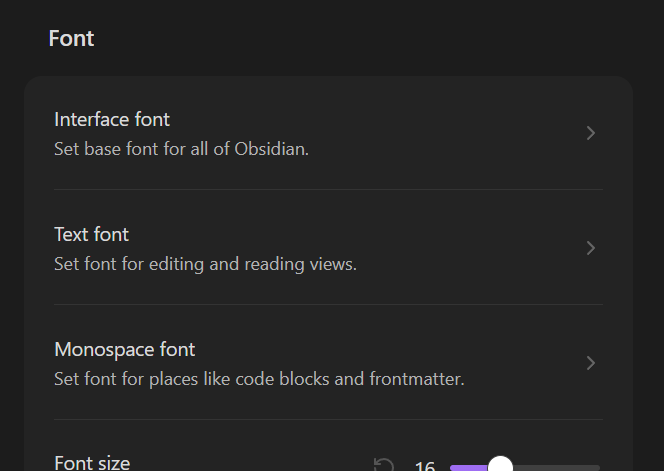
I am trying to set custom fonts in the Obsidian program. I’m using Windows 10, so I don’t know where those fonts would load from.
I try to, but instead of getting the neat Manage button everyone else has, I get an arrow and then up to an hour of the program trying to acquire the fonts before Obsidian just freezes entirely and I have to use the Task Manager to close the program and restart. And I have looked everywhere for a solution to this. I have tried reading the help doc which didn’t help and I can’t get into the Discord.
Unless this is a paid feature, that’s the only thing I can think of.
So can anyone help me figure out how to set text/interface fonts without trying to mess with CSS (I know almost none).
Are you saying that clicking that icon is what makes Obsidian freeze? If so, then try going through the Troubleshooting Guide.
If it happens somewhere later in the process, and the troubleshooting doesn’t resolve it, then can you explain the steps you take up to the moment of the freezes? And also say your Obsidian version, installer version, path to your vault folder, the font’s name as shown in Windows settings, and whether you’re currently able to use the font in other applications.
All righty. If it helps, clicking the icon takes me to a loading screen.
My Obsidian Version is I believe the latest version (1.15.0), the path to my vault folder is C:/Users//Documents/—/Projects/Obsidian Vaults
I wasn’t trying to use a specific font at the time but I am able to access all my fonts in other applications because they’re my system fonts. Do I need to copy the ones I want to my individual vault(s).
I’m sorry if my questions seem kind of dumb, I only got Obsidian a few days ago when someone recommended it for keeping track of story notes.
Your questions are good! Don’t worry about asking.
Do I need to copy the ones I want to my individual vault(s).
Nope. Being accessible on your system should be sufficient.
Does the em-dash in your path represent something you redacted, or is it literally a dash. If it’s literally a dash, or if the redacted part has any special characters, then I would try making a test vault at a simpler path (e.g., C:/Users/YOU/test vault) to see if you can set the font there. That also moves your vault out of OneDrive’s default management location, so helps check again OndeDrive as a contributing factor.
So I might have fixed it by renaming the folder where my actual notes are to something with no special letters and it worked to load my fonts in my other Vaults! Thanks!