Hi all, I’ve used Obsidian for years now, and unfortunately I often do not want to add to existing notes because it will take too long to find the note. The search function is bad and the more notes you have the worse it gets.
WHAT I WANT
A plugin that creates an Explorer View within Obsidian itself. Essentially, when I click on a folder, that folder becomes a dynamically updating Note itself that always contains all the Notes within that Folder. Which is exactly how OS file systems work. You open a folder and the files are inside and those show in the right side pane. So you have the Left side tree view(navigation) and the Right side Explorer View.
I’m aware of a couple plugins that try to do something like this, but they fail at it. The alternative-tree plugin is a disaster.
I have played around with MoCs but that is just another note that you have to find to see what is in the list of notes within it. And you have to create the MoC for every new folder. I want it to be automatic. I click on a Folder and the contents open as a note (or virtual note). Its doesn’t actually have to be a note that persists, I just want to browse to find what I want easily.
I just need to know if this functionality exists and I somehow am unaware of it. I may have to vibe code a plugin if nothing exists to do this very logical thing.
I do this every time, I post a question to this forum, I wait an hour and get frustrated, then I solved my own issue…
It wasn’t easy.
I used the Folder Notes plugin to automatically create a note in every folder, and I have templater and therefore I set up a template that the folder notes plugin uses when it creates the note. The template inserts the plugin’s folder-overview code block.
I ran into a little bit of an issue as I always leave my notes in editing mode, and the code blocks don’t render unless its Reading Mode. So I got the Force Note View Mode plugin and added the correct view mode setting to the frontmatter of the template.
Voila!
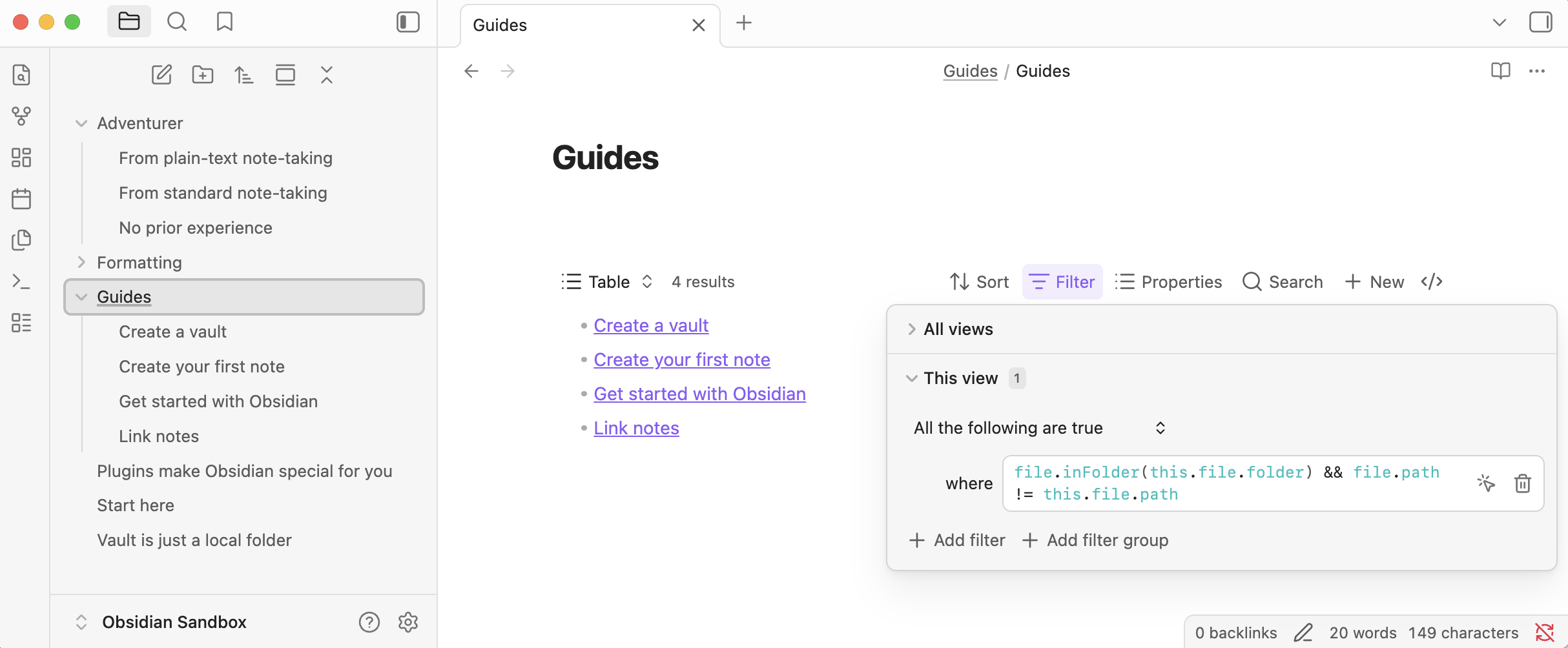
I would have used Bases, but as far as I know that doesn’t have a simple List mode to simulate an Explorer view.
I haven’t included the template as I think the plugin generates specific data for your install.
When in doubt, ask Claude. It is still kinda dumb for these types of hard-to-know issues, since its not trained and seems to have trouble finding the information, but I managed it in the end.
There may be simpler solutions, but this worked for me.
Yes, List, I had forgotten that I could change the Base display type to List.
I also realized that the Folder Notes plugin allows the auto creation of a Base when a new folder is created. So I am doing that now. This avoids the Editing Mode versus Reading Mode issue as the base is natively rendered as links, so no a code block that has to be rendered.
I created a .base template and set up Folder Notes to use that as the template. Works great.