Some of you might remember the old Flowershow Next.js template we shared here a while back — it let you self-host your Obsidian vault as a site. We’ve now launched something new: a fully hosted Flowershow platform.
With hosted Flowershow you can:
Turn your notes into a clean, fast website in minutes.
Use your own domain, customize the theme, and make it your own.
Add comments, full-text search, and more — no plugins or coding required.
Skip the hassle of deployment, servers, or build pipelines.
If you’ve ever wanted to share your Obsidian vault without touching Docker or Next.js, this is for you → flowershow.app
We’ll be posting updates in this thread as Flowershow grows, so if you’re curious, feel free to follow along. Feedback, ideas, and sharp edges spotted are very welcome
So local file embeds should be avoided or one should use automated tools to convert local file embeds to 3rd party file embeds (Imgur, Youtube, Vimeo etc). Obviously this adds more friction to the process of publishing. Also 3rd party dependence needs to be monitored somehow if you want to be sure that the content in your site is always available.
I really love what you’ve built here As someone who isn’t technical, I always thought sharing notes or setting up a personal site would be way too complicated. With Flowershow it felt effortless
Excited to see this grow and to support the project!
Flowershow doesn’t yet support backlinks or bases, though we’re actively exploring base support - you can follow progress here: #861.
As for media, Flowershow hosts your embedded files directly, so you don’t need third-party services like Imgur or YouTube. But ofc uploads count toward your site’s storage quota (different for free and premium plans), and also, since your vault must be pushed to GitHub for publishing, and since GitHub has it’s own file size limits (and Flowershow doesn’t yet support Git LFS), this can add a bit of friction - we’re aware of it and looking into better solutions. So for now it’s best to optimize or compress large files to save space and keep your site fast.
easier collaboration–for example in Google Docs you don’t need much to begin collaboration with others
What I’m thinking is a way to send feedback with some authentication (Google etc) to GitHub repo without actually visiting GitHub (so you don’t even have to know anything about GitHub). Obviously if you want to make actual changes in the blog then visiting GitHub or performing more complex steps to setup Obsidian etc is needed. You could possibly avoid using Obsidian though and make edits only in GitHub which would make collaboration slightly more user friendly.
Flowershow: Full CommonMark + GitHub-Flavored Markdown compatibility
Hey everyone
We’ve been working hard to make sure Flowershow renders Markdown exactly as you wrote it.
This update isn’t about adding something entirely new, but about tightening compliance with the CommonMark and GitHub-Flavored Markdown (GFM) specs.
All core Markdown features — lists, tables, code blocks, footnotes, task lists, emoji, etc. — should now work just like they do in GitHub or modern editors.
We also made sure that extended features like Obsidian callouts, wikilinks, embeds, and math continue to play nicely with the Markdown base.
If you notice any weird Markdown edge cases or rendering quirks, please let us know — we want Flowershow to be the most Markdown-faithful publishing engine for Obsidian vaults
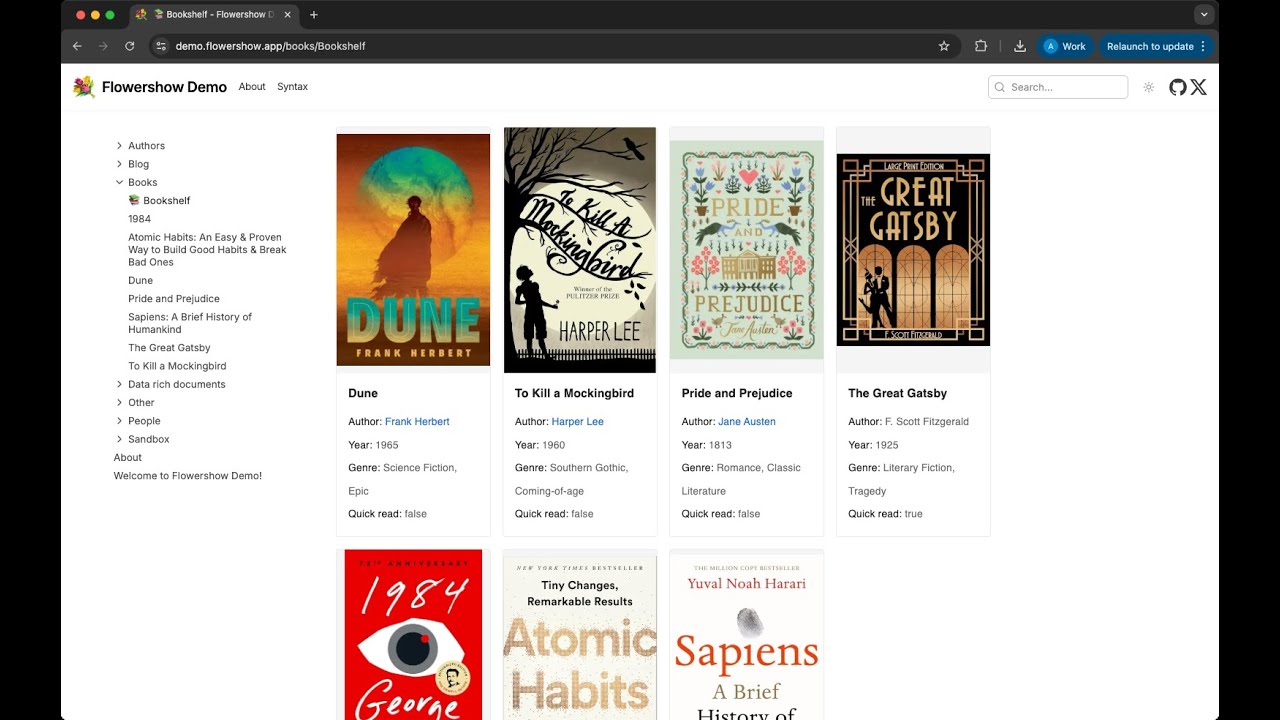
We added Obsidian Bases support to Flowershow (now in Beta)
Hi everyone
We’ve just released Obsidian Bases support in Flowershow (Beta).
If you’re using Bases locally to create dynamic views (cards, tables) from folders and frontmatter, Flowershow can now render those same Bases on your published site.
 Turn your notes into a clean, fast website in minutes.
 Use your own domain, customize the theme, and make it your own.
 Add comments,
  full-text search, and more — no plugins or coding required.
 Skip the hassle of deployment, servers, or build pipelines.
 Feedback, ideas, and sharp edges spotted are very welcome

 As someone who isn’t technical, I always thought sharing notes or setting up a personal site would be way too complicated. With Flowershow it felt effortless
 Video tutorial:
 Step-by-step guide:
 See this guide:

 Full syntax reference:
 What’s new


 We also recorded a short video DEMO video