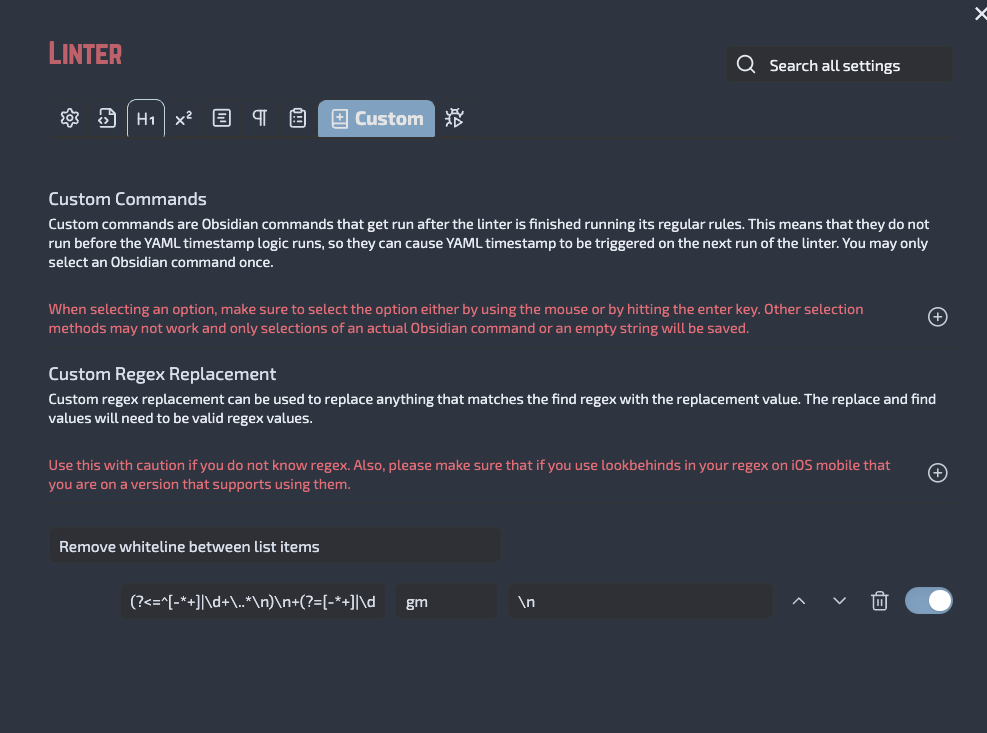
This bothered me a lot because every time I was pasting from, say, type fully, I would get lists that have an extra blank line in between each item. I managed to find a workaround, using the linter plugin. Here is the custom regex:
I’ve wrestled this since adopting Obsidian on MacOS. Pastes from Notes, Stickies, ChatGPT, etc were all littered with extra lines.
Here’s my 2 steps for the perfect solution:
Install & activate Paste Reformatter (by Keath Milligan) community plugin.
Options > Turn on “Remove empty lines” (the last toggle)
Other solutions were slightly off. Linter with a custom regex was ok but if I turned on lint upon save I could never keep intentional blanks so extra keystrokes to lint what I pasted but that would also remove intentional spacing already in the file. Also it littered the undo history with every single removal.