There are many ways to Rome, the saying says, and I just wanted to show some variant queries achieving some of the goals you’ve talked about.
My test file setup
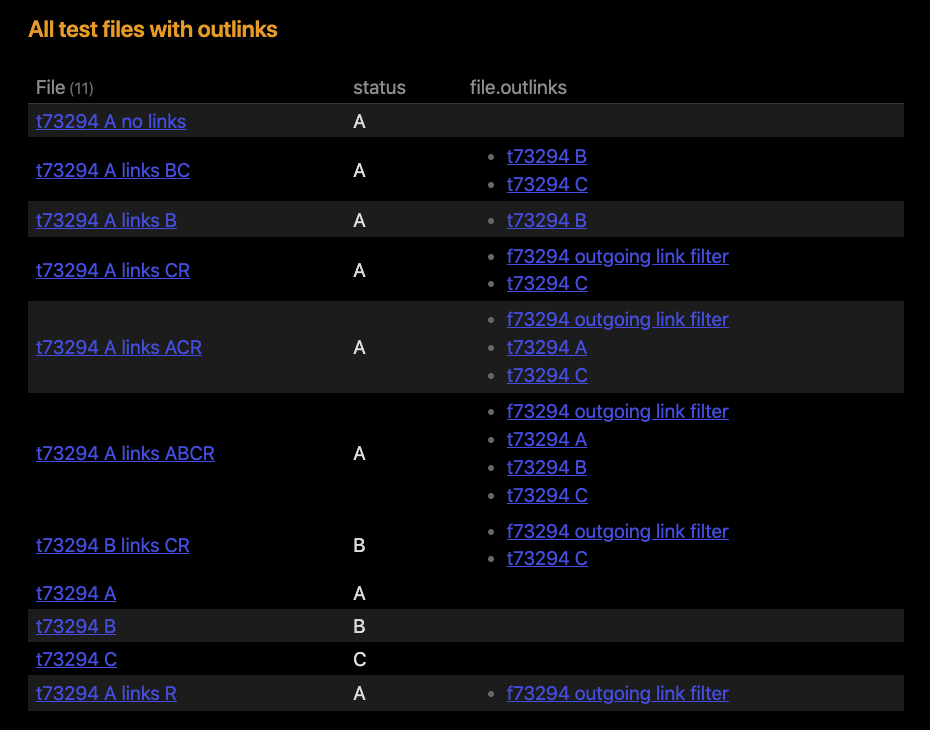
First of all, let me describe my test file setup based upon your hints with a simple table query:
All files follow the name of the status early in the name, and which other files it links to, with “R” being a non-interesting outlink just to show that filtering do work.
My basic LIST query
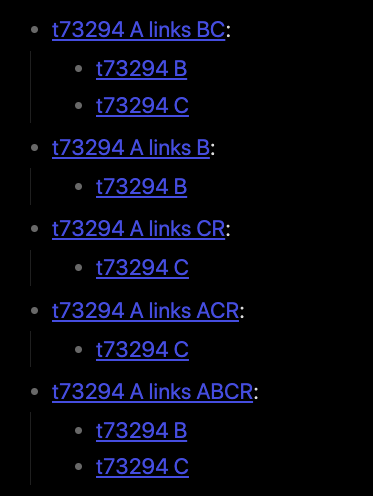
The query below aims to pick out any files with status “A”, having outlinks of status “B” or “C”, and these files are listed under each of the original files:
```dataview
LIST statusMatches
WHERE status = "A"
FLATTEN list(filter(
  file.outlinks,
  (f) => contains( list("B", "C"), f.status ))) as statusMatches
WHERE length(statusMatches) > 0
```
The trick here is to list(filter( ... )) on the file.outlinks to pick out only those with matching statuses, and using FLATTEN to keep these links in statusMatches. Finally we are only interested in files actually having any in this list.
Output of this query:
Two variants of this query from dataviewjs
You said you had issues doing the similar query from within dataviewjs, so here are two queries which would produce just the same output. The first query reuse the DQL query from above, which would allow for further handling in the result.successful branch below:
```dataviewjs

const result = await dv.query(`
  LIST statusMatches
  WHERE status = "A"
  FLATTEN list(filter(
    file.outlinks,
    (f) => contains( list("B", "C"), f.status ))) as statusMatches
  WHERE length(statusMatches) > 0
`)

if ( result.successful ) {
  dv.list(result.value.values)
} else
  dv.paragraph("~~~~\n" + result.error + "\n~~~~")
```
The second query is a somewhat cleaner script based upon dv.pages(), but I’ve opted for using flatMap() to create the statusMatches which I’m not sure is the optimal way to do this. But the query works, and produces the same output as before:
```dataviewjs

const result = dv.pages()
  .where(p => p.status == "A")

// Extract only status "B" and "C" files
// This could possibly be done in a better way...
result.flatMap( p => {
    p.statusMatches = []
    p.file.outlinks.forEach( out => {
      const outP = dv.page(out.path)
      if ( ["B", "C"].includes(outP.status) ) {
        p.statusMatches.push(outP.file.link)
      }
    })
  })

dv.list(result
  .where( r => r.statusMatches.length >= 1 )
  .map( p => new ListPairWidget(p.file.link, p.statusMatches) )
  )
```
Finally, a variant reading the file content
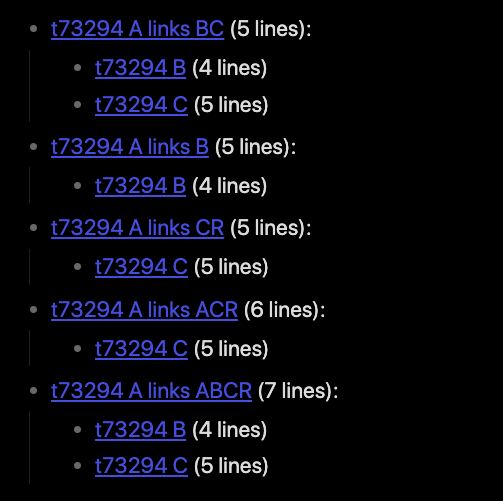
The last query variant uses the DQL query to get the same result as before, but in the result.successful branch we read the file contents of the various files and appends the number of lines of each file. (And we do this slightly ineffective as we re-read the files in the outlinks sections. This could be avoided by keeping track of which files we’ve already read, but I’m leaving that as an exercise for the reader  )
)
```dataviewjs

const result = await dv.query(`
  LIST statusMatches
  WHERE status = "A"
  FLATTEN list(filter(
    file.outlinks,
    (f) => contains( list("B", "C"), f.status ))) as statusMatches
  WHERE length(statusMatches) > 0
`)

function linesInFile(content) {
  return content.split("\n").length
}

if ( result.successful ) {
  const values = await Promise.all(
    result.value.values.map( async (aFile) => {
      const content = await dv.io.load(aFile.key.path)
      aFile.key += ` (${ linesInFile(content) } lines)`
      aFile.value = await Promise.all(
        aFile.value.map( async (outlink) => {
          const content = await dv.io.load(outlink.path)
          return outlink += ` (${ linesInFile(content) } lines)`
        }))
      return aFile
    }))
  dv.list(values)
} else
  dv.paragraph("~~~~\n" + result.error + "\n~~~~")
```
Maybe this is a whimsical example, but you never said what you wanted to do with the content anyways, so there you go. It should however showcase how to do file reads based upon a result of links. The output of this variant is:
In summary, it’s no problem to list out files with status matching in both the original or linked files, and if you are so inclined these result can be further processed using dv.io.load() or similar methods. It does get a little hairy depending on which method you chooses, and you need to thread carefully when starting to use multiple await..async stuff in javascript.
This response also showcases that you don’t need to go into the app.metadataCache immediately to lift results, and that using dv.pages or another query is a valid approach as well.